Mermaid Chart is the commercial platform from the creators of Mermaid, aimed at teams that want collaborative, visual editing and integrations. MermaidViewer focuses on being the fastest way for individuals and small teams to write, generate, fix and share Mermaid diagrams. Starter is $6.99/month and Pro is $11.99/month.
At a glance
| MermaidViewer | Mermaid Chart | |
|---|---|---|
| Use without an account | Yes | Account required for most features |
| AI diagram generation | 5 uses total on Free, 500/month on Starter, unlimited on Pro | Available on paid plans / limited credits |
| Code editor with live preview | Yes | Yes |
| Visual drag-and-drop editing | No — code-first | Yes |
| Real-time multiplayer collaboration | No (share links & embeds) | Yes |
| Export PNG / SVG / PDF | PNG every plan; JPG, SVG, PDF on Pro | Yes |
| Price for individuals | Free, Starter $6.99/mo, Pro $11.99/mo | Higher per-seat pricing |
Choose Mermaid Chart if…
you need real-time collaboration for larger teams, a visual editor for non-technical colleagues, or enterprise integrations. It's a strong product built by the Mermaid team.
Choose MermaidViewer if…
- You prefer a fast, code-first editor that opens instantly with no login.
- You want AI generate, edit, fix and explain without a big subscription.
- You mostly share diagrams via links, embeds, Markdown and image exports.
A mermaid chart alternative is a reasonable search once you have seen what Mermaid Chart costs per seat and what it is actually built to do. Mermaid Chart is the commercial product from the people who maintain Mermaid. It is a hosted editor with visual editing, realtime collaboration, AI credits, and team controls. MermaidViewer is independent. We use the same open-source library, and we aim at a smaller job: a fast code editor, optional accounts, and a lower price for people who mostly write diagrams rather than workshop them.
Prices below for Mermaid Chart come from Mermaid's own account documentation in the help center, as published in 2026, and they are billed annually. Prices change. Check mermaid.ai before you buy, and treat this page as a reading of those docs, not a quote from a sales call.
What Mermaid Chart is good at
Mermaid Chart assumes more than one person will touch the diagram, and that some of those people would rather move boxes than edit text. Visual editing is the feature to take seriously. A product manager can adjust a label without learning arrow syntax. Realtime collaboration is the other half. People can be in the diagram together, which is what co-editing means in practice.
That is a different product from a Markdown file in a repo. If your review meeting is "everyone look at this flow and we'll fix it live," a shared canvas wins. MermaidViewer does not have multiplayer cursors. We are not going to describe share links as if they were the same thing. A share link shows the saved diagram. An embed updates when you save. Neither puts two carets on one screen.
Mermaid Chart also sits next to the official ecosystem. If your company already standardises on it, an alternative has to be worth the split. Sometimes it is, on price and on simplicity. Sometimes it is not, because the team features are the reason you bought it.
Mermaid Chart prices, from their docs
These are the figures we are willing to cite. Each paid number is per user, per month, billed annually.
| Plan | Price | What their docs list |
|---|---|---|
| Basic | Free | 3 diagrams, 15 AI credits |
| Plus | $10/user/month | Unlimited diagrams, 300 AI credits/year |
| Premium | $20/user/month | 2000 AI credits/year, co-editing, SSO |
| Enterprise | Custom | Talk to them |
Read the rows narrowly. Plus is where unlimited diagrams show up in the note we used. Premium is where co-editing and SSO show up, with a much larger yearly AI allowance. We are not filling in caps the help center note did not spell out for every cell. Enterprise is custom, so there is no number here to invent.
A five-person Premium team, on the annual figure, is $20 times five per month before taxes and before any enterprise add-on. That can be the right spend if those five people are in the same diagram every week. It is a strange spend if four of them only needed to read a flowchart in GitHub.
AI on Mermaid Chart is metered in credits. Basic includes 15. Plus includes 300 a year. Premium includes 2000 a year. A year is not a month. Three hundred credits across twelve months is a light allowance if several people generate drafts daily. Budget the credit pool against the habit, not against the word "AI" on the pricing page.
MermaidViewer prices, from our plan code
Our numbers come from the plan definitions in this product, not from a comparison blog. They can change when the code changes. The public list is on pricing.
| Plan | Price | Diagrams and AI | Export and extras |
|---|---|---|---|
| Free | $0 | 3 saved diagrams, 5 AI uses total | Watermarked PNG in the editor |
| Starter | $6.99/month or $69.90/year | 30 diagrams, 500 AI chats/month | PNG up to 4×, no watermark |
| Pro | $11.99/month or $119.90/year | Unlimited diagrams, unlimited AI with fair use | PNG, JPG, SVG, PDF, notes, view stats |
Pro is $11.99 a month, or $119.90 a year. The $6.99 figure is Starter. Yearly billing on our side is ten times the monthly price, which is two months included in the way the code comments describe it. You can still pay month to month.
Free AI is 5 uses in total, counted as the highest of the account, the IP-address hash, and a device cookie. It is a trial of generate, edit, fix, and explain, not a daily refill. Starter's 500 chats a month is the plan for someone who redrafts diagrams through the week. Pro's "unlimited" has a fair-use ceiling so a script cannot drain the allowance. The marketing line is unlimited AI. The honest line is unlimited for a person using the editor, with abuse protection behind it.
Free PNG is 1× with a watermark, in the editor and on the PNG converter. Starter removes the watermark and unlocks PNG up to 4×, still PNG only. Pro adds JPG up to 8×, plus SVG and PDF. Version history is on the paid plans. Notes and view stats are Pro. The export guide is the longer map.
Code-first, on purpose
We stayed with a text editor because Mermaid is text. A diff of a flowchart should be a changed line, reviewable beside the code that changed. Visual editors can round-trip back to text, and Mermaid Chart does that kind of work, but the canvas is the main event there. Here the code is the main event. Autocomplete, the parser error, and the preview sit next to the source.
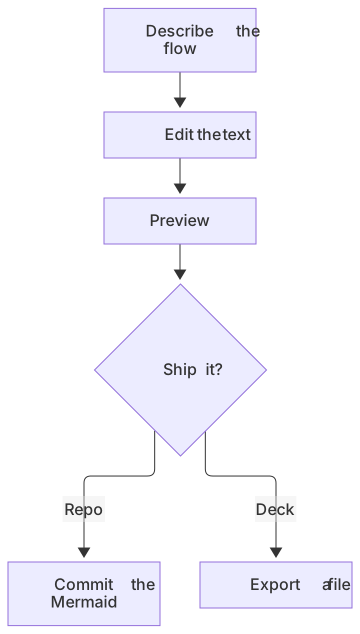
flowchart TD
  A[Describe the flow] --> B[Edit the text]
  B --> C[Preview]
  C --> D{Ship it?}
  D -->|Repo| E[Commit the Mermaid]
D -->|Deck| F[Export a file]You can start from a sentence. AI writes a draft, you fix the words, and the preview updates. That loop is the reason people look for a mermaid chart alternative after they bounce off a credit counter. It is a worse loop if the person editing cannot stand looking at syntax. Send that person to a visual editor. Taste is a requirement, not a character flaw.
Collaboration, stated plainly
Premium on Mermaid Chart lists co-editing. Combined with the product's realtime collaboration, that is the package for a workshop: several people, one diagram, cursors moving. SSO on that tier is the package for a company that will not create a pile of personal logins.
MermaidViewer collaborates by saving, sharing, and embedding. One person edits. Others open the link, comment in the doc where the embed lives, or edit the text in Git and push. Paid plans add version history so you can step back. That is enough for a lot of engineering docs. It is not enough for a design review where the facilitator is rearranging boxes while someone else talks.
If you need both, split the work by lifespan. Use Mermaid Chart, or any canvas, for the meeting. When the picture settles, keep the Mermaid source in the repo so it renders on GitHub and GitLab without a seat for every reader. Readers are the hidden cost of per-user pricing. A diagram in Markdown does not charge the intern who only wanted to understand checkout.
Where each bill makes sense
Choose Mermaid Chart if you want visual editing, live co-editing, SSO, or a vendor that is the Mermaid team. Pay Premium when co-editing is the point, not because a comparison table told you the top row is safer. Choose Plus when you need more than three diagrams and you can live inside the yearly credit number. Stay on their free Basic plan if three diagrams and 15 credits answer the question. There is no prize for paying early.
Choose MermaidViewer if you want to write Mermaid, use AI without a large per-seat bill, and keep optional accounts. Free is a real editor with a short AI trial and a watermark on the saved PNG export. Starter fits a weekly habit. Pro fits someone who wants every export format in the editor, notes, view stats, and a fair-use reading of unlimited AI. Choose neither paid product if the diagram lives in Git and mermaid.live is enough of a scratchpad. That comparison is on the live editor page.
Moving a diagram across
The syntax matches, because both products run Mermaid. Copy the code out of Mermaid Chart and paste it into the editor. Themes and a few editor-specific wrappers may need a look. The diagram body, the flowchart nodes and the sequence messages, should render. The other direction works the same way. We would rather you keep the source than redraw the picture.
Comments in the text are worth more than people expect during a move. A one-line note above a subgraph ("this is the legacy path, delete in March") survives in Git and in our editor. A sticky note on a canvas may not. If the diagram is a contract with the future you, put the warning in the source.
Accounts are optional here. You can paste, preview, and export without saving. Save when you want folders, a stable link, or history on a paid plan. You do not need a seat for every person who can read the Markdown.
A fair stop
Mermaid Chart is a strong product for teams that want the Mermaid authors' hosted platform, a visual layer, and realtime editing. The price is per user, and the AI meter is credits per year on the plans their docs describe. MermaidViewer is the cheaper code-first editor, with a free tier that is intentionally small, Starter at $6.99, and Pro at $11.99. We do not have multiplayer cursors, and we do not pretend to. Pick the tool whose missing feature you can live with. If you cannot live without live cursors, stay on Mermaid Chart.
Frequently asked questions
Is MermaidViewer affiliated with Mermaid Chart or the Mermaid project?
No. MermaidViewer is an independent tool built on the open-source Mermaid library.