Basic gantt chart example
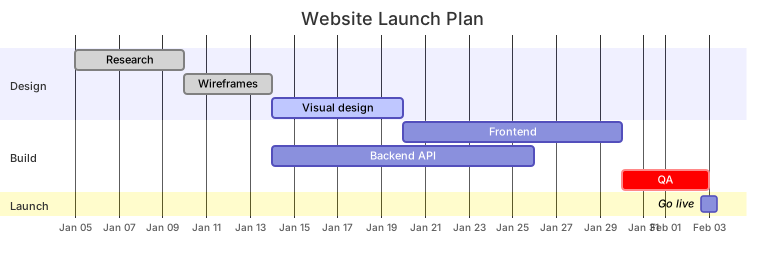
gantt
    title Website Launch Plan
    dateFormat YYYY-MM-DD
    axisFormat %b %d
    section Design
      Research           :done,    r1, 2026-01-05, 5d
      Wireframes         :done,    w1, after r1, 4d
      Visual design      :active,  v1, after w1, 6d
    section Build
      Frontend           :         f1, after v1, 10d
      Backend API        :         b1, after w1, 12d
      QA                 :crit,    q1, after f1, 4d
    section Launch
Go live :milestone, m1, after q1, 0dGantt charts show a project schedule: which tasks happen when, how long they take and which ones depend on others. Mermaid Gantt charts let you write the plan as text and get a properly scaled timeline.
They're perfect for roadmaps in README files, sprint plans in Notion or Confluence, and launch checklists that need to be updated frequently without opening a heavyweight project tool.
When to use a gantt chart
- Product roadmaps and release plans
- Sprint and milestone planning
- Event and launch schedules
- Academic project timelines
Gantt Chart syntax reference
| Syntax | What it does |
|---|---|
gantt | Start a Gantt chart. |
title Text | Chart title. |
dateFormat YYYY-MM-DD | How dates are written in the task list. |
axisFormat %b %d | How dates are shown on the axis (d3 time format). |
section Name | Group tasks into a section. |
Task :id, 2026-01-01, 3d | Task with id, start date and duration. |
Task :after id, 5d | Start after another task finishes. |
done / active / crit / milestone | Status tags that change color or shape. |
excludes weekends | Skip weekends when computing durations. |
todayMarker off | Hide the vertical line for today. |
Gantt Chart examples
Sprint plan excluding weekends
excludes weekends makes durations count working days only.
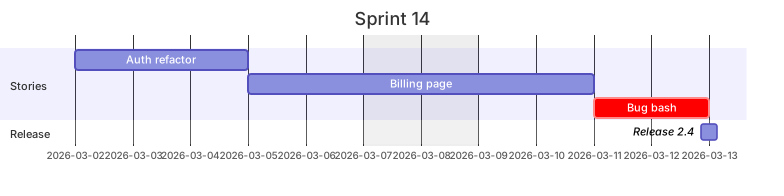
gantt
    title Sprint 14
    dateFormat YYYY-MM-DD
    excludes weekends
    section Stories
      Auth refactor     :a1, 2026-03-02, 3d
      Billing page      :a2, after a1, 4d
      Bug bash          :crit, a3, after a2, 2d
    section Release
Release 2.4 :milestone, after a3, 0dTips and best practices
- Give tasks ids so you can chain them with after id; the plan then updates automatically when a duration changes.
- Use crit for the critical path and milestone for fixed dates like launches.
- Set axisFormat to something compact (%b %d or %W for week numbers) on long projects.
Generate a gantt chart with AI
Not sure where to start? Describe what you need and the AI gantt chart generator writes the Mermaid code for you. Try prompts like:
- “Mobile app MVP plan over 8 weeks”
- “Conference organisation timeline”
- “Data migration project with testing phases”
Gantt Chart templates
Gantt Chart FAQ
How do I add dependencies between Gantt tasks?
Give the first task an id and start the second with after id, for example Build :b1, after d1, 5d. Multiple ids can be listed: after a1 b2.
How do I add a milestone?
Add the milestone tag and a 0d duration: Launch :milestone, m1, 2026-06-01, 0d.
Can Mermaid Gantt charts skip weekends or holidays?
Yes. Use excludes weekends, and list specific dates too: excludes weekends, 2026-12-25.