Basic class diagram example
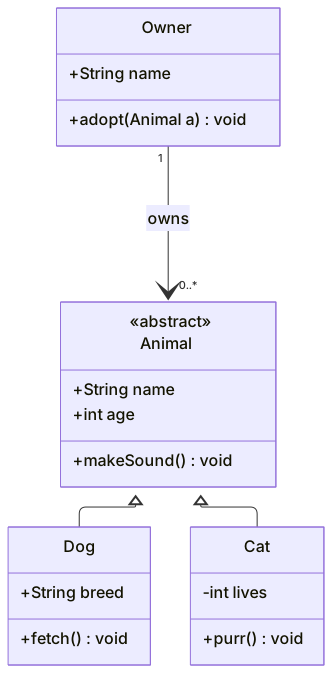
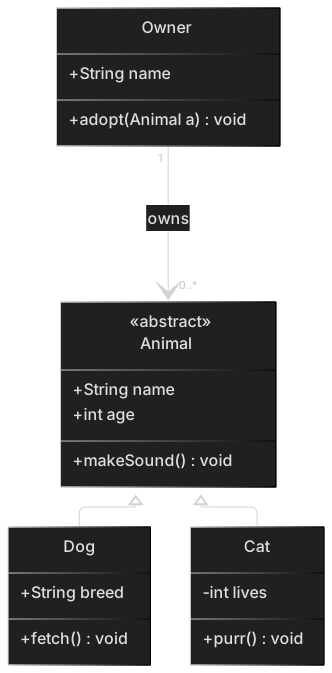
classDiagram
    class Animal {
      <<abstract>>
      +String name
      +int age
      +makeSound()* void
    }
    class Dog {
      +String breed
      +fetch() void
    }
    class Cat {
      -int lives
      +purr() void
    }
    class Owner {
      +String name
      +adopt(Animal a) void
    }
    Animal <|-- Dog
    Animal <|-- Cat
Owner "1" --> "0..*" Animal : ownsMermaid class diagrams describe the structure of object-oriented systems using UML notation: classes with attributes and methods, and the relationships between them such as inheritance, composition and association.
They are ideal for domain modelling, design reviews and documenting libraries. Because the diagram is text, you can keep it in the same repository as the code it describes and update it in the same pull request.
When to use a class diagram
- Domain-driven design and modelling sessions
- Documenting SDKs, libraries and public APIs
- Planning refactors and explaining design patterns
- Teaching object-oriented programming
Class Diagram syntax reference
| Syntax | What it does |
|---|---|
classDiagram | Start a class diagram. |
class Name { +type field \n +method() ret } | Declare a class with members. |
+ - # ~ | Visibility: public, private, protected, package/internal. |
method()* / field$ | Abstract method (*) / static member ($). |
<<interface>> / <<abstract>> | Annotations shown above the class name. |
A <|-- B | Inheritance: B extends A. |
A *-- B / A o-- B | Composition / aggregation. |
A --> B / A ..> B | Association / dependency. |
A ..|> B | Realization: A implements interface B. |
A "1" --> "*" B : label | Cardinality and relationship label. |
class Box~T~ | Generic type parameter. |
namespace Core { class A } | Group classes into a namespace. |
Class Diagram examples
Interface and generics
Repositories implementing a generic interface — a common pattern in backend code.
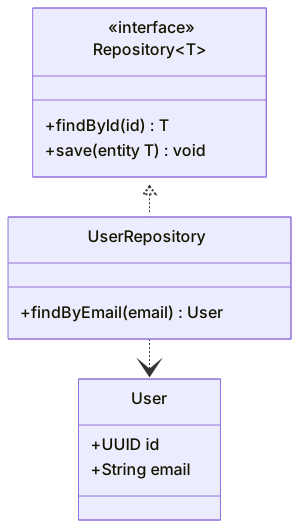
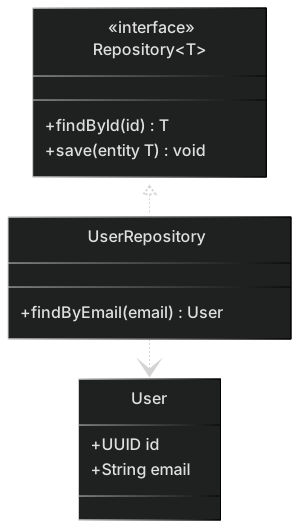
classDiagram
    class Repository~T~ {
      <<interface>>
      +findById(id) T
      +save(entity T) void
    }
    class UserRepository {
      +findByEmail(email) User
    }
    class User {
      +UUID id
      +String email
    }
    Repository~T~ <|.. UserRepository
UserRepository ..> UserComposition vs aggregation
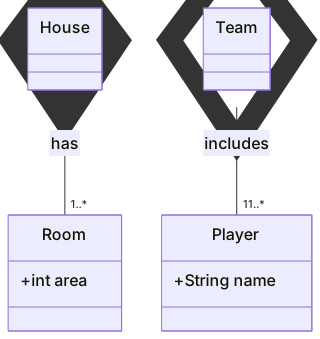
A house is composed of rooms (they die with it); a team aggregates players.
classDiagram
    House *-- "1..*" Room : has
    Team o-- "11..*" Player : includes
    class Room { +int area }
class Player { +String name }Tips and best practices
- Use generics with tildes (List~String~) because angle brackets are reserved.
- Show only the members that matter for the discussion; full class listings get noisy fast.
- Use namespaces to separate bounded contexts in larger models.
- Add cardinality on associations so the diagram also communicates data constraints.
Generate a class diagram with AI
Not sure where to start? Describe what you need and the AI class diagram generator writes the Mermaid code for you. Try prompts like:
- “E-commerce domain model with orders, products and customers”
- “Observer design pattern”
- “Library management system”
Class Diagram templates
Class Diagram FAQ
How do I show inheritance in a Mermaid class diagram?
Use Parent <|-- Child. The hollow triangle points at the parent class. For interfaces use Interface <|.. Implementation (dotted line).
How do I mark a class as an interface?
Add the annotation <<interface>> inside the class body, or write <<interface>> ClassName on its own line.
Can Mermaid class diagrams show static and abstract members?
Yes. Append $ to make a member static (count$) and * to make a method abstract (draw()*).
Is a Mermaid class diagram valid UML?
It follows UML class diagram notation for visibility, relationships and cardinality, which is enough for most documentation and design work.