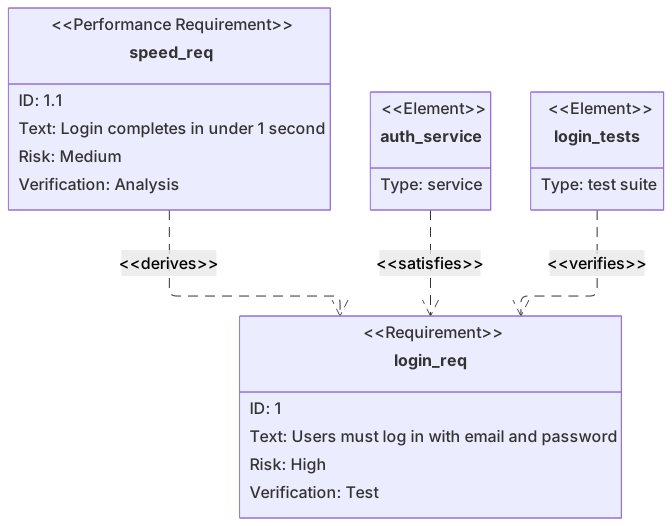
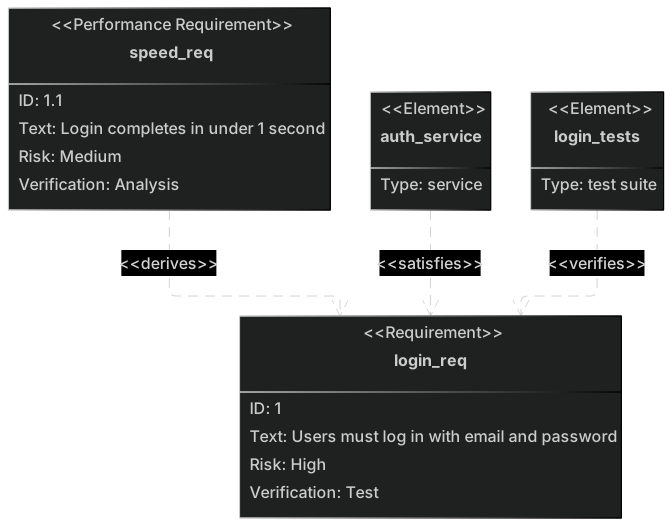
Basic requirement diagram example
requirementDiagram
    requirement login_req {
      id: 1
      text: Users must log in with email and password
      risk: high
      verifymethod: test
    }
    performanceRequirement speed_req {
      id: 1.1
      text: Login completes in under 1 second
      risk: medium
      verifymethod: analysis
    }
    element auth_service {
      type: service
    }
    element login_tests {
      type: "test suite"
    }
    auth_service - satisfies -> login_req
    login_tests - verifies -> login_req
speed_req - derives -> login_reqRequirement diagrams come from SysML and show requirements, the system elements that satisfy them, and how they're verified. They're useful in regulated industries and anywhere traceability matters.
Each requirement has an id, text, risk level and verification method; relationships like satisfies, verifies, traces and derives connect everything together.
When to use a requirement diagram
- Traceability for regulated software (medical, automotive)
- Systems engineering
- Acceptance criteria mapping
- Test coverage of requirements
Requirement Diagram syntax reference
| Syntax | What it does |
|---|---|
requirementDiagram | Start a requirement diagram. |
requirement name { id: … text: … risk: … verifymethod: … } | Define a requirement. |
functionalRequirement / performanceRequirement / interfaceRequirement / physicalRequirement / designConstraint | Requirement subtypes. |
risk: low | medium | high | Risk level. |
verifymethod: analysis | inspection | test | demonstration | How it is verified. |
element name { type: … } | A system element. |
a - satisfies -> b | Relationship: contains, copies, derives, satisfies, verifies, refines, traces. |
Requirement Diagram examples
A requirement is a statement you can test, plus the thing that claims to meet it. A mermaid requirement diagram draws that pair, with a risk and a verification method on the requirement. It records the trace from an obligation to the element that meets it. The class boxes and the sequence of calls live in other diagrams.
The block and the link
requirementDiagram opens the file. A requirement has a single-word name and a body:
id, text, risk, and verifymethod.
id is the stable number you would put in a test name. text is the obligation, in one line. A colon inside that line breaks the parse, because the colon already separates fields. Rephrase "sends a link: now" as "sends a reset link now." risk in the example is low. verifymethod is test, which says an automated or scripted test is how you'll show the requirement holds.
An element is the implementing thing. type is a short role, such as service. The link mailer - satisfies -> reset_email reads as a sentence: the mailer satisfies the reset-email requirement. Direction matters. The element is the source and the requirement is the target. Reverse it and the trace says the requirement satisfies the mailer, which is nonsense in a review.
One requirement and one element is a complete example. A real spec repeats the block. Keep names stable. reset_email can be referenced from several elements. The prose of the obligation stays in text, not in the name.
Worked example
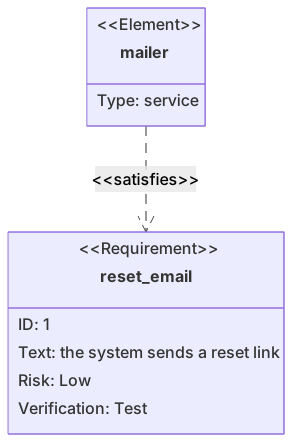
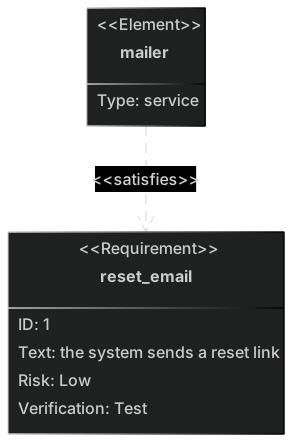
Password reset must send a link. A mailer service is what satisfies that statement, and the check is a test.
requirementDiagram
    requirement reset_email {
        id: 1
        text: the system sends a reset link
        risk: low
        verifymethod: test
    }
    element mailer {
        type: service
    }
mailer - satisfies -> reset_emailid: 1 is what a test report can cite. The text has no colon and no brace, so the block closes on the brace you typed, not on a character inside the sentence. Risk is low because a failed reset email is annoying and not, in this product, dangerous. If the same flow also had to avoid leaking whether the account exists, that would be a second requirement with a different risk, not a longer sentence crammed into this one.
verifymethod: test tells the reader not to look for a demo script. The proof is a test. The element type service stops people from satisfying the requirement with a wiki page. You can add a second element later, such as the API that triggers the mailer, with its own satisfies line. Each line is one claim. Keep id values stable across edits. If you renumber when you insert a requirement, every test name that cited id: 1 silently points at a different obligation.
When this is the wrong diagram
A class diagram is the better picture of the mailer's fields and methods. A flowchart is the better picture of the reset steps a user walks. Use a requirement diagram when you need the obligation, how risky it's, how you'll verify it, and which element claims to meet it.
Common mistakes
- A colon inside
text.text: send a link: nowfails because the second colon looks like a new field. Keep the obligation free of colons. - A requirement name with a space. Use a token such as
reset_emailso later links can name it cleanly. - Drawing
reset_email - satisfies -> mailer. The element satisfies the requirement. The arrow starts at the element. - Several obligations in one
textline. Split them into two requirements, each with its own id, so a test can fail one without the other.
Where to go next
The AI requirement diagram generator will draft blocks from a list of obligations. Read every text line for stray colons in the editor, and the cheat sheet has the field names. The password reset template is a fuller trace if this one link is only the start.
An element is a requirement, not a wish
Each requirement needs an id you could put in a test name, a type (requirement or functionalRequirement), and a risk you mean. An element that says "the system should be fast" cannot be verified. Write the limit: "password reset email arrives within two minutes." Relationships (satisfies, traces) point at another id that exists in the same diagram. A dangling id is a broken link, and the parser may still draw a lonely box.
The password requirements template shows a small set that a reviewer can actually test. The AI requirement generator can draft ids from a list. You still delete the ones nobody will test.
Tips and best practices
- Use hierarchical ids (1, 1.1, 1.2) to mirror your requirements document.
- Keep requirement text short and testable.
- Model test suites as elements with verifies relationships to show coverage.
Generate a requirement diagram with AI
Not sure where to start? Describe what you need and the AI requirement diagram generator writes the Mermaid code for you. Try prompts like:
- “Requirements for a password reset feature”
- “Safety requirements for an insulin pump”
- “Requirements for a payment API”
Requirement Diagram templates
Requirement Diagram FAQ
What relationships can a Mermaid requirement diagram show?
contains, copies, derives, satisfies, verifies, refines and traces, written as source - relationship -> target.
When should I use a requirement diagram instead of a table?
When relationships matter — for example to show which tests verify which requirements, or how a performance requirement derives from a functional one.