Lucidchart is a commercial visual diagramming and whiteboarding platform. Mermaid is a free, open-source text-to-diagram language. For engineering documentation, many teams are moving from Lucidchart to Mermaid; for workshops and stakeholder visuals, Lucidchart still shines.
At a glance
| Mermaid + MermaidViewer | Lucidchart | |
|---|---|---|
| Price | Free, Starter $6.99/mo, Pro $11.99/mo | Paid plans for full features |
| Editing | Code + AI | Visual canvas |
| Lives next to code in Git | Yes | No |
| Real-time whiteboarding | No | Yes |
| Renders in GitHub/Notion/Obsidian | Yes | Via exports/embeds |
Why engineers switch to Mermaid
- Diagrams stay accurate because updating them is fast.
- No per-seat licenses for every engineer who needs to edit a diagram.
- AI can generate and update Mermaid diagrams from descriptions or code.
The honest cut for mermaid vs lucidchart is audience and editing style. Lucidchart is a commercial visual diagramming product. People share a canvas, drag shapes, comment, and leave with a polished picture. Mermaid is a text language. The diagram lives in a file, renders in GitHub and GitLab, and costs nothing per reader. MermaidViewer is an optional editor for that text. We make it, so the price notes below separate Lucidchart's published figures from ours.
Lucidchart wins workshops and polished stakeholder visuals. Mermaid wins Git docs and the price of each additional editor. Both wins are real. A company that picks one for every picture will be annoyed every week.
What you are buying with Lucidchart
Lucidchart is built for a meeting. Several people can work on one board, the layout is whatever you drag into place, and the result can look like a slide rather than a generated graph. That matters when the audience is a customer, an executive review, or a workshop that is inventing the process while looking at it. Visual collaboration is the product. A text fence is a poor substitute for "let's move this box while we talk."
Visio import on paid plans is the other practical reason teams stay. Years of .vsdx files do not translate themselves into Markdown. If the archive is Visio and the buyers still think in that archive, import is a feature, not a nice-to-have. We are not going to invent which click completes an import. We are saying paid Lucidchart is where that path lives, and a Mermaid rewrite is a different project from an import.
The free plan exists, and it is limited. We are not quoting an object cap. The public pages describe limits, and those limits move. If you are evaluating the free tier, read Lucidchart's current plan page and count the objects in a real diagram of yours. A limit you have not checked is how teams "standardise" on a tool and then discover the intern cannot open the file.
Prices we are willing to cite
Lucidchart Individual is $9 a month when billed annually. That figure is from Lucid's trial page on lucid.co, as of 2026. Team is $10 per user per month, billed annually, according to their public pricing trackers and help center. Prices change. Confirm both on Lucid's site before you send a number to finance. We are not citing an enterprise price, because that is a conversation, not a page we can freeze here.
Our prices are from this product's plan code. Free is $0, with 3 saved diagrams, 5 AI uses in total, and a 1× PNG with a watermark. Starter is $6.99 a month or $69.90 a year, with 30 diagrams, 500 AI chats a month, and PNG up to 4× with no watermark. Pro is $11.99 a month or $119.90 a year, with unlimited diagrams, unlimited AI with fair use, and PNG and JPG up to 8× plus SVG and PDF, plus notes and view stats. The $6.99 plan is Starter. The list people should bookmark is pricing.
The per-editor contrast is the point of putting those numbers together. Lucidchart Team at $10 per user per month, billed annually, charges every person who needs a paid seat. Mermaid in a Git repository does not. A reader on GitHub does not consume a seat. An editor is anyone with a pull request. MermaidViewer Pro, if you even want it, is $11.99 for that account, not $11.99 times the number of people who can read the README. You can also skip our account entirely and use mermaid.live, VS Code, or Obsidian.
Do the multiplication for your team, not for a hypothetical company. Five Team seats at the annual $10 rate are $50 a month before tax, for five editors. That can be cheap compared with a workshop that actually uses the canvas. It is expensive compared with five people editing a Markdown fence for free. The diagram type decides which sentence is true.
Workshops versus Git docs
Take a workshop first. A facilitator, a product manager, and two engineers are renaming steps on a wall of boxes. They want alignment guides, comments, and a picture they can drop into a deck before lunch. Lucidchart is the better room for that hour. Mermaid would slow the room down, because someone would be typing syntax while everyone else waited. Use the canvas. Export when the hour ends.
Take a Git doc next. The checkout flow changes in the same pull request as the handler. The reviewer should see the new step as a line of text. Next month a different author should change it without a license. Mermaid is the better file for that life. The picture renders in the pull request. The diff is readable. Nobody asks who "owns" the Lucid document.
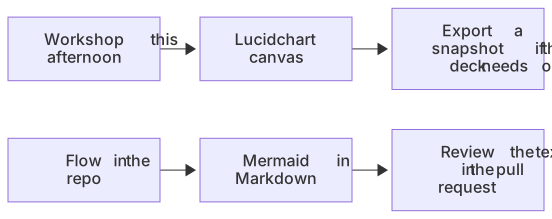
flowchart LR
  A[Workshop this afternoon] --> B[Lucidchart canvas]
  C[Flow in the repo] --> D[Mermaid in Markdown]
  B --> E[Export a snapshot if the deck needs one]
D --> F[Review the text in the pull request]The failure mode is using the workshop board as the long-term source. Six months later the code has changed, the board has not, and the board still looks more official because it is prettier. Polished is not the same as current. If the system is the authority, the text next to the system should be the authority. The board can remain a snapshot with a date on it.
The other failure mode is using Mermaid for the customer-facing picture that has to look designed. Stakeholders will say it looks like a spec, because it does. That is a compliment in a design review and a complaint in a sales deck. Export options do not add a designer's layout. When the pixels are the message, stay on Lucidchart or on draw.io, which is free and also visual.
What "price per editor" includes
Seat price is not the only cost. Lucidchart's cost includes the license and the time to keep the board in sync with the code, which is often a person. Mermaid's cost includes learning a small syntax and accepting automatic layout. For a team that already writes Markdown, the syntax is an afternoon. For a team that will not open a code fence, the syntax is infinite, and the free language is still the wrong tool.
AI does not erase that split. MermaidViewer can draft a flowchart from a sentence, which shortens the first version of a Git doc. It does not put five cursors on a canvas, and it should not be sold that way. Lucidchart's collaboration is the feature you are paying the per-user price for. If you are not using it, you are paying for a drawing tool while storing the real spec somewhere else.
Readers are the quiet discount on the Mermaid side. A 40-person engineering org where four people edit diagrams and 36 people read them is a bad fit for a seat per human, and a fine fit for text in the repo. A consulting team where every engagement is a live workshop with the client in the file is a bad fit for a README. Buy the workshop tool.
Moving a settled diagram
When a Lucidchart picture has stopped changing every day, you can rewrite the meaning as Mermaid and commit it. Do not expect the layout to survive. You are keeping the steps and the decisions, not the x and y positions. A short flowchart is a half-hour rewrite. A poster with icons is a candidate to stay exported as an image, with the image committed and the source board left as the design file.
The other direction matters too. A Mermaid diagram that suddenly needs to be a designed leave-behind can be exported to PNG or SVG and placed on a Lucidchart page, or rebuilt there by hand if the layout has to change. The PNG converter and SVG converter render in the browser and then follow the same plan limits as the editor. Free PNG is 1× with a watermark. SVG and PDF downloads are on Pro, at $11.99 a month. You do not need Pro to keep Mermaid in Git.
Visio files that already imported into Lucidchart can stay there until a diagram proves it belongs in Git. Migrating an archive for purity is how a quarter disappears. Migrate the diagrams that change with code. Leave the org charts and the polished maps where the canvas is earning its fee.
A decision you can repeat per diagram
Choose Lucidchart when the session is a workshop, when the picture must look designed for stakeholders, when several people will edit the canvas together, or when paid Visio import is how the old archive gets in. Budget Individual at $9 a month billed annually for a single paid user, or Team at $10 per user per month billed annually, and recheck lucid.co because those figures move.
Choose Mermaid when the diagram is documentation in Git, when every reader should see it without a seat, and when the next edit should be a reviewed line of text. Use our editor if you want AI, folders, and saved history on a paid plan. Use the official playground if you want no account at all. The editor comparison sits beside this page if the question is which Mermaid editor, not whether to leave the canvas.
Keep both if your week contains both kinds of picture. The expensive mistake is a single standard that makes either the workshop or the pull request worse.
Moving one decision out of a Lucidchart file is Lucidchart export to Mermaid.
Frequently asked questions
Can I replace Lucidchart with Mermaid?
For technical documentation (flows, sequences, data models, architecture), usually yes. For freeform whiteboarding and highly designed visuals, a canvas tool remains more suitable.