draw.io (diagrams.net) is a free drag-and-drop diagramming tool. Mermaid generates diagrams from text. They solve the same problem in opposite ways, and the right choice depends on who maintains the diagram and how often it changes.
At a glance
| Mermaid | draw.io | |
|---|---|---|
| Editing style | Text / code | Visual drag and drop |
| Layout | Automatic | Manual, pixel-perfect |
| Version control diffs | Readable line diffs | XML diffs |
| Update speed for changing systems | Fast | Slow for large changes |
| Custom visuals & icons | Limited | Extensive |
| AI generation | Excellent (text format) | Limited |
Use Mermaid for living documentation
Architecture notes, API flows and data models change constantly. With Mermaid, updates are a one-line edit reviewed in the same pull request as the code.
Use draw.io for polished one-off visuals
Marketing diagrams, network maps with vendor icons and posters benefit from draw.io's manual control.
The practical version of mermaid vs draw.io is a maintenance question. draw.io, also called diagrams.net, is a free visual editor. You drag shapes, line them up by hand, and save a drawing. Mermaid is text that a layout engine turns into a diagram. One of them is patient about pixels. The other is patient about the tenth revision. Teams get into trouble when they pick from habit and then fight the tool for a year.
Both can end up in a Git repo. They do not behave like the same kind of file once they are there. And draw.io can take a Mermaid snippet and turn it into shapes, which is the bridge most people miss.
Two ways to make the same boxes
A flowchart in Mermaid is a few lines. You name the nodes, you say which way the arrows point, and you stop. The engine decides where the boxes sit.
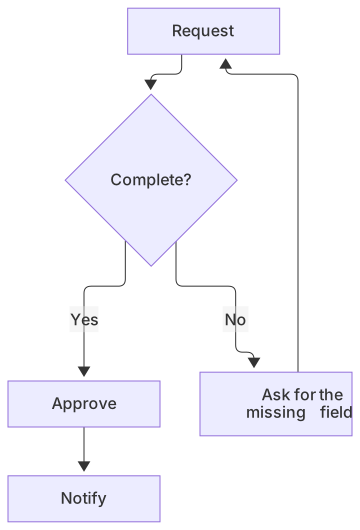
flowchart TD
  A[Request] --> B{Complete?}
  B -->|No| C[Ask for the missing field]
  C --> A
  B -->|Yes| D[Approve]
D --> E[Notify]In draw.io you would create five shapes, draw five connectors, set the labels, and nudge anything that overlaps. The first version takes longer. The version that has to match a brand illustration, sit on a poster, or avoid a logo in the corner can be better, because you can put a box exactly where the page needs it. Mermaid will not do that. If you add a node, it may reflow the picture. That reflow is the feature when the diagram is a living description. It is the bug when the diagram is a designed artifact.
So the first cut is simple. If the next edit is "add a step," text wins. If the next edit is "move this icon four pixels and align it to the header," the canvas wins.
Manual layout is the product
draw.io's value is the manual layout. Swimlanes, custom geometry, a library of vendor icons, and a page that looks like the poster in the hallway are normal requests there. You can spend an hour on spacing and it will stay where you left it. Nothing in Mermaid replaces that hour. Themes, colors, and a handful of direction keywords (LR, TD) are as much layout control as the language wants to give you. People who promise pixel-perfect Mermaid are selling a different tool.
That control has a human cost. The person who drew it is often the only person who feels allowed to change it. Everyone else exports a PNG and writes around it, or they duplicate the file and now you have two posters. Mermaid's bias is the opposite. Anyone who can edit the file can add a node, and the layout is not a personal craft. The picture may be plainer. The edit is socially cheaper.
Use draw.io for the diagram that is the deliverable: a conference slide background, a network map with specific device icons, a one-page architecture poster for a customer. Use Mermaid for the diagram that is a side effect of the system changing: the request path, the state machine, the review flow in the contributing guide.
What Git actually shows you
draw.io files are XML. The format is the mxGraph document diagrams.net has used for years. It is text, so Git can store it, and a determined reader can see a label change. A layout change is a different story. Move a box and the diff is a new set of coordinates, widths, and style strings. Reviewers do not read that diff. They open the picture, or they skip it. Merge conflicts in the XML are miserable, because two people moved different shapes and the coordinates do not combine cleanly.
Mermaid diffs are the line you changed.
-  B -->|Yes| D[Approve]
+  B -->|Yes| D[Manager approves]
   D --> E[Notify]
A reviewer can reject that in the same pull request as the code that added the manager. There is no coordinate block to ignore. This is the strongest argument for Mermaid in a software team, and it does not require you to dislike draw.io. It requires you to admit that an XML diff of positions is not a review.
If you still want the drawing in Git, you can. Many teams commit the .drawio file and a PNG next to it. Just do not expect the XML to be the thing humans review. The PNG is the review, and the PNG will drift unless someone regenerates it. The export guide is the parallel habit for Mermaid: the source stays in the repo, and a PNG or SVG is produced when a tool needs a file.
Inserting Mermaid into draw.io
diagrams.net can insert Mermaid. The menu path is Arrange → Insert → Advanced → Mermaid. You paste the code, and draw.io converts it into shapes on the canvas. That is useful at the moment a text diagram needs to become a poster. You keep the meaning, you gain manual layout, and you accept that the canvas is now the source unless you are careful.
The conversion is one way in spirit. Inserting Mermaid gives you shapes. It does not give you a promise that every future tweak will round-trip back to the same text. If you drag a box and change a label, the authoritative copy is the drawing. The convert draw.io to Mermaid guide is the other direction, and it is honest about the limits: flows, sequences, and simple architecture sketches are worth rewriting as text. Icon-heavy maps and freeform whiteboards should stay images. Layout will not match, because Mermaid lays the graph out again. You keep the meaning and give up the pixel positions. That is the point of the move.
A sane workflow is to draft in Mermaid while the steps are still changing, insert into draw.io when a stakeholder needs a designed page, and not pretend both files are the source of truth. Pick one. If the steps will change again next week, the text is the source and the drawing is an export. If the page is a designed leave-behind, the drawing is the source and the Mermaid was a head start.
Cost, accounts, and where the file lives
draw.io is free. diagrams.net runs in the browser, and there are desktop builds. You can store files on your disk, which matters for teams that will not put a diagram on someone else's account. There is no per-seat fee standing between a reader and the file. That part of the comparison is easy, and it is in draw.io's favor whenever the alternative is a paid canvas.
Mermaid the language is free and open source. Rendering it on GitHub costs nothing extra. MermaidViewer is optional. You can preview in mermaid.live, in VS Code, or in Obsidian and never create an account with us. Our paid plans are for AI allowances, more saved diagrams, and editor exports. They are not required to have a diagram in a README. Do not let a vendor comparison, including ours, turn a free language into a subscription question.
The place the file lives still differs. A draw.io drawing wants a home that understands the format, or it wants to be exported. A Mermaid diagram wants a Markdown file. If your handbook is already Markdown, adding a fence is a smaller change than adopting a drawing tool and a PNG pipeline. If your handbook is a wiki of embedded drawings, draw.io is already the culture, and a text diagram is the foreign object.
When each one fails
Mermaid fails when the picture is the product. Dense network diagrams, floor plans, and anything that depends on a specific icon set will look like a compromise, because they are. It also fails when authors refuse the syntax. A team that will not edit a code fence will not keep the diagram current, and a stale text diagram is worse than a slightly awkward drawing someone will actually open.
draw.io fails when the system changes weekly and the only person who can "make it look right" is on leave. It fails code review, in the sense that reviewers cannot see the change as text. It fails search, a little, because the labels are buried in XML unless you also export. None of that makes it a bad drawing tool. It makes it a bad source format for a living flow.
There is a third failure shared by both: too much diagram. A flowchart with forty nodes is hard to drag and hard to read as text. Split it. The tool choice will not rescue a picture that is trying to be the entire system.
Choosing for the next diagram, not the policy
Use Mermaid when the diagram lives next to code or in a Markdown handbook, when the next change is a new step or a renamed state, and when a readable diff is part of the review. Use draw.io when someone must control the layout, when the icon or the poster is the point, and when the file can be the deliverable rather than the source.
If you are unsure, write the Mermaid first. It is faster to throw away. Insert it into draw.io only when a human asks for a layout the engine will not give you. The menu path is Arrange → Insert → Advanced → Mermaid. If you later want the text back, follow the conversion guide and expect to edit the result. The two tools are complements more often than they are rivals. The mistake is keeping both copies "official."
Frequently asked questions
Can I import Mermaid into draw.io?
Yes. draw.io has an Arrange → Insert → Advanced → Mermaid option that converts Mermaid code into an editable diagram, so you can start in Mermaid and polish in draw.io.