Basic mindmap example
mindmap
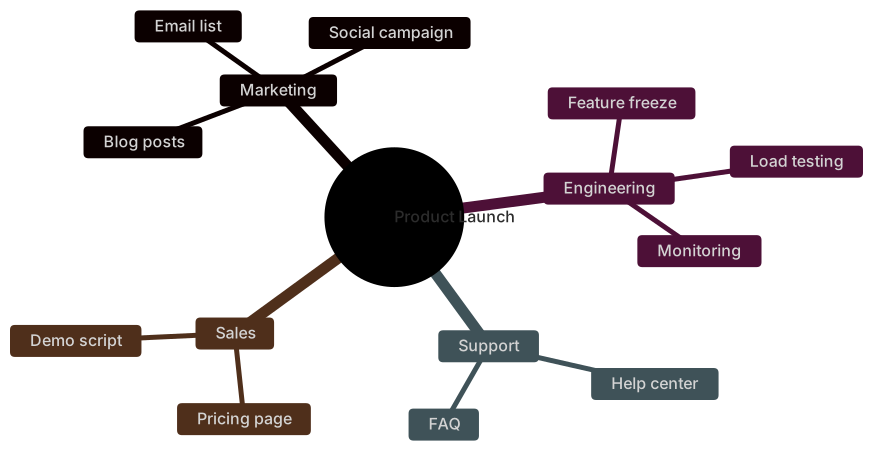
  root((Product Launch))
    Marketing
      Blog posts
      Social campaign
      Email list
    Engineering
      Feature freeze
      Load testing
      Monitoring
    Support
      Help center
      FAQ
    Sales
      Pricing page
Demo scriptMermaid mindmaps use indentation to build a tree of ideas around a central topic. There are no arrows to write: each deeper indent becomes a child branch.
This makes mindmaps the quickest way to turn meeting notes, outlines or brainstorming sessions into a visual overview you can paste into docs.
When to use a mindmap
- Brainstorming and workshop notes
- Study notes and revision outlines
- Feature breakdowns and scoping
- Content and SEO topic clusters
Mindmap syntax reference
| Syntax | What it does |
|---|---|
mindmap | Start a mindmap. |
Indentation | Each deeper indent creates a child node. |
root((Text)) | Circle-shaped node (common for the root). |
[Text] / (Text) / {{Text}} | Square, rounded and hexagon node shapes. |
)Text( / ))Text(( | Cloud and bang shapes. |
::icon(fa fa-book) | Add an icon to the previous node (needs icon fonts). |
Mindmap examples
Study notes
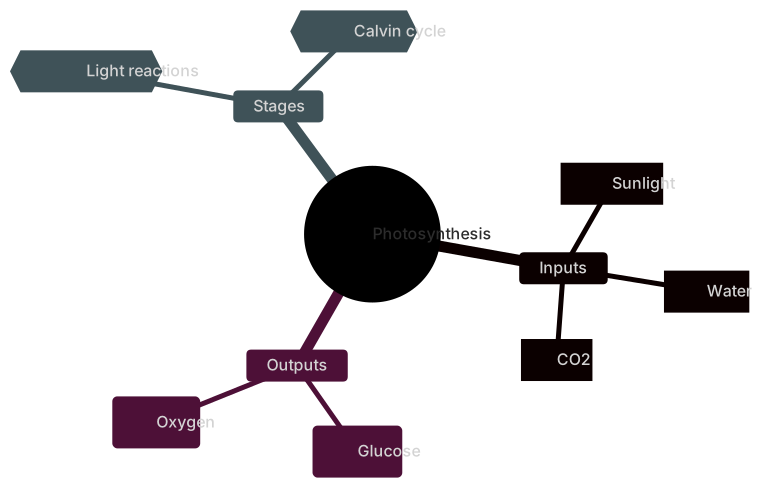
Different node shapes highlight key concepts.
mindmap
  root((Photosynthesis))
    Inputs
      [Sunlight]
      [Water]
      [CO2]
    Outputs
      (Glucose)
      (Oxygen)
    Stages
      {{Light reactions}}
{{Calvin cycle}}Indent is the relationship. A mermaid mindmap has no arrows, because the parent of a node is whatever sits one level out. That makes it a fast way to dump a branching note, and a bad way to show a process. The syntax table mentions the root and the two-space indent. This section is about keeping that indent honest on a real note.
Root, levels, and shapes
The first line after mindmap is the root. root((Incident)) draws it as a circle, which is enough of a cue that everything else hangs off that word. Children sit two spaces in. Their children sit two more. Mermaid doesn't read a tab the way a person does when the tab stop is wrong, so use spaces and keep the step at two.
A node can change shape with the brackets you already know from flowcharts. ((circle)), (rounded), and [square] work on a mindmap node. Use one extra shape for the root, and leave the branches as plain text, unless a shape carries a meaning you explain. A mindmap full of mixed shapes looks like a diagram that forgot its arrows.
The text is the id. There's no separate short name. If you rename a branch, you re-indent the children under the new line. Keep branch names short so the layout stays wide instead of deep. A chain of eight single-child levels is an outline pretending to be a map. Split it.
Mindmaps don't show sequence. "Detect" isn't before "Fix" unless you say so in the words. Readers still scan left to right or top to bottom and invent an order. If the order matters, you wanted a flowchart or a timeline.
Worked example
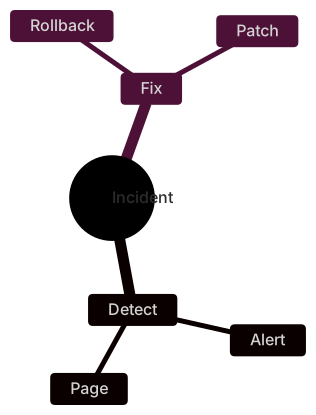
An incident note has two branches. Detect is how you learn. Fix is what you do. Each has two children.
mindmap
  root((Incident))
    Detect
      Alert
      Page
    Fix
      Rollback
PatchThe root is the topic, not a step. Detect and Fix are siblings because they share the same indent. Alert sits under Detect because it's two spaces further in. If Patch were indented only as far as Fix, it would become a third response, a sibling of Fix, and the note would say the patch is a strategy of its own rather than a way to fix. That's the entire language. There's no link statement to inspect. The whitespace is the link.
This map is a checklist skeleton. It doesn't say that you page someone before you roll back. The moment a teammate asks "which first", move that part to a flowchart and keep the mindmap as the index of topics. The two diagrams can live in the same doc. They answer different questions.
When this is the wrong diagram
A flowchart is the better picture when branches are decisions with yes and no. A treemap is the better picture when a child has a size, such as a budget share. A mindmap can show that Eng contains Pay and Cloud. It can't show that Pay is four times Cloud. Use the mindmap for structure without amounts.
Common mistakes
- A level that's off by a space, so a node sits under the wrong parent. Count two spaces per level and keep siblings in the same column.
- Starting with a child before
root((Topic)). The first node is the center. Anything before it scrambles the tree. - Writing arrows such as
Alert --> Pageinside the map. A mindmap has no edges. The parent relationship is the indent, and arrow text becomes a messy node label. - A root paragraph instead of a short label. The circle has room for one or two words. Put the sentence in the doc, not in the root.
Where to go next
The AI mindmap generator will indent a topic list for you. Fix the levels in the editor, where a one-space slip is easier to see, and the cheat sheet shows the root shapes. The startup mindmap template is a wider example if your note has more than two branches.
Indent is the parent
The parent of a node is the nearest line above it that is indented less, not the line you happened to type before it. If a branch jumps two levels, Mermaid still attaches it to the closer ancestor, and the picture looks like a child of the wrong idea. Fix the spaces before you add another root. One root is the whole point of a mindmap.
A reporting tree is a different picture. An org chart in Mermaid uses a flowchart when the arrow means reports-to, and a mindmap only when it does not.
Tips and best practices
- Use consistent indentation (two spaces works well) — inconsistent indents are the most common mindmap error.
- Keep labels to a few words; the radial layout gets crowded with long sentences.
- Split very large maps into one mindmap per main branch.
Generate a mindmap with AI
Not sure where to start? Describe what you need and the AI mindmap generator writes the Mermaid code for you. Try prompts like:
- “Learning roadmap for becoming a backend developer”
- “Marketing plan for a podcast”
- “Pros and cons of remote work”
Mindmap templates
Mind map outlining the key areas of a startup business plan: problem, solution, market, revenue and team.
Mind map of the skills to learn to become a web developer: fundamentals, frontend, backend, tools and soft skills.
Mindmap FAQ
How does a Mermaid mindmap know the hierarchy?
By indentation. A line indented more than the previous one becomes its child; lines at the same level become siblings.
Can I use icons in a Mermaid mindmap?
Yes, with ::icon(fa fa-name) for Font Awesome or ::icon(mdi mdi-name) for Material Design icons, provided the icon font is loaded on the page.
Can I convert an outline or bullet list to a mindmap?
Yes. Paste your outline into the MermaidViewer AI generator and ask for a mindmap, or replace bullets with indentation under a mindmap root yourself.