AI mind map generator
AI mind map generator that outlines a topic as a Mermaid mindmap. Edit the branches or export an image.
By MermaidViewer editorsPublished Updated
Example prompts for a mindmap
- “Learning roadmap for becoming a backend developer”
- “Marketing plan for a podcast”
- “Pros and cons of remote work”
What a Mermaid mindmap looks like
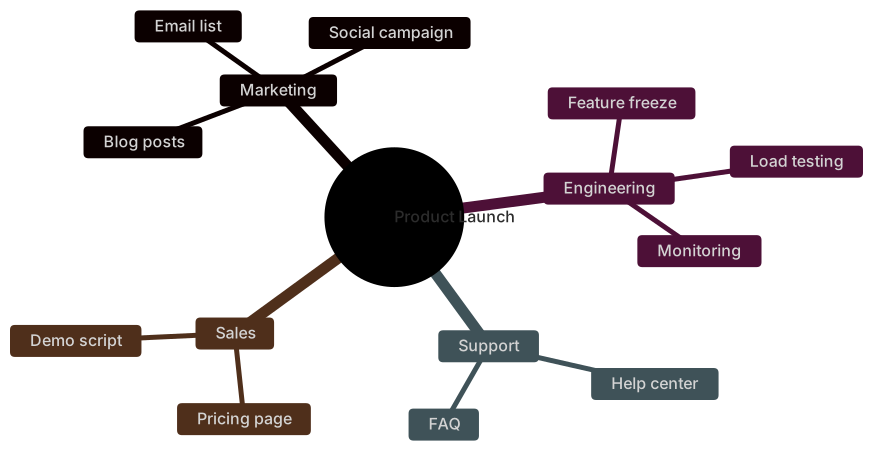
Example mindmap
mindmap
  root((Product Launch))
    Marketing
      Blog posts
      Social campaign
      Email list
    Engineering
      Feature freeze
      Load testing
      Monitoring
    Support
      Help center
      FAQ
    Sales
      Pricing page
Demo scriptWant to write it by hand? See the full Mermaid mindmap syntax and examples, or browse templates.
Indentation is the syntax, so an ai mind map generator works when the prompt is an outline and fails when the prompt is a mood. A camping weekend, a novel's middle, a new-hire first week: you want a root and branches a person can scan, not a paragraph crammed into one bubble. The box above writes a Mermaid mindmap. The rest of this page is about depth, shape, and the drafts that come back as a flowchart with a circle in the middle.
Branches it places without a fight
A clear root and three to six first-level branches usually land in the right generation. Children follow when you indent them in the prompt with dashes or when you write "under Food: water, stove, coffee." The model respects a depth limit if you set one. "Two levels under the root, no deeper" is a sentence it can follow. Short labels stick. Long sentences get truncated or, worse, kept, and the radial layout collides.
Shapes are optional and a bit fragile. A circle on the root, ((Camping)), appears when you ask for a round center. Squares and rounded nodes appear when you ask for them on specific branches. You rarely need them. Icons are the feature to avoid on a first draft. They depend on icon fonts the preview may not have, and a missing icon set looks like a broken node.
The mindmap reference shows indentation, the root shape, and the other node shapes. Two spaces per level is the habit that parses. Tabs look identical in a prompt and then fail in the file.
What a mind map draft botches
The model emits flowchart because it knows flowcharts better, with a central node and arrows to children. That is not a mind map, and the layout will not read as one. Or it emits a mind map whose root is a sentence: "Things we should think about for the Q3 camping trip if the weather holds." The center becomes a blob and the branches have nowhere to sit.
Depth runs away. You asked for a packing list and received six levels, including "brand of carabiner." Duplicate leaves show up under two parents because the model hedged. Sibling order is scrambled relative to the agenda you have to present. Inconsistent indentation, two spaces then four then a tab, is the parse error. A colon inside a label can also split a node into junk.
Another quiet failure: every item is a child of the root. The groups you named, Site and Food and Travel, got flattened. The diagram is a star. It is not an outline.
The outline words to include
Speak the tree.
- The root phrase, a few words, and the shape if you care.
- The first-level branch names, in the order you want them read.
- The children of each branch, introduced with "under."
- The maximum depth.
- Labels to keep short, and any label that must be exact.
- Branches that must not appear. Models add "Conclusion" and "Next steps" to almost any outline.
The startup mindmap template is a lean business plan: problem, solution, market, revenue, team. Generate when the topic is a trip, a chapter, or an onboarding week. Use the template when you are actually outlining a venture and you want those branches as the spine. The prompt guide explains generate versus edit. On mind maps, "two levels only" is the constraint that saves a retry.
Three prompts
- Mind map, root "Fall camping", circle shape. First level in this order: Site, Food, Travel, Safety. Under Site: tent, water, fire rules. Under Food: stove, coffee, one no-cook dinner. Under Travel: car share, trailhead parking. Under Safety: first aid, weather cutoff. Two levels only. No icons. No "Notes" branch.
- Mind map for the middle of a novel, root "Act two". Branches: Ally, Betrayal, Place, Clock. Under Ally: debt, secret. Under Betrayal: letter, public scene. Under Place: harbor, stairwell. Under Clock: three days, tide table. Do not add themes, symbols, or a moral. Short labels.
- Mind map of a new hire's first week, root "Week one". Branches: Access, People, Ship, Rules. Under Access: laptop, repo, VPN. Under People: manager, buddy, support rotation. Under Ship: readme, one small bug. Under Rules: on-call expectations, time off. Two levels. Do not add a Welcome branch full of slogans.
A map you can pack from
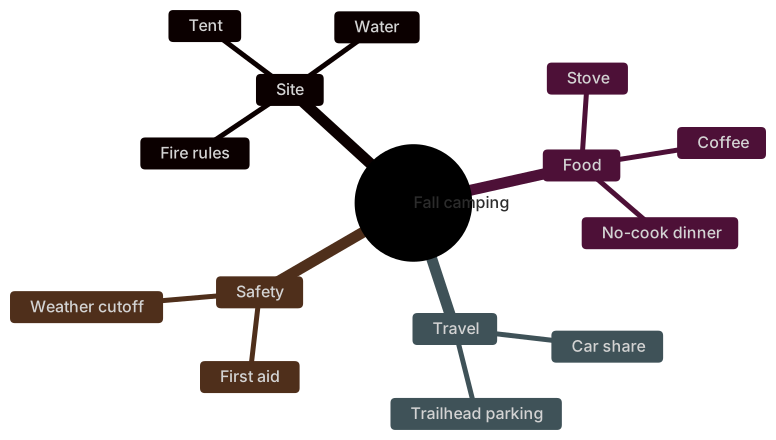
The camping map stays at two levels. Fire rules live under Site, not under a vague "Other." That is a map you can hold next to a bag.
mindmap
  root((Fall camping))
    Site
      Tent
      Water
      Fire rules
    Food
      Stove
      Coffee
      No-cook dinner
    Travel
      Car share
      Trailhead parking
    Safety
      First aid
      Weather cutoff
Open the editor and add a child under Food if someone is bringing a grill. Keep the new node at the same indent as Coffee. A deeper indent makes it a child of Coffee, which is a different claim.
Revising a scrambled tree
Choose an AI edit when the groups are wrong or the map is a flowchart. "Convert this to a mindmap. Root Fall camping. Put fire rules under Site. Delete the Conclusion branch. Two levels only. Two-space indents." Restructuring a whole tree in one instruction is a fair use of a generation. Re-parenting ten nodes by hand is slower and easier to indent wrong.
Choose a hand edit when one label is off or one node is on the wrong parent. Change Coffee to Tea. Move a line and fix its indent. Delete a slogan node. Add a sibling at the same column. Hand editing stays free. Mind map source is an outline. You already know how to edit an outline.
If the preview is blank, you are probably looking at mixed tabs and spaces, or a flowchart keyword left on line one. Replace the first line with mindmap, select the block, and convert indentation to spaces in the editor. Then check that each level is two spaces deeper than its parent. Do not ask the model to "try again" until you have seen the indent with spaces made visible.
Uses, monthly plans, and free typing
Five free AI uses is the entire free allotment. It is not a daily refill. The counter follows the account, the IP address, and a device cookie. A mind map is often right on the first pass if the prompt was an outline. It needs a second pass when the model returns a flowchart or a six-level tree. Spend the second pass on structure. Rename a leaf with the keyboard.
The pricing page is where Starter and Pro are spelled out. Starter, at $6.99 a month, is the plan with 500 AI conversations each month. Pro is $11.99 a month and includes unlimited AI within fair use, sized for a person, not for a bot refreshing maps all night. Hand editing stays free after the five uses are gone. Every plan can still download PNG: Free is 1× with a watermark, Starter reaches 4×, and Pro reaches 8×. JPG, SVG, and PDF are on Pro. A camping list can live in the editor and grow by a line each trip.
For a drawing that is really a process with decisions, switch from the AI diagram generator index to a flowchart. A mind map does not say yes or no. It says what sits under what. Use this generator for that job only.
Frequently asked questions
How do I generate a mindmap with AI?
Describe the mindmap you need in the box above and click Generate. The AI writes valid Mermaid mindmap code that renders instantly, and you can open it in the editor to refine it.
Is the AI mindmap generator free?
You can try it free: 5 AI generations in total, not per day, with no sign-up. Starter includes 500 AI conversations a month and Pro is unlimited. Manual editing stays available, and every plan can still download a PNG. JPG, SVG and PDF are on Pro.
Can I edit the generated mindmap?
Absolutely. The output is plain Mermaid code — edit it by hand in the live editor, or ask the AI for changes in natural language.