AI sankey diagram generator
AI sankey diagram generator that turns a flow of quantities into a Mermaid sankey diagram.
By MermaidViewer editorsPublished Updated
Example prompts for a sankey diagram
- “Household income to expenses flow”
- “Website traffic from channels to conversions”
- “Electricity generation by source to usage”
What a Mermaid sankey diagram looks like
Example sankey diagram
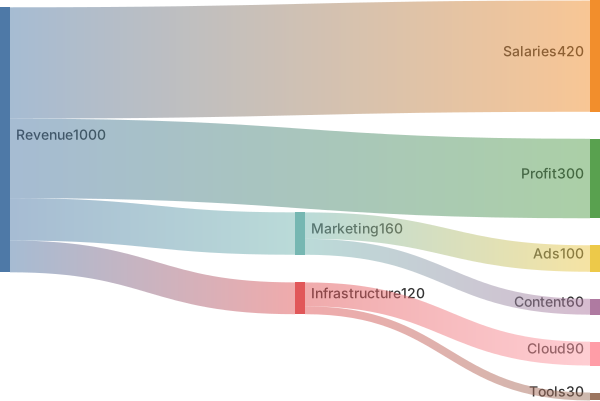
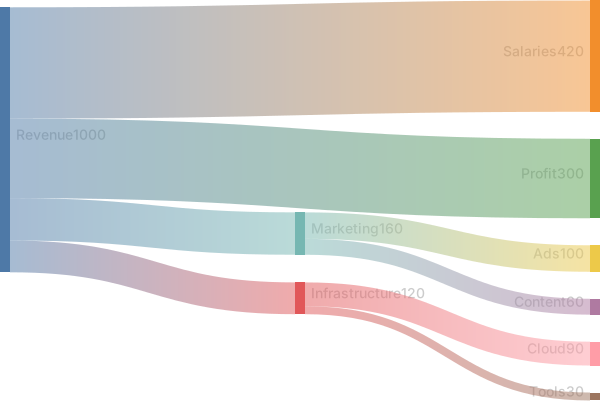
sankey

Revenue,Salaries,420
Revenue,Infrastructure,120
Revenue,Marketing,160
Revenue,Profit,300
Marketing,Ads,100
Marketing,Content,60
Infrastructure,Cloud,90
Infrastructure,Tools,30Want to write it by hand? See the full Mermaid sankey diagram syntax and examples, or browse templates.
Flow widths mean something only when the numbers add up, and an ai sankey diagram generator will draw a confident ribbon from a table that does not balance. A hiring class, a power budget, a cafeteria's waste: each row is source, target, and a quantity. The widget above writes Mermaid sankey source. This page is about conservation, the CSV shape the renderer expects, and the edits that fix one leak without a new prompt.
Flows it can layout
A two-level split is a comfortable request. "Hired becomes Engineering, Design, and Research" with three numbers will usually become three lines. Names you wrote are kept if they have no commas. Blank lines between groups are tolerated, so you can separate a funnel's stages visually in the source. The width of a ribbon follows the number, which is the only visual encoding that matters. Get the number right and the picture does its job.
The chart is also willing to continue a flow to a third node. Engineering can split into Backend and Frontend if you add those rows and the parts sum to the Engineering total. The model does this when you say "the parts must sum to the parent." It skips the check when you do not.
The safe keyword in the source is sankey-beta, followed by CSV rows. The sankey syntax page shows the same idea: source,target,value. Newer Mermaid builds also accept sankey. The beta keyword is the one to keep if you are pasting the file into tools that lag a version behind.
Diagrams that do not conserve
Children sum to more than the parent. You sent 40 people through onboarding and the branches sum to 55, because the model treated overlapping labels as extra flow. Or a node both receives 40 and emits 70, and the ribbon gets wider in the middle. Cycles appear: A flows to B and B flows back to A, which sankey layouts are bad at and your story did not ask for.
Commas inside names break the CSV. "New York, NY" becomes three columns. Percentages and headcount get mixed in one file, so a ribbon labeled in people is actually a 30 and a 70 that mean percent. The model adds a "Dropoff" node with a made-up remainder, which is useful only when you asked for the remainder and supplied it. A flowchart with thick arrows is the other botch, when the keyword never became sankey-beta.
Negative values and zero rows either error or draw nothing useful. Totals typed as the first column header, source,target,value, sometimes get read as a flow from a node called source.
Rows the prompt should dictate
Speak CSV out loud.
- The unit, once: people, kilowatts, kilograms.
- Each flow as source, target, and a number.
- The rule that outflows of a node equal its inflows, unless the node is a start or an end.
- Names with no commas, or a note to quote any name that has one.
- Whether a remainder node exists, and its exact number.
- A ban on cycles and on extra nodes.
The marketing funnel sankey template already splits visitors into signup, activation, and paying customers. Generate a new diagram for hiring, energy, or food waste. Use the template when the story is a marketing funnel and you are pasting this month's analytics. Say the numbers twice if a previous draft failed to balance. The prompt guide covers the edit action. On sankey diagrams, "make the branches sum to 40" is the edit.
Three prompts
- Sankey diagram of a hiring class, unit people. Offers 40 flows to Accepted 28 and Declined 12. Accepted flows to Engineering 16, Design 7, and Research 5. Those three must sum to 28. Declined is an end. No other nodes. No commas in names. Use sankey-beta CSV.
- Sankey diagram of a small power budget, unit kilowatts. Supply 100 flows to Building 80 and Loss 20. Building flows to HVAC 45, Lights 15, and Servers 20, which sum to 80. Loss is an end. Do not add a renewable node. Numbers are absolute kilowatts, not percentages.
- Sankey diagram of cafeteria waste for one Friday, unit kilograms. Prep 50 flows to Served 35 and Trim 15. Served flows to Eaten 27 and Plate waste 8. Trim flows to Compost 15. Plate waste is an end. Check that Served's children sum to 35 and Trim's child equals 15. No money values.
A class that balances
Accepted is 28, and 16 plus 7 plus 5 is 28. Declined does not continue. The picture can be checked with a pencil.
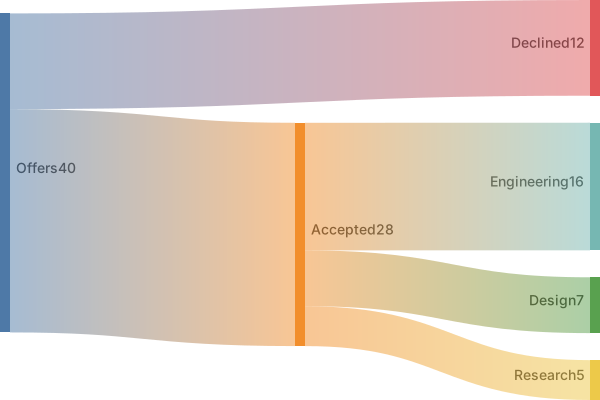
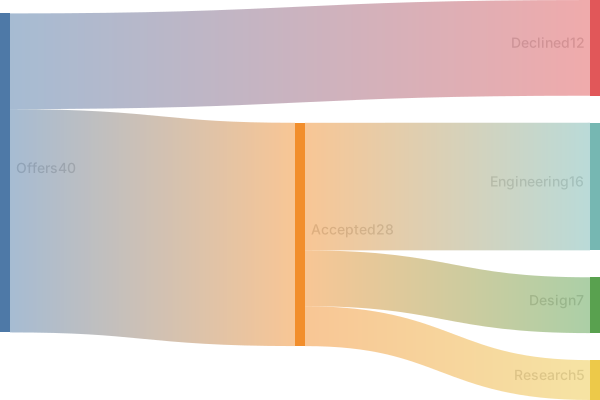
sankey-beta

Offers,Accepted,28
Offers,Declined,12
Accepted,Engineering,16
Accepted,Design,7
Accepted,Research,5Load that in the editor when Research hired one more and Design hired one fewer. Change 7 to 6 and 5 to 6. The Accepted total still holds. If you change only one side, the diagram stops being a statement about the same 28 people.
Balancing a draft that grew a ribbon
Use an AI edit when nodes were invented or the sums are wrong in several places. "Unit is people. Offers splits into Accepted 28 and Declined 12. Accepted splits into Engineering 16, Design 7, Research 5. Delete every other node. Output sankey-beta CSV with no header row." A generation is the right tool when the file has become a different funnel.
Edit a number yourself when one cell changed. The row Accepted,Design,7 is the whole fact. Change the digit. Delete a leftover Dropoff row. Quote a name that contains a comma, or rename it. Hand editing stays free. Adding the keyword sankey-beta on line one is also a hand edit if the model returned a flowchart.
A parse error usually means a fourth CSV column or a blank value. Each data line needs exactly two commas. Fix the line in the editor and leave the balanced rows untouched.
Five uses, not a daily set
Free accounts get five AI uses in total. A new morning does not restore them. The count is on the account, the IP address, and a device cookie. A sankey with a stated sum often needs two tries, because the first try adds a drop-off you did not measure. Use the second try to delete it. Adjust a single weight by hand afterward.
Pricing lists Starter at $6.99 a month with 500 AI conversations a month, and Pro at $11.99 a month with unlimited AI under fair use. The cap is about automated volume. Hand editing stays free on every plan, so a weekly update of the same three numbers does not need Pro. Export stays available after the free uses are gone.
A pie shows one split of a whole. A sankey shows a quantity moving through stages, including splits that happen later. If you only have one split, the AI diagram generator pie page may be clearer. Stay here when the width of the ribbon is the sentence.
Frequently asked questions
How do I generate a sankey diagram with AI?
Describe the sankey diagram you need in the box above and click Generate. The AI writes valid Mermaid sankey diagram code that renders instantly, and you can open it in the editor to refine it.
Is the AI sankey diagram generator free?
You can try it free: 5 AI generations in total, not per day, with no sign-up. Starter includes 500 AI conversations a month and Pro is unlimited. Manual editing stays available, and every plan can still download a PNG. JPG, SVG and PDF are on Pro.
Can I edit the generated sankey diagram?
Absolutely. The output is plain Mermaid code — edit it by hand in the live editor, or ask the AI for changes in natural language.