AI timeline generator
AI timeline generator for roadmaps and history. Describe the events, get a Mermaid timeline you can edit.
By MermaidViewer editorsPublished Updated
Example prompts for a timeline
- “History of the internet”
- “Startup fundraising journey”
- “Evolution of JavaScript frameworks”
What a Mermaid timeline looks like
Example timeline
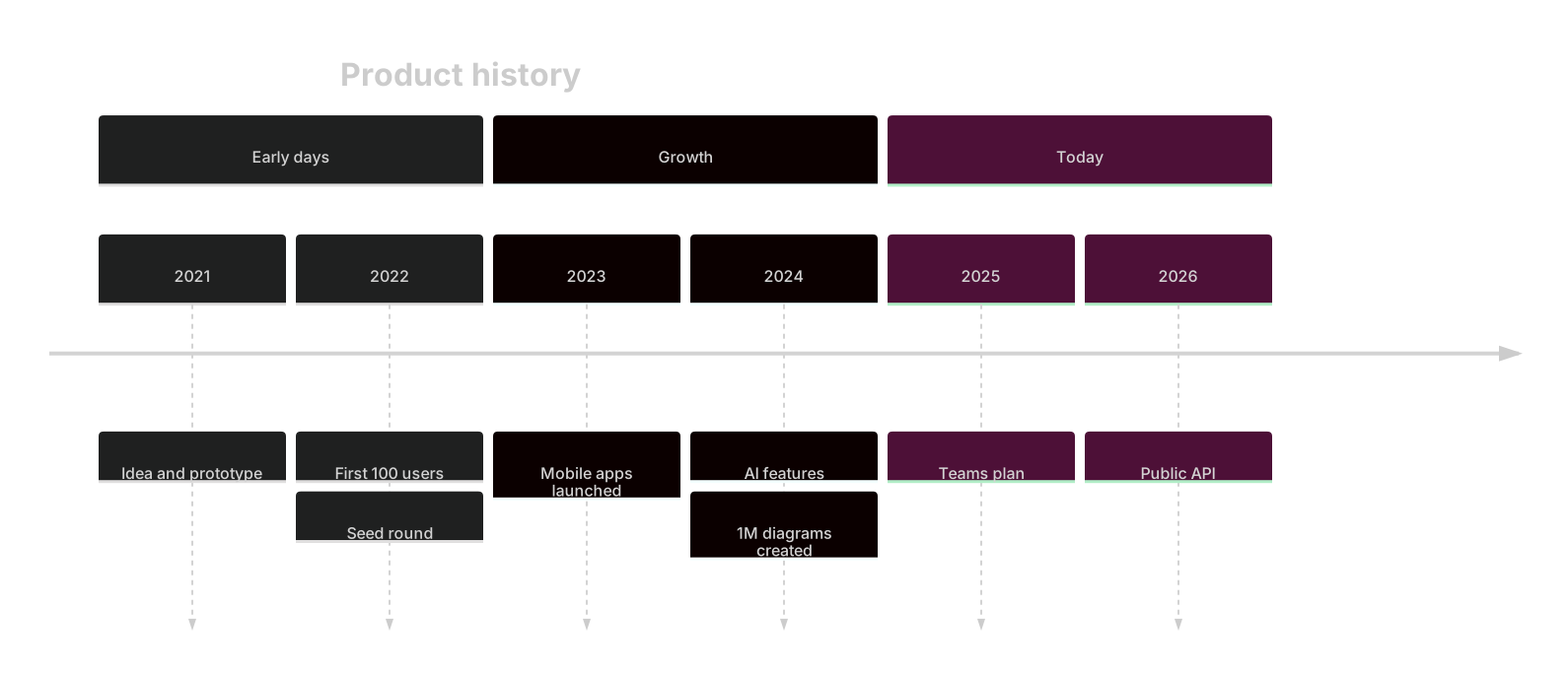
timeline
    title Product history
    section Early days
      2021 : Idea and prototype
      2022 : First 100 users : Seed round
    section Growth
      2023 : Mobile apps launched
      2024 : AI features : 1M diagrams created
    section Today
      2025 : Teams plan
2026 : Public APIWant to write it by hand? See the full Mermaid timeline syntax and examples, or browse templates.
Years are labels here, not bar widths, which is the reason to reach for an ai timeline generator instead of a schedule. A city's streetcars, a language's releases, a band's albums: the reader needs eras and the events inside them, evenly spaced, without anyone pretending a founding year "lasted" twelve months of project work. The widget above writes Mermaid timeline source. Under it, the briefing that keeps colons out of your event names, and the repairs that do not need another prompt.
History it can lay out
Sections stick when you name eras: horse era, electric era, bus era. Period labels stick when they are short: a year, a quarter, a reign. Multiple events in one period work if you say "two events in 1902" and list them. The model keeps chronological order when you list periods in order. It does not sort a shuffled list reliably, so the prompt should already be sorted.
Titles land. So do plain phrases without punctuation. The diagram looks like a history, which is what you want for an about page or a lecture slide. It will not compute durations, and that is correct. The timeline syntax is section, then Period : Event, with extra events after more colons or on following lines that start with a colon. Once you have seen that pattern, bad generations are obvious: they look like Gantt charts.
What goes wrong on a timeline
Colons inside an event split it into extra events. "Opened: the river line" becomes a period called Opened and a stray event. Quotes sometimes get added around the whole line and then the period disappears. Events arrive out of order because the prompt said "also mention 1888" at the end. The model appends. It does not weave.
Another botch is turning the timeline into a Gantt chart with dateFormat and durations, because the word timeline is ambiguous in English. You asked for history and received a project plan. Or every decade gets one vague event ("growth") when you named three ordinances. Future plans get mixed into the history section, and a reader cannot tell what already happened.
Too many events on one year stack until the labels overlap. The generator will not warn you. Six events in 1964 is a paragraph, not a timeline. Split the year or cut the list.
Periods, sections, and events to name
The prompt is a sorted list.
- The title.
- Section names for the eras, in order.
- Each period label, in order.
- The events in that period, written with no colon inside the event text.
- Which periods have two events.
- A future section only if you want one, clearly named Future or Roadmap.
- A cap, such as "at most two events per year."
The company history timeline template groups founding, growth, and expansion, with more than one event on some years. Generate when the subject is a transit agency, a language, or a band. Use the template when the page is a company story and you are filling in real years. If you need working-day durations, stop and use a Gantt chart. The prompt guide is the general briefing habit. On timelines, "no colons inside events" is the habit that prevents a parse error.
Three prompts
- Timeline titled River City transit. Section Horse era: 1888 first streetcar on Main, 1894 night service added. Section Electric era: 1902 overhead wires on Main, 1910 last horse car retired. Section Bus era: 1947 electric lines replaced by buses, 1981 downtown transit mall. At most two events per year. No colons inside event text. Do not use a Gantt chart.
- Timeline titled Wren language. Section Experiments: 2014 bytecode prototype, 2016 self-hosted compiler. Section Releases: 2019 version 1, 2022 async io proposal. Section Now: 2025 package index, 2026 linter in the core repo. Keep years in order. Two events maximum on any year. Spell version numbers as words or digits without a colon.
- Timeline titled The North Lane albums. Section Clubs: 2009 first single, 2011 debut record. Section Rooms: 2014 second record, 2016 live album. Section Pause and return: 2019 hiatus, 2023 reunion tour. Do not add a future album. Do not add band-member biography.
Events that stay events
The transit timeline uses sections for technology eras and keeps each event free of colons. 1902 holds one event. 1888 is not appended at the bottom.
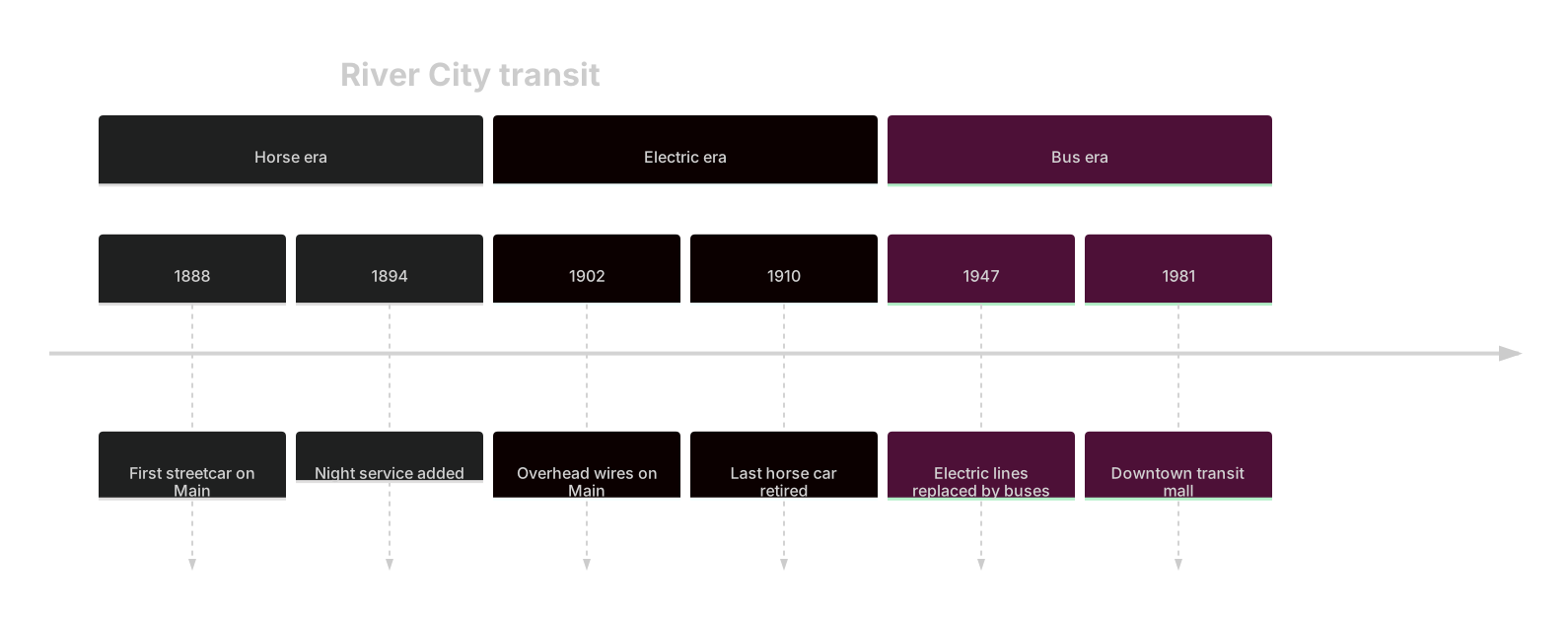
timeline
    title River City transit
    section Horse era
      1888 : First streetcar on Main
      1894 : Night service added
    section Electric era
      1902 : Overhead wires on Main
      1910 : Last horse car retired
    section Bus era
      1947 : Electric lines replaced by buses
1981 : Downtown transit mallTake it into the editor to add a second event on 1902, on its own line starting with a colon under that year. That is the readable way to stack two facts without a long horizontal label.
Fixing a history that will not render
Use an AI edit when the type is wrong or the eras are mixed. "Rewrite as a timeline, not a gantt. Three sections: Horse era, Electric era, Bus era. Sort years ascending. Remove any colon inside an event. Drop the 2030 extension plan." Changing the diagram type and the section structure is a good spend. Retyping twelve events you already like is not.
Hand-edit when one year is wrong or one event has a colon. Change 1894 to 1895. Replace "Opened: the river line" with "River line opened." Add a section line. Delete a future event that leaked into Bus era. Hand editing stays free. Timeline source is a list. You can maintain it like a list.
A blank preview usually means a colon or a missing space around the separator. The pattern is Year : Event with spaces. Look at the line the parser names, fix that line in the editor, and do not regenerate the eras you already checked.
Five in total, then the paid caps
Free AI use is five generations total. The pile does not refill every morning. It is counted for the account and for the IP. A timeline with clean years often works the first time. It needs a second generation when the model returns a Gantt chart or shuffles decades. Use the second generation for that. Correct a single year by typing.
Pricing shows Starter at $6.99 a month, 500 AI conversations a month, and Pro at $11.99 a month, unlimited AI under fair use. The fair-use cap is there so a script cannot drain the pool. People editing a company history by hand are not the thing it limits. Hand editing stays free on the free plan after the five are used. Export stays available. The diagram is text you can commit.
If the audience needs dependencies and a start date, leave this page and open a Gantt generator from the AI diagram generator index. If the audience needs "what happened in that era," stay. An ai timeline is a sequence of labels, and the generator on this page is built for that reading.
Frequently asked questions
How do I generate a timeline with AI?
Describe the timeline you need in the box above and click Generate. The AI writes valid Mermaid timeline code that renders instantly, and you can open it in the editor to refine it.
Is the AI timeline generator free?
You can try it free: 5 AI generations in total, not per day, with no sign-up. Starter includes 500 AI conversations a month and Pro is unlimited. Manual editing stays available, and every plan can still download a PNG. JPG, SVG and PDF are on Pro.
Can I edit the generated timeline?
Absolutely. The output is plain Mermaid code — edit it by hand in the live editor, or ask the AI for changes in natural language.