AI C4 diagram generator
AI C4 diagram generator for system context and containers. Describe the people and systems, get Mermaid C4.
By MermaidViewer editorsPublished Updated
Example prompts for a c4 diagram
- “Container diagram for a food delivery platform”
- “System context for a hospital records system”
- “Microservices e-commerce architecture”
What a Mermaid c4 diagram looks like
Example c4 diagram
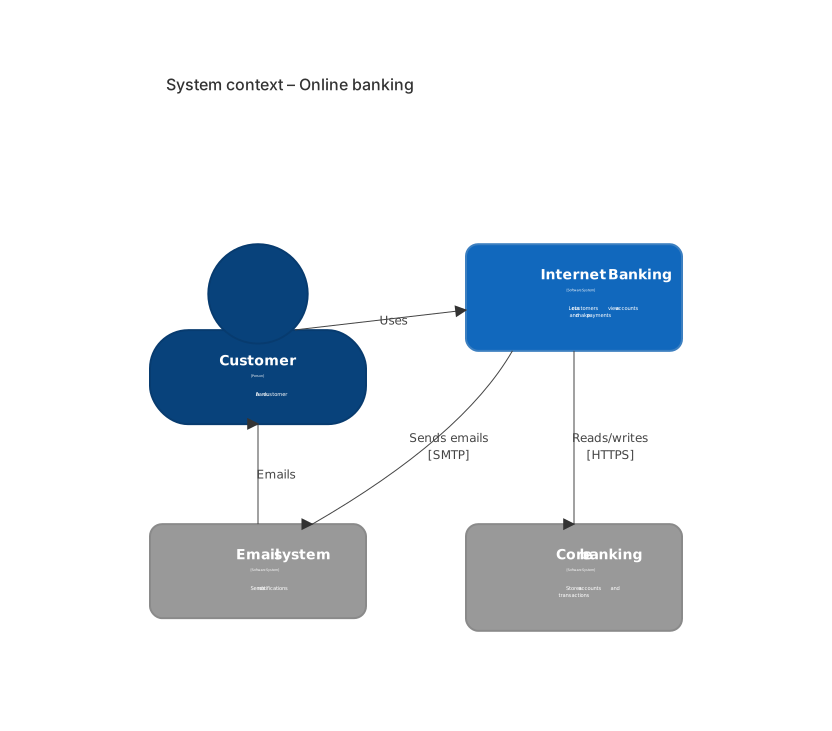
C4Context
    title System context – Online banking
    Person(customer, "Customer", "A bank customer")
    System(bank, "Internet Banking", "Lets customers view accounts and make payments")
    System_Ext(mail, "Email system", "Sends notifications")
    System_Ext(core, "Core banking", "Stores accounts and transactions")
    Rel(customer, bank, "Uses")
    Rel(bank, core, "Reads/writes", "HTTPS")
    Rel(bank, mail, "Sends emails", "SMTP")
Rel(mail, customer, "Emails")Want to write it by hand? See the full Mermaid c4 diagram syntax and examples, or browse templates.
Stakeholders need the outside of the system before they need a class list, which is the job of an ai c4 diagram generator. A branch library, a vet portal, a podcast host: you want people, the system you own, the systems you do not, and a label on each arrow. The widget above writes Mermaid C4. This page is about context diagrams that stay at context level, the container syntax the model leaks in early, and the edits that rename a vendor without a new generation.
Context diagrams it can produce
Person, System, and System_Ext are the macros models know. If you list the patron, the catalog, and the email provider, those three boxes usually appear. Rel labels stick when you write the verb yourself: searches, sends mail, charges a card. A technology on the relationship, such as HTTPS or SMTP, appears when you put it in the prompt as its own word. A title sticks.
Boundaries are less reliable, and you often do not want one on a pure context diagram. They belong on a container diagram, around the applications you own. The model draws a decent System_Boundary when you say "only the web app, the API, and the database are inside the boundary" and you ask for C4Container explicitly. Mixing those levels in one prompt is how you get a context diagram with databases floating in it.
The C4 syntax page shows C4Context, C4Container, Person, System_Ext, Container, ContainerDb, and Rel. Aliases have to be identifiers. The visible name is a separate quoted string. That split is the thing to check in every generated file.
Levels it mashes together
Containers show up inside C4Context: a Postgres box beside the person, as if the patron talks to the database. External systems get drawn as internal System boxes, so a card processor looks owned. Descriptions contain commas and the macro's argument list shifts, which either fails the parse or assigns the technology string to the description. Aliases have spaces. Rel points at an alias that was never declared, often email versus mail.
The model also writes PlantUML leftovers, !include and LAYOUT_TOP_DOWN, which Mermaid does not want. Or it writes a flowchart and calls the nodes "C4." Relationship direction is reversed: the email system uses the patron, instead of the product emailing the patron. Technology is stuffed into the label ("Uses via HTTPS") and the fourth Rel argument is empty, which is readable and still harder to restyle later.
A context diagram with eight external systems is technically valid and useless in a kickoff. The generator will not stop at five. You have to say stop.
Names the prompt has to separate
Keep the level and the cast distinct.
- The keyword: C4 context or C4 container, not both.
- Each person: alias, label, one-sentence description.
- The system in scope, marked as yours.
- Each external system, marked external, with who operates it.
- Each relationship: from alias, to alias, verb, technology.
- For a container diagram only: containers, their tech, and the boundary name.
- A maximum number of external systems.
The C4 context template is a SaaS product with users, admins, the core system, and external payments, email, and identity. Generate a new context for a library, a clinic, or a podcast host. Open the template when you are documenting a SaaS product and swapping vendors. Ask for container level only after the context picture is agreed. The prompt guide covers the editor's AI edit action. On C4 diagrams, "context only, no databases" prevents the usual leak.
Three prompts
- C4 context diagram titled Branch library. Person patron, a neighbor who borrows books. System catalog, the library system that holds titles and loans. System_Ext smtp, the city's email gateway, external. System_Ext ill, a regional interlibrary service, external. Relationships: patron uses catalog. Catalog sends overdue mail to smtp over SMTP. Catalog requests a copy from ill over HTTPS. Do not draw containers or databases.
- C4 context diagram titled Vet portal. Person clerk, front-desk staff. System portal, the clinic's booking system. System_Ext labs, an outside lab that returns bloodwork, external. System_Ext sms, an SMS vendor, external. Clerk uses portal. Portal sends results requests to labs over HTTPS. Portal sends reminders through sms over HTTPS. No payment provider. No container boxes.
- C4 container diagram titled Podcast host, only if the context is already settled. Person host, the show's producer. Boundary "Host app" containing Container web, Next.js, the upload UI, and Container api, Node, the feed builder, and ContainerDb db, Postgres, episode rows. System_Ext cdn, an external CDN. Host uses web over HTTPS. Web calls api over JSON. Api reads db over SQL. Api pushes audio to cdn over HTTPS. Do not add a billing container.
A library, from the outside
The patron never touches SMTP. The catalog does. Interlibrary loan is external. There is no database on the picture, because this is context level.
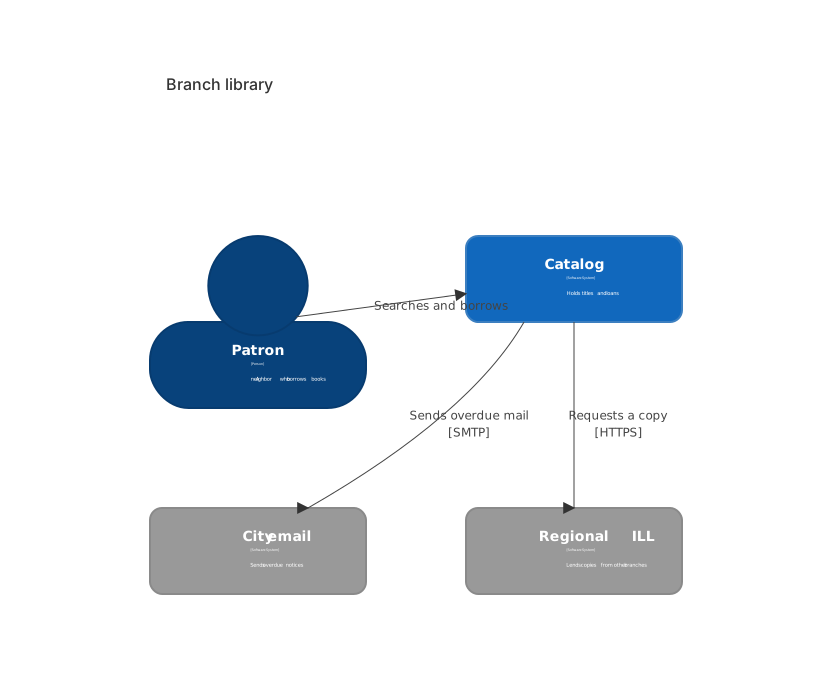
C4Context
    title Branch library
    Person(patron, "Patron", "A neighbor who borrows books")
    System(catalog, "Catalog", "Holds titles and loans")
    System_Ext(smtp, "City email", "Sends overdue notices")
    System_Ext(ill, "Regional ILL", "Lends copies from other branches")
    Rel(patron, catalog, "Searches and borrows")
    Rel(catalog, smtp, "Sends overdue mail", "SMTP")
Rel(catalog, ill, "Requests a copy", "HTTPS")Take this into the editor and rename City email when the contract changes. Change the label string. Leave the alias smtp so the Rel lines still resolve. Renaming an alias means renaming every Rel that uses it. That is a hand edit if you are careful, and a mess if you rename only the box.
Putting a leaked database back outside
Use an AI edit when the level is wrong. "Rewrite as C4Context. Remove Postgres and any Container. Mark City email and Regional ILL as System_Ext. Patron uses catalog. Catalog sends mail to smtp. No PlantUML includes." Changing level is a structural edit. It is a fair generation.
Edit text when the picture is already at the right level. Change a description. Fix HTTPS on a Rel fourth argument. Correct email to smtp in one relationship. Delete a sixth external system. Hand editing stays free. C4 lines are function calls. One argument is one fact.
A parse error is often a comma inside an unescaped description, or a quote that ended too early. Shorten the description to a clause without commas, or keep the commas inside the quotes and make sure the quotes pair. Do that on the single line in the editor. If Rel complains about an unknown alias, the alias string does not match the declaration. Copy it. Do not regenerate the cast to fix a spelling drift.
The five, and the plans after
Five free AI uses is the full complimentary amount. They do not refresh daily. They are counted against the account, the IP address, and a device cookie. A context diagram with four boxes often succeeds immediately. A prompt that said "architecture" without saying context often needs a second use to strip the containers. Take that second use. Rename a vendor by editing the string.
Pricing is where the monthly numbers live. Starter runs $6.99 a month, and the AI allowance on it is 500 conversations a month. Pro is $11.99 a month and includes unlimited AI under fair use, a cap aimed at scripted abuse rather than at a person documenting systems. Hand editing stays free once the five are gone. You can keep a context diagram in the repo and update a Rel label in review.
An architecture diagram with cloud icons is a different picture, and so is a block diagram with a fixed grid. Both are on the AI diagram generator index. Use this C4 generator when the audience expects Person, System, and System_Ext, and when "external" is a claim you need the syntax to enforce.
Frequently asked questions
How do I generate a c4 diagram with AI?
Describe the c4 diagram you need in the box above and click Generate. The AI writes valid Mermaid c4 diagram code that renders instantly, and you can open it in the editor to refine it.
Is the AI c4 diagram generator free?
You can try it free: 5 AI generations in total, not per day, with no sign-up. Starter includes 500 AI conversations a month and Pro is unlimited. Manual editing stays available, and every plan can still download a PNG. JPG, SVG and PDF are on Pro.
Can I edit the generated c4 diagram?
Absolutely. The output is plain Mermaid code — edit it by hand in the live editor, or ask the AI for changes in natural language.