C4Context
    title System context – SaaS app
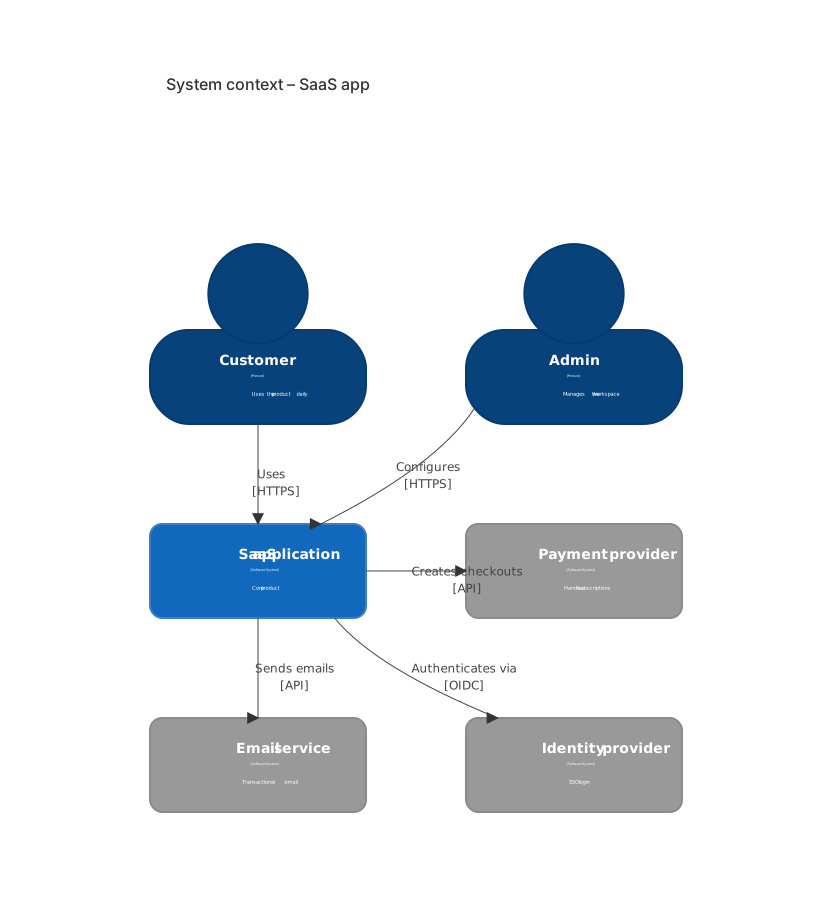
    Person(user, "Customer", "Uses the product daily")
    Person(admin, "Admin", "Manages the workspace")
    System(app, "SaaS application", "Core product")
    System_Ext(pay, "Payment provider", "Handles subscriptions")
    System_Ext(mail, "Email service", "Transactional email")
    System_Ext(idp, "Identity provider", "SSO login")
    Rel(user, app, "Uses", "HTTPS")
    Rel(admin, app, "Configures", "HTTPS")
    Rel(app, pay, "Creates checkouts", "API")
    Rel(app, mail, "Sends emails", "API")
Rel(app, idp, "Authenticates via", "OIDC")About this template
The C4 system context is the first diagram every architecture doc should have. This template shows the people who use the system and the external systems it depends on — payments, email and identity providers.
How to customise it
- Replace external systems with your vendors
- Add a C4Container diagram as the next level
- Add internal systems your product talks to
This template is a Mermaid c4 diagram. See the c4 diagram page for the full syntax reference and more examples.
Frequently asked questions
How do I use this c4 system context for a saas app template?
Click "Use this template" to open it in the MermaidViewer editor. Edit the Mermaid code on the left and the diagram updates instantly. No account is needed.
Can I export the template as an image?
Yes. In the editor use Export to download PNG, SVG or PDF, or copy the image to your clipboard. You can also copy the code as a Markdown block for GitHub, GitLab or Notion.
Can AI customise this template for me?
Yes. Open the AI assistant (Ctrl/Cmd+K) and describe the change, for example "Replace external systems with your vendors". The updated diagram streams into the editor.