Basic entity relationship diagram example
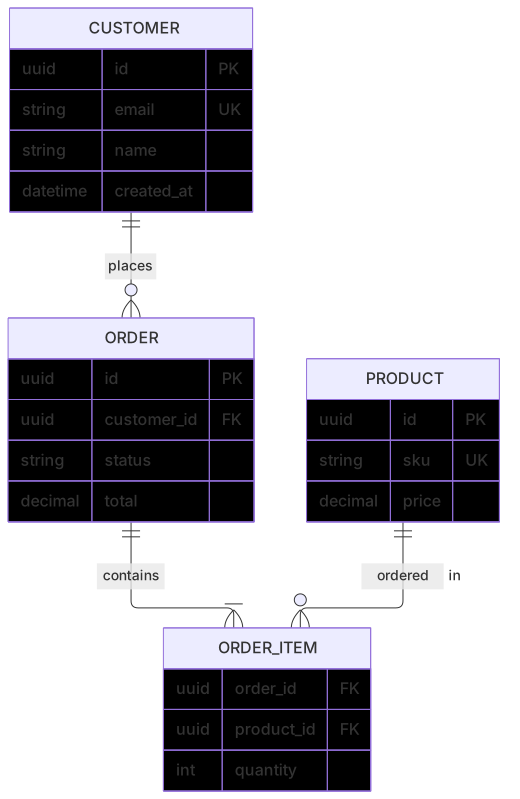
erDiagram
    CUSTOMER ||--o{ ORDER : places
    ORDER ||--|{ ORDER_ITEM : contains
    PRODUCT ||--o{ ORDER_ITEM : "ordered in"
    CUSTOMER {
      uuid id PK
      string email UK
      string name
      datetime created_at
    }
    ORDER {
      uuid id PK
      uuid customer_id FK
      string status
      decimal total
    }
    ORDER_ITEM {
      uuid order_id FK
      uuid product_id FK
      int quantity
    }
    PRODUCT {
      uuid id PK
      string sku UK
      decimal price
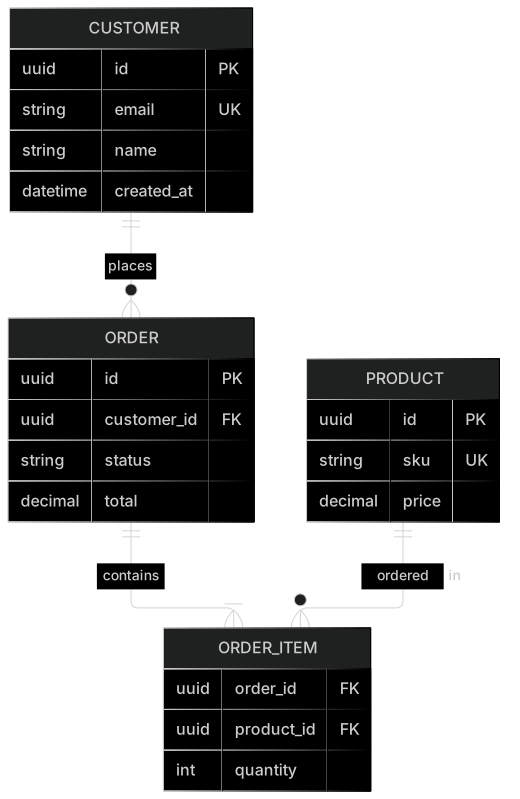
}Entity relationship (ER) diagrams describe the tables in a database, their columns and how they relate. Mermaid uses crow's foot notation, the standard way data teams show one-to-one, one-to-many and many-to-many relationships.
Keeping your schema as a Mermaid erDiagram next to migrations makes reviews easier: the diagram changes in the same pull request as the SQL, and anyone can read it without a database GUI.
When to use a entity relationship diagram
- Designing a new database schema before writing migrations
- Documenting an existing data model for new team members
- Reviewing schema changes in pull requests
- Explaining data relationships to analysts and product managers
Entity Relationship Diagram syntax reference
| Syntax | What it does |
|---|---|
erDiagram | Start an ER diagram. |
A ||--o{ B : label | Relationship with cardinality on both ends and a label. |
|o / o| | Zero or one. |
|| | Exactly one. |
}o / o{ | Zero or more. |
}| / |{ | One or more. |
-- vs .. | Identifying (solid) vs non-identifying (dashed) relationship. |
ENTITY { type name PK } | Attributes with type, name and optional PK, FK or UK keys. |
type name "comment" | Attribute comment shown in the diagram. |
ENTITY["Display name"] | Entity alias with a friendlier label. |
Entity Relationship Diagram examples
Many-to-many with a join table
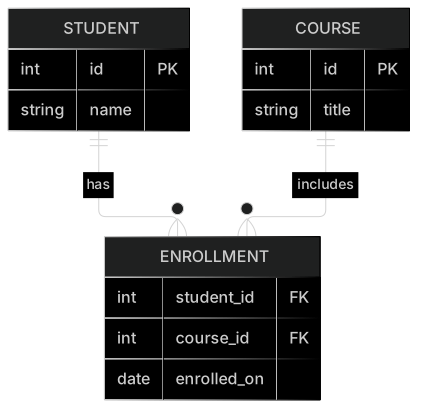
Students and courses are linked through an ENROLLMENT table.
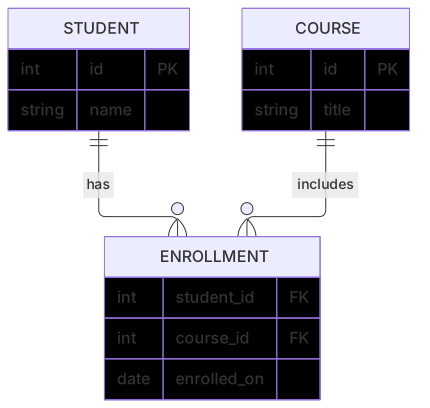
erDiagram
    STUDENT ||--o{ ENROLLMENT : has
    COURSE ||--o{ ENROLLMENT : includes
    STUDENT {
      int id PK
      string name
    }
    COURSE {
      int id PK
      string title
    }
    ENROLLMENT {
      int student_id FK
      int course_id FK
      date enrolled_on
}Blog schema
Users write posts; posts have comments and tags.
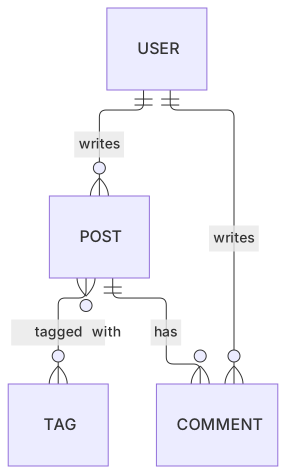
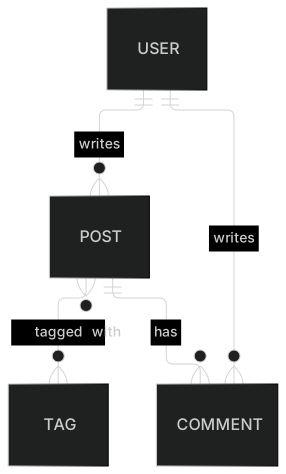
erDiagram
    USER ||--o{ POST : writes
    POST ||--o{ COMMENT : has
    USER ||--o{ COMMENT : writes
POST }o--o{ TAG : "tagged with"Tips and best practices
- Use singular, uppercase entity names (ORDER, not orders) to make them stand out from attributes.
- Mark PK, FK and UK on attributes — reviewers mostly care about keys.
- Quote relationship labels that contain spaces: "ordered in".
- Model many-to-many relationships explicitly with a join entity when it carries data (dates, roles).
Generate a entity relationship diagram with AI
Not sure where to start? Describe what you need and the AI entity relationship diagram generator writes the Mermaid code for you. Try prompts like:
- “SaaS multi-tenant schema with organizations, users and roles”
- “Hotel booking database”
- “Inventory and warehouse management”
Entity Relationship Diagram templates
Entity Relationship Diagram FAQ
How do I show one-to-many in a Mermaid ER diagram?
Use ||--o{ for one-to-zero-or-many or ||--|{ for one-to-one-or-many. The left side describes how many of the first entity, the right side how many of the second.
Can I mark primary and foreign keys?
Yes. After the attribute name add PK, FK or UK (unique key). You can combine them, for example PK, FK.
Can I generate an ER diagram from SQL?
Paste your CREATE TABLE statements into the MermaidViewer AI generator and ask for an erDiagram; it converts tables, columns and foreign keys into Mermaid syntax you can then edit.