AI ER diagram generator
AI ER diagram generator that turns a schema or plain description into a Mermaid erDiagram with keys.
By MermaidViewer editorsPublished Updated
Example prompts for a entity relationship diagram
- “SaaS multi-tenant schema with organizations, users and roles”
- “Hotel booking database”
- “Inventory and warehouse management”
What a Mermaid entity relationship diagram looks like
Example entity relationship diagram
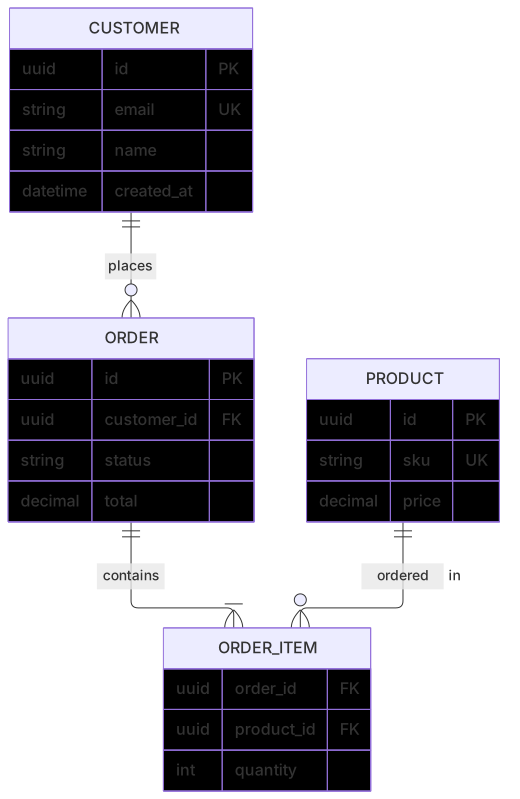
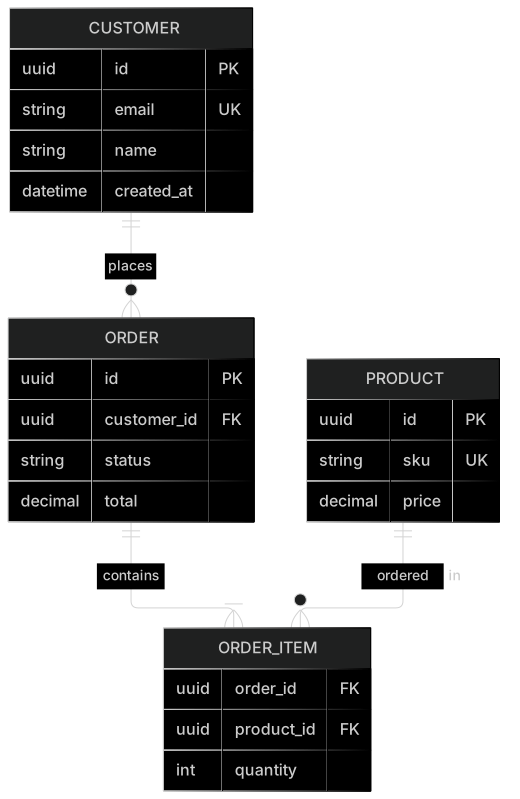
erDiagram
    CUSTOMER ||--o{ ORDER : places
    ORDER ||--|{ ORDER_ITEM : contains
    PRODUCT ||--o{ ORDER_ITEM : "ordered in"
    CUSTOMER {
      uuid id PK
      string email UK
      string name
      datetime created_at
    }
    ORDER {
      uuid id PK
      uuid customer_id FK
      string status
      decimal total
    }
    ORDER_ITEM {
      uuid order_id FK
      uuid product_id FK
      int quantity
    }
    PRODUCT {
      uuid id PK
      string sku UK
      decimal price
}Want to write it by hand? See the full Mermaid entity relationship diagram syntax and examples, or browse templates.
A schema you cannot migrate is worse than a blank page, so an ai er diagram generator has to hear table names, keys, and how many rows point at how many. Clinic appointments, playlist tracks, course enrollment: the useful output is crow's foot notation a DBA can argue with. The tool above drafts erDiagram source. Below is how to brief it, which mistakes to expect, and when to stop generating and edit the text.
What the draft gets right
Entities you name show up as boxes. Primary keys appear when you say "id is the primary key," and foreign keys appear when you say which column points at which table. One-to-many is the relationship models draw best. "A teacher teaches many courses" becomes a crow's foot on the course side more often than not. Attribute lists stay inside the entity when you present them as columns rather than as extra boxes.
The draft is also good at a first pass over real SQL. Paste a few CREATE TABLE statements and ask for an ER diagram with PK and FK markers. The SQL to ER guide walks through that translation by hand, including cardinality. The prompt guide covers generate and edit for every diagram type. Use the generator to get the first boxes, then use the guide's rules to check the feet. The ER diagram reference lists the markers: ||--o{ and its cousins. You should be able to point at a line and say "one and only one" or "zero or many" without guessing.
Junction tables appear when you ask for them by name. If you only say "students and courses are many to many," the model sometimes draws a direct line and skips the enrollment row that would actually exist in the database. Naming ENROLLMENT fixes that.
Where ER drafts go wrong
The crow's foot lands on the wrong end. The picture says one course has one student and one student has many courses, which is the opposite of the enrollment you described. Relationship labels get the verb backwards too: the line says "teaches" on the side that holds the foreign key, so a reader thinks the course teaches the teacher.
Attributes turn into entities. Email, phone, and address become three boxes linked to CUSTOMER, and you have a schema nobody wanted. Types get invented: a money column becomes float, a status becomes a free string, an id becomes text because the prompt said "identifier." Many-to-many without a junction is the design bug that parses cleanly. So does a foreign key with no relationship line, or a relationship line with no foreign key column.
Reserved words and spaces in entity names break the render. ORDER is a frequent one. Quoting or renaming to SHOP_ORDER is the fix. Comments pasted from SQL, --, inside the Mermaid block also break it.
Columns and verbs the model needs
Say the schema the way you would say it to a new teammate who has to write the migration.
- Entity names, singular and uppercase if you want them to match the ecommerce ER template style.
- Each column that belongs in the picture, with a type you actually use.
- Which column is PK, which is FK, which is unique.
- For every relationship: the parent, the child, the verb, and the cardinality in words ("one teacher, zero or many courses").
- Junction tables by name when the link is many-to-many, plus the two foreign keys.
- Tables to leave out. Models love to add
USERandAUDIT_LOG.
If you are starting from SQL, paste the statements and add "mark PK and FK, infer crow's foot from the foreign keys, do not add tables I did not paste." That last clause saves a generation. The ecommerce template is the right base for a store: customers, addresses, orders, line items, products, categories, payments. Generate a new diagram for a school or a clinic. Fork the template when the domain is a shop and you are only adding reviews or stock.
Example prompts
- ER diagram for a neighborhood clinic. Entities: PATIENT, APPOINTMENT, CLINICIAN, ROOM. A patient has zero or many appointments. A clinician has zero or many appointments. A room has zero or many appointments. Appointment holds foreign keys to patient, clinician, and room, plus a start time and a status. Primary key id on each entity. Do not add a billing table.
- ER diagram for a music app. Entities: LISTENER, PLAYLIST, PLAYLIST_TRACK, TRACK, ARTIST. A listener owns many playlists. A playlist contains many tracks through PLAYLIST_TRACK, which stores position. A track has one artist. Mark primary keys and foreign keys. Playlist and track are many-to-many only through the junction.
- ER diagram from these tables only. STUDENT(id PK, email unique, name). TEACHER(id PK, name). COURSE(id PK, teacher_id FK, code unique, title). ENROLLMENT(student_id PK FK, course_id PK FK, grade). One teacher teaches many courses. One student enrolls in many courses through ENROLLMENT. One course has many enrollments. No extra entities.
A compact enrollment diagram
This is the third prompt drawn with the feet on the many side. Enrollment's key is the pair of foreign keys, which is what you want for a real join table.
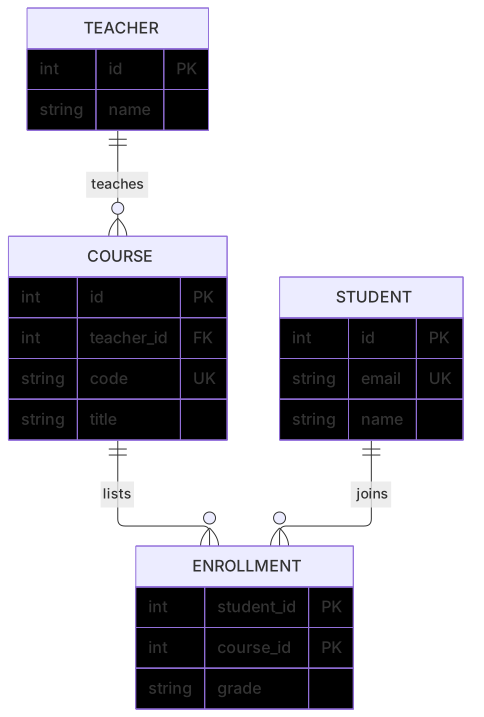
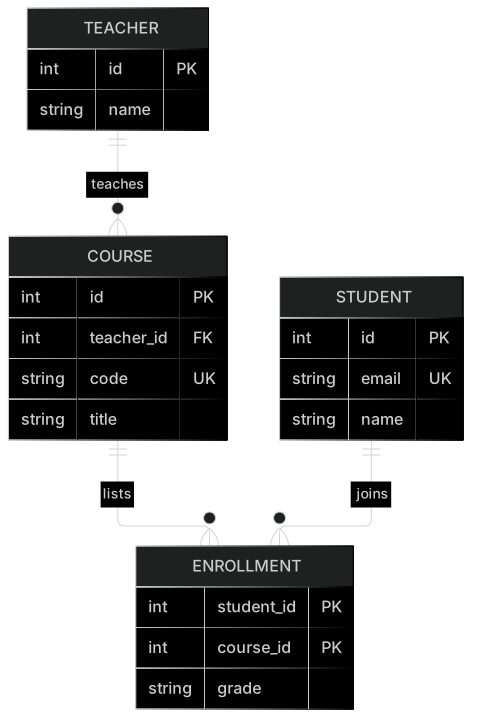
erDiagram
    TEACHER ||--o{ COURSE : teaches
    STUDENT ||--o{ ENROLLMENT : joins
    COURSE ||--o{ ENROLLMENT : lists
    TEACHER {
        int id PK
        string name
    }
    STUDENT {
        int id PK
        string email UK
        string name
    }
    COURSE {
        int id PK
        int teacher_id FK
        string code UK
        string title
    }
    ENROLLMENT {
        int student_id PK
        int course_id PK
        string grade
    }
Open it in the editor and add a semester column on ENROLLMENT if the same student can take the same course twice. That is a key change, so think before you let a model "tidy" it.
AI edit or typing it yourself
Use an AI edit when the feet are on the wrong entity or a junction is missing. "Put the crow's foot on COURSE and on ENROLLMENT. Add PLAYLIST_TRACK between PLAYLIST and TRACK with position. Delete the ADDRESS entity." Structural repairs across several lines are what a generation is for.
Type the fix when one marker is wrong. Change ||--|| to ||--o{. Add FK on teacher_id. Rename ORDER to SHOP_ORDER. Delete a column the model invented. Hand editing stays free, and ER syntax is line-oriented, so a wrong foot is a one-line repair. Do not regenerate the diagram to change int to bigint.
If the error is a parse error inside an entity block, look for a comma, a comment, or a type with a space that is not quoted. string "display name" is safer than a bare two-word type. The editor highlights the bad line. Fix that line and leave the relationships alone.
Five tries, then a plan
You get five free AI uses altogether, not five per day. They stick to the account, the IP address, and a device cookie. Turning a pasted schema into a diagram might succeed on the first try. Fixing swapped feet might take a second. After that, the source is yours to edit. A third try to align column order with a style guide is waste.
On pricing, Starter costs $6.99 a month and includes 500 AI conversations a month. Pro costs $11.99 a month and includes unlimited AI with a fair-use cap, so a team can draft schemas all week without a bot hitting the route in a loop. Hand editing never draws from that allowance. You can revise keys and cardinality on the free editor after the five are spent.
The AI diagram generator index has a class diagram generator too. Use that when you mean objects and methods. Use this page when you mean tables a migration could create.
Frequently asked questions
How do I generate a entity relationship diagram with AI?
Describe the entity relationship diagram you need in the box above and click Generate. The AI writes valid Mermaid entity relationship diagram code that renders instantly, and you can open it in the editor to refine it.
Is the AI entity relationship diagram generator free?
You can try it free: 5 AI generations in total, not per day, with no sign-up. Starter includes 500 AI conversations a month and Pro is unlimited. Manual editing stays available, and every plan can still download a PNG. JPG, SVG and PDF are on Pro.
Can I edit the generated entity relationship diagram?
Absolutely. The output is plain Mermaid code — edit it by hand in the live editor, or ask the AI for changes in natural language.