erDiagram
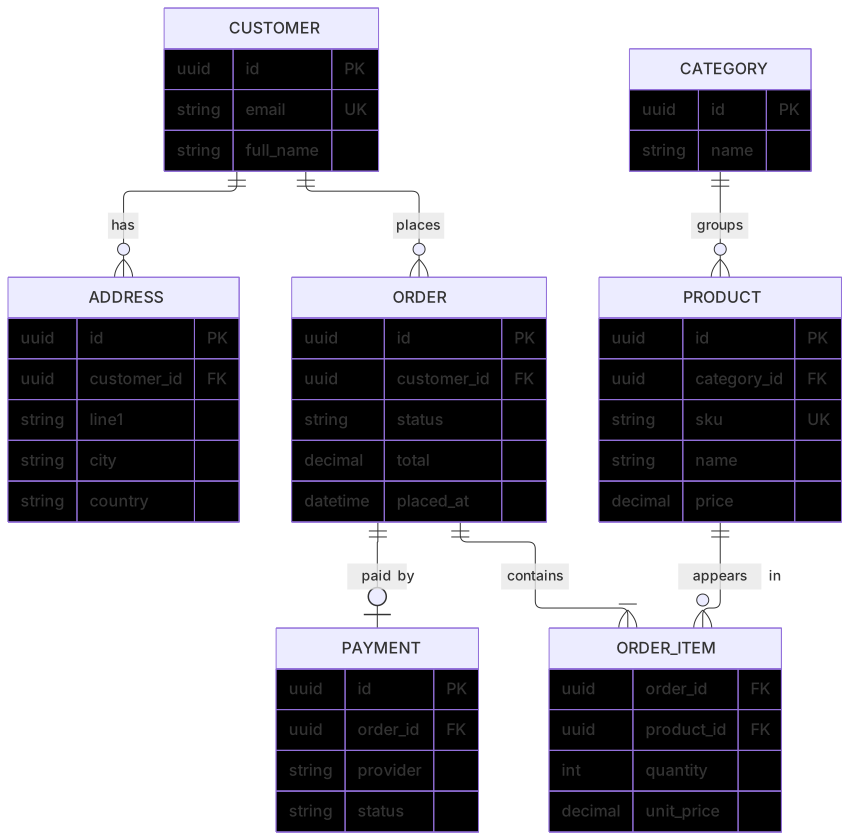
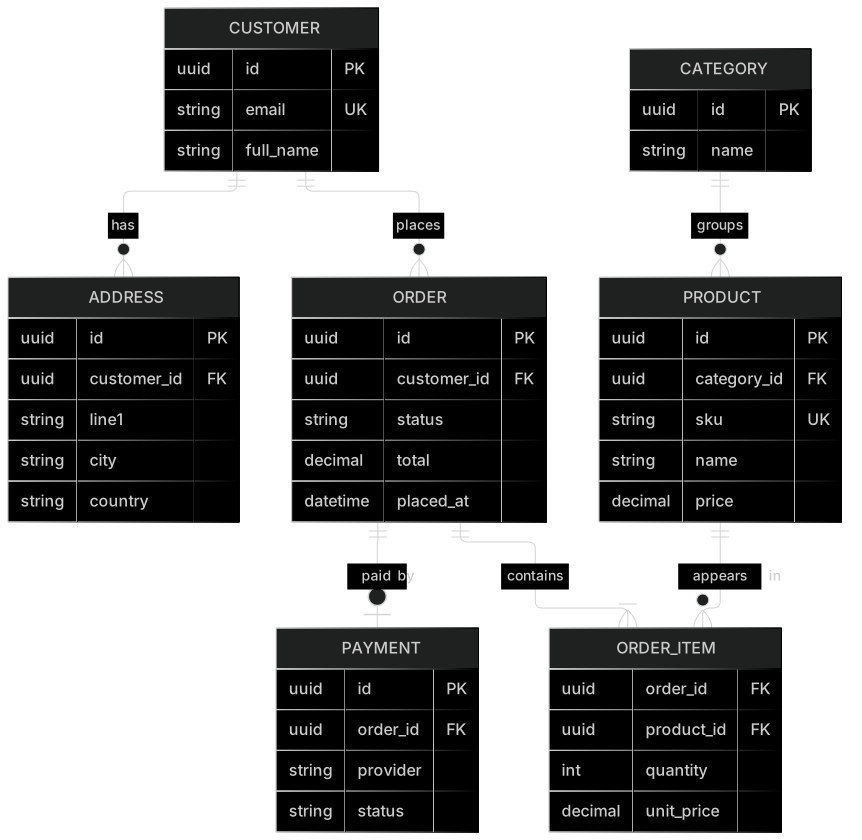
    CUSTOMER ||--o{ ADDRESS : has
    CUSTOMER ||--o{ ORDER : places
    ORDER ||--|{ ORDER_ITEM : contains
    PRODUCT ||--o{ ORDER_ITEM : "appears in"
    CATEGORY ||--o{ PRODUCT : groups
    ORDER ||--o| PAYMENT : "paid by"
    CUSTOMER {
      uuid id PK
      string email UK
      string full_name
    }
    ADDRESS {
      uuid id PK
      uuid customer_id FK
      string line1
      string city
      string country
    }
    ORDER {
      uuid id PK
      uuid customer_id FK
      string status
      decimal total
      datetime placed_at
    }
    ORDER_ITEM {
      uuid order_id FK
      uuid product_id FK
      int quantity
      decimal unit_price
    }
    PRODUCT {
      uuid id PK
      uuid category_id FK
      string sku UK
      string name
      decimal price
    }
    CATEGORY {
      uuid id PK
      string name
    }
    PAYMENT {
      uuid id PK
      uuid order_id FK
      string provider
      string status
}About this template
A realistic starting schema for an online shop. It models the core entities every store needs and the relationships between them, including the many-to-many link between orders and products through order items. Use it to kick off schema design or to explain your data model to new team members.
How to customise it
- Add inventory or warehouse tables
- Add a REVIEW entity linked to CUSTOMER and PRODUCT
- Rename columns to match your naming conventions
This template is a Mermaid entity relationship diagram. See the entity relationship diagram page for the full syntax reference and more examples.
Frequently asked questions
How do I use this e-commerce database er diagram template?
Click "Use this template" to open it in the MermaidViewer editor. Edit the Mermaid code on the left and the diagram updates instantly. No account is needed.
Can I export the template as an image?
Yes. In the editor use Export to download PNG, SVG or PDF, or copy the image to your clipboard. You can also copy the code as a Markdown block for GitHub, GitLab or Notion.
Can AI customise this template for me?
Yes. Open the AI assistant (Ctrl/Cmd+K) and describe the change, for example "Add inventory or warehouse tables". The updated diagram streams into the editor.