AI Gantt Chart generator
Describe your gantt chart in plain English and get editable Mermaid code instantly. Plan projects with tasks, durations, dependencies and milestones.
Example prompts for a gantt chart
- “Mobile app MVP plan over 8 weeks”
- “Conference organisation timeline”
- “Data migration project with testing phases”
What a Mermaid gantt chart looks like
Example gantt chart
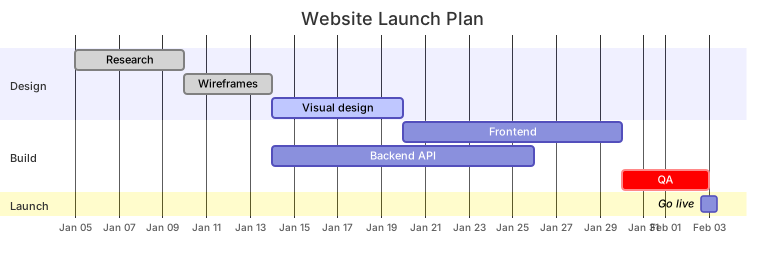
mermaid
gantt
    title Website Launch Plan
    dateFormat YYYY-MM-DD
    axisFormat %b %d
    section Design
      Research           :done,    r1, 2026-01-05, 5d
      Wireframes         :done,    w1, after r1, 4d
      Visual design      :active,  v1, after w1, 6d
    section Build
      Frontend           :         f1, after v1, 10d
      Backend API        :         b1, after w1, 12d
      QA                 :crit,    q1, after f1, 4d
    section Launch
Go live :milestone, m1, after q1, 0dWant to write it by hand? See the full Mermaid gantt chart syntax and examples, or browse templates.
Frequently asked questions
How do I generate a gantt chart with AI?
Describe the gantt chart you need in the box above and click Generate. The AI writes valid Mermaid gantt chart code that renders instantly, and you can open it in the editor to refine it.
Is the AI gantt chart generator free?
You can try it free — 5 AI generations in total, no sign-up needed. Starter includes 500 AI conversations a month and Pro is unlimited. Manual editing and export stay free after that.
Can I edit the generated gantt chart?
Absolutely. The output is plain Mermaid code — edit it by hand in the live editor, or ask the AI for changes in natural language.