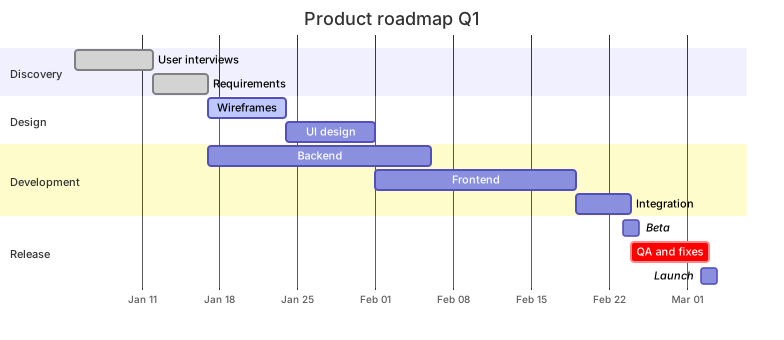
gantt
    title Product roadmap Q1
    dateFormat YYYY-MM-DD
    axisFormat %b %d
    section Discovery
      User interviews      :done, d1, 2026-01-05, 7d
      Requirements         :done, d2, after d1, 5d
    section Design
      Wireframes           :active, s1, after d2, 7d
      UI design            :s2, after s1, 8d
    section Development
      Backend              :b1, after d2, 20d
      Frontend             :f1, after s2, 18d
      Integration          :i1, after f1, 5d
    section Release
      Beta                 :milestone, m1, after i1, 0d
      QA and fixes         :crit, q1, after i1, 7d
Launch :milestone, m2, after q1, 0dAbout this template
A ready-to-edit Gantt chart for a typical product project. Tasks are chained with dependencies so changing one duration shifts everything after it, and milestones mark beta and launch dates.
How to customise it
- Change the start date and durations
- Add excludes weekends for working-day planning
- Mark your critical path with crit
This template is a Mermaid gantt chart. See the gantt chart page for the full syntax reference and more examples.
Frequently asked questions
How do I use this project roadmap gantt chart template?
Click "Use this template" to open it in the MermaidViewer editor. Edit the Mermaid code on the left and the diagram updates instantly. No account is needed.
Can I export the template as an image?
Yes. In the editor use Export to download PNG, SVG or PDF, or copy the image to your clipboard. You can also copy the code as a Markdown block for GitHub, GitLab or Notion.
Can AI customise this template for me?
Yes. Open the AI assistant (Ctrl/Cmd+K) and describe the change, for example "Change the start date and durations". The updated diagram streams into the editor.