AI treemap generator
AI treemap generator for nested amounts. Describe the hierarchy, get a Mermaid treemap you can edit.
By MermaidViewer editorsPublished Updated
Example prompts for a treemap
- “Website bundle size by package”
- “Company headcount by department and team”
- “Time spent per project per month”
What a Mermaid treemap looks like
Example treemap
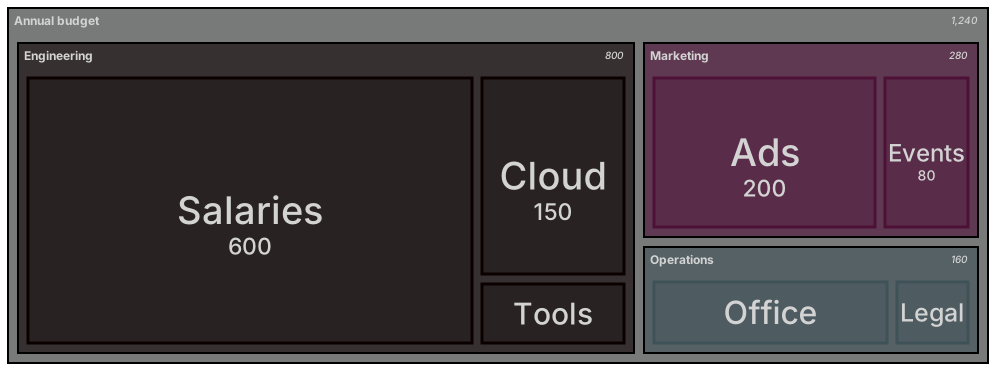
treemap-beta
"Annual budget"
    "Engineering"
        "Salaries": 600
        "Cloud": 150
        "Tools": 50
    "Marketing"
        "Ads": 200
        "Events": 80
    "Operations"
        "Office": 120
"Legal": 40Want to write it by hand? See the full Mermaid treemap syntax and examples, or browse templates.
Parent rectangles are sums, not a second budget, and an ai treemap generator stays honest only when the numbers sit on the leaves. Disk usage, hours in a course, a grocery basket: area is the encoding, and a parent that also carries a value will not match its children. The widget above writes treemap-beta. This page is about indentation, the drafts that double-count, and the leaf edits that should never spend a generation.
Trees it can size
Two levels, a few parents and their leaves, usually come back indented correctly. Leaf values you typed are kept when you say they are the only values. Parent labels without numbers are kept when you say parents are headers. The area of a parent then reads as the total of what is inside it, which is the sentence a treemap is for. A title as the root node sticks if you want one root. You can also start with several top-level groups. One root is easier to talk about.
The model respects a depth cap if you set it. "Two levels under the root" prevents a tree that drills into individual files. Labels with spaces survive inside quotes. The treemap syntax is indentation, like a mind map, plus a colon and a number on each leaf. Parents do not get a colon. Tabs and mixed indents are the usual reason a child becomes a sibling. Use four spaces per level and stay consistent.
Totals that cannot be true
The model writes "Engineering": 800 and then children that sum to 640, or to 900. The rectangle and the conversation disagree. Sometimes it omits the children and only draws one box per department, which is a bar chart that happens to be nested in name only. Negative numbers appear for refunds and break the layout. A tiny leaf for every cent you spent turns the map into confetti. The prompt should have grouped those into Other.
Unquoted labels with a colon or a comma split the line. The keyword comes back as pie or mindmap because those are nearby ideas. A mind map has no amounts. A pie has no nesting. Indentation with two spaces on one branch and four on the next makes a leaf look like a department. The picture renders and the hierarchy is a lie. That is worse than a parse error, because a parse error at least stops you.
Leaves and parents to name
Speak the tree and the amounts.
- The root label.
- Each parent, with no number.
- Each leaf, with a number, and the unit in the title or the root, not on every leaf.
- The statement that parents must not have their own values.
- A depth limit.
- A cutoff, such as "roll anything under 5 into Other."
- The keyword treemap-beta.
The budget treemap template splits an annual budget by department and line item. Generate a new map for a disk, a course, or a grocery run. Open the template when you are publishing a department budget and you will replace the sample dollars. The prompt guide shows the difference between an AI edit and a hand edit. On treemaps, "remove numbers from parents" is the edit that fixes a double count.
Three prompts
- Treemap titled Disk on the laptop, unit GB. Root Laptop. Parent Code with leaves src 40 and deps 90. Parent Media with leaves video 120 and photos 30. Parent Mail with leaf archive 25. No numbers on parents. Two levels under the root. Do not list individual files. Use treemap-beta.
- Treemap titled Hours in a studio course. Root Course. Parent Class with leaves critique 12 and lecture 8. Parent Making with leaves shop 20 and writing 6. Parent Show with leaf install 4. Parents have no values. Do not add a sleep leaf. Unit is hours, stated once.
- Treemap titled Saturday groceries, unit dollars. Root Basket. Parent Produce with leaves greens 9 and fruit 7. Parent Pantry with leaves rice 4 and oil 6. Parent Other with leaf snacks 5. No parent values. Roll nothing else in. No cents. treemap-beta.
A disk that adds up from the leaves
Code is 40 plus 90. Media is 120 plus 30. Mail is 25. None of those parents carry a competing total. If someone asks "how big is Code," the answer is the sum of the leaves, and the rectangle already shows it.

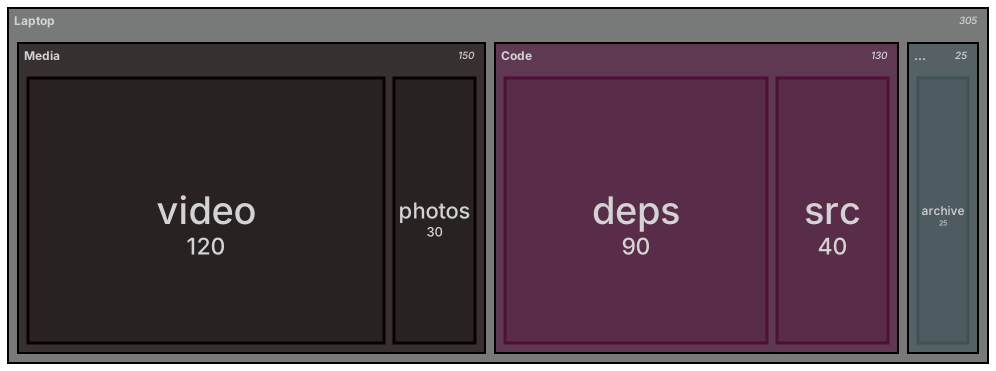
treemap-beta
"Laptop"
    "Code"
        "src": 40
        "deps": 90
    "Media"
        "video": 120
        "photos": 30
    "Mail"
        "archive": 25
Open the editor and change deps from 90 to 70 after a cleanup. The Code rectangle shrinks because its children shrank. You do not edit a parent total, because there is not one. If you had let the model write "Code": 130 beside those children, you would now have to remember to update two places. Leaving the number off the parent is what keeps the edit local.
Removing a parent total
Use an AI edit when the file is a pie, or parents and children both have values. "Rewrite as treemap-beta. Root Laptop. Code contains src 40 and deps 90. Media contains video 120 and photos 30. Mail contains archive 25. Delete every value on a parent. Four-space indents. No extra leaves." Restructuring the tree and stripping the double count is a fair generation.
Edit a leaf by hand when the shape is right. Change 90 to 70. Add a sibling leaf at the same indent as src. Delete photos if that folder moved. Rename a parent. Hand editing stays free. Add a number to a parent only if you are sure your Mermaid build expects it. On this syntax, the honest file leaves parents bare.
A parse error points at a missing quote, a tab, or a value on a line that also tries to be a parent. Make leaf lines "name": number and parent lines "name" with children indented beneath. Fix the indent in the editor before you ask for a new tree. A second generation that reshuffles folders you already checked is more dangerous than a careful indent.
The allowance, once
Five free AI uses is the total on the free tier. They are not refilled each morning. The account and the IP share the counter with the other generators. A two-level treemap with leaf-only values often succeeds immediately. It needs another try when the model returns a pie or writes a second budget on the parents. Take that try. Update a leaf with the keyboard afterward.
Look at pricing for what comes next. Move to Starter at $6.99 a month when you want 500 AI conversations inside the month. Pro is $11.99 a month and includes unlimited AI under fair use, which is room for a person's weekly diagrams and a stop for scripted calls. Hand editing stays free after the five uses are gone. Free still downloads a watermarked PNG. A budget map can change every quarter by editing leaves only.
A pie is a single split. A treemap is a split inside a split, with area doing the arithmetic. If you have one level, the pie generator on the AI diagram generator index may read faster. If you have departments and the items inside them, stay with this generator.
Frequently asked questions
How do I generate a treemap with AI?
Describe the treemap you need in the box above and click Generate. The AI writes valid Mermaid treemap code that renders instantly, and you can open it in the editor to refine it.
Is the AI treemap generator free?
You can try it free: 5 AI generations in total, not per day, with no sign-up. Starter includes 500 AI conversations a month and Pro is unlimited. Manual editing stays available, and every plan can still download a PNG. JPG, SVG and PDF are on Pro.
Can I edit the generated treemap?
Absolutely. The output is plain Mermaid code — edit it by hand in the live editor, or ask the AI for changes in natural language.