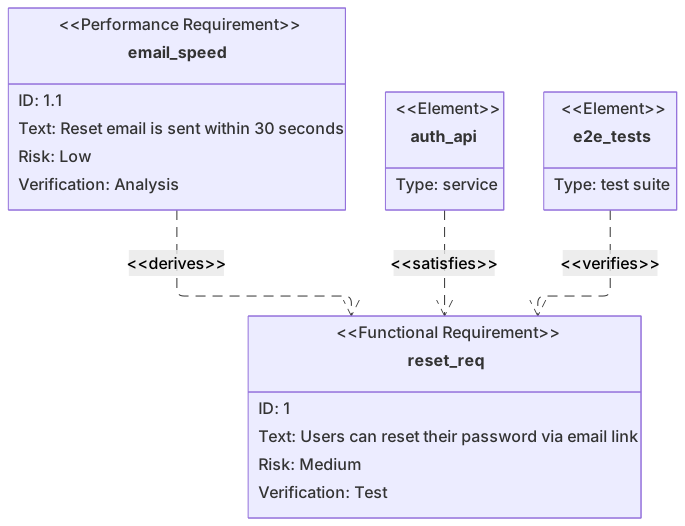
requirementDiagram
    functionalRequirement reset_req {
      id: 1
      text: Users can reset their password via email link
      risk: medium
      verifymethod: test
    }
    performanceRequirement email_speed {
      id: 1.1
      text: Reset email is sent within 30 seconds
      risk: low
      verifymethod: analysis
    }
    element auth_api {
      type: service
    }
    element e2e_tests {
      type: "test suite"
    }
    auth_api - satisfies -> reset_req
    e2e_tests - verifies -> reset_req
email_speed - derives -> reset_reqAbout this template
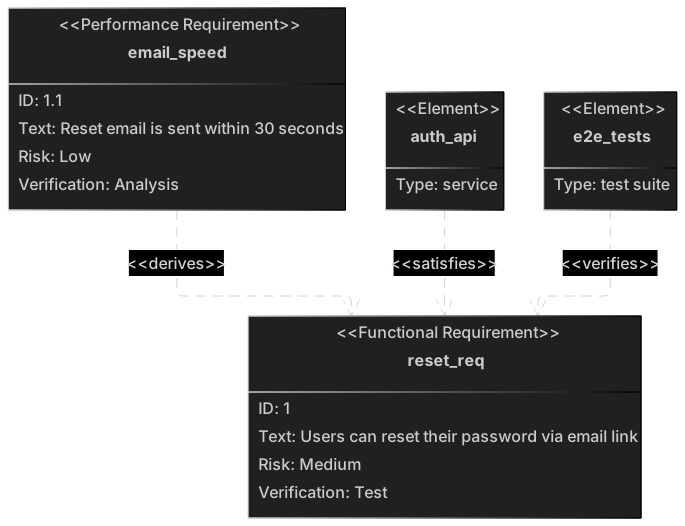
Shows how requirement diagrams create traceability: functional and performance requirements for password reset, the services that implement them and the test suites that verify them.
How to customise it
- Add security requirements like rate limiting
- Link to your actual test suites
- Adjust risk levels
This template is a Mermaid requirement diagram. See the requirement diagram page for the full syntax reference and more examples.
Frequently asked questions
How do I use this password reset requirements template?
Click "Use this template" to open it in the MermaidViewer editor. Edit the Mermaid code on the left and the diagram updates instantly. No account is needed.
Can I export the template as an image?
Yes. In the editor use Export to download PNG, SVG or PDF, or copy the image to your clipboard. You can also copy the code as a Markdown block for GitHub, GitLab or Notion.
Can AI customise this template for me?
Yes. Open the AI assistant (Ctrl/Cmd+K) and describe the change, for example "Add security requirements like rate limiting". The updated diagram streams into the editor.