This uml class diagram example is the fastest way to see whether a domain model will survive contact with real code. The model is a small blog: authors, posts, comments, and tags. You can paste it into the editor, change a field, and watch the boxes redraw. If you already have a sketch on a whiteboard, use this page as the translation of that sketch. The full arrow list sits on the mermaid class diagram page.
The model is deliberately ordinary. A blog is small enough to read in one screen and messy enough to force the decisions people postpone: who owns a comment, whether tags are shared, and what an admin can do that an author cannot. Those decisions are the diagram. The boxes are just the labels.
What this picture is for
A class diagram names types, the data they hold, the operations they offer, and how the types depend on each other. Treat it as a design conversation you can review. If you paste every DTO your framework generated, the picture becomes a directory listing and nobody reviews it.
Use it when a pull request changes the shape of the domain. "We added publishedAt" is a sentence. A diagram that shows publishedAt on Post, and shows that comments cannot exist without a post, is a review artifact. Store it next to the code that implements it. The next person who adds drafts will update one file instead of reconstructing the model from six services.
Skip it when the question is a request path. A login call is a sequence. A lifecycle of an order is a state machine. A class diagram that tries to be all three ends up with methods named handleEverything.
The smallest diagram that still teaches
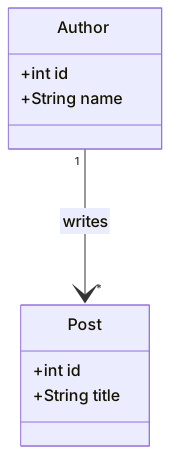
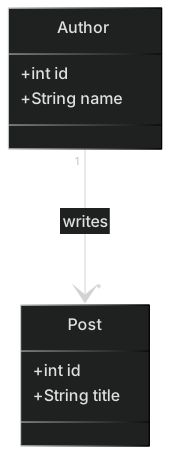
Start with two types and one association. Open a fence with classDiagram, declare the classes, then connect them. Cardinality is a quoted string on each side of the arrow. Leaving the quotes off is the first parse error most people hit, because * is also a Mermaid token.
classDiagram
  class Author {
    +int id
    +String name
  }
  class Post {
    +int id
    +String title
  }
Author "1" --> "*" Post : writesRead the arrow as a sentence: one author writes many posts. The label writes is optional, and you should add it when the same pair of classes has two relationships. Author and Post might also have features, and without the label those two arrows look identical.
Member lines inside the braces are visibility, a type, and a name, or a method signature. Mermaid does not check that int exists. The types are documentation for humans. Keep them short and consistent with the language you actually ship. Mixing int, Integer, and number in one diagram is how reviews stall on trivia.
Paste the snippet into the editor before you commit it. A red parse error there is cheaper than a blank panel in a README.
Visibility, fields, and methods
Four markers cover almost every review:
| Marker | Meaning | When to bother |
|---|---|---|
+ | Public | The method other types are allowed to call |
- | Private | A field you do not want callers to touch |
# | Protected | A hook meant for subclasses |
~ | Package | Rare in app code; useful in library sketches |
You do not have to mark every field. A diagram of a public API can show only + members and hide the rest. A diagram of a module boundary should show the private fields that explain an invariant, such as a cached slug that must match the title.
Methods use parentheses. A return type can sit after the parentheses. Parameters can be names, types, or both. Pick one style and stick to it in the file. This pair is readable:
+publish() void
+findBySlug(slug) Post
This pair is how the diagram fills up with noise:
+public void publish() throws IllegalStateException
+Optional<Post> findBySlug(String slug, Clock clock, boolean includeDrafts)
Angle brackets are a parse hazard. Mermaid uses ~ for generics, so a list of posts is List~Post~, not List<Post>. If the line still breaks, wrap the whole member in quotes or shorten the signature. The diagram is not the compiler.
A practical split I use on review: fields that are stored, methods that change a rule. title is a field. publish() is a method because it fills publishedAt and refuses to run twice. Getters that only return a field do not earn a line.
Relationships you will actually draw
Six arrows cover a blog and most other app models. Learn the sentence each one speaks, then pick the arrow. People memorize the glyphs and still pick the wrong one.
| Arrow | Name | Sentence it should support | |
|---|---|---|---|
| `< | --` | Inheritance | Admin is a kind of User |
*-- | Composition | A comment dies with its post | |
o-- | Aggregation | A playlist has tracks that outlive it | |
--> | Association | An author writes posts | |
..> | Dependency | A repository uses Post but does not own one | |
| `.. | >` | Realization | SqlPostRepository implements PostRepository |
Composition versus aggregation is the argument that wastes meetings. Use composition when the child has no meaning alone. A comment with no post is a bug, so Post *-- Comment. Use aggregation, or a plain association, when the child is shared. A tag named mermaid appears on many posts and survives when one post is deleted, so tags are not composed into a post.
Cardinality goes in quotes: "1", "0..1", "*", "1..*". Write the numbers you mean. "*" on both ends of author and post is a polite way to avoid deciding, and it hides the bug where a post can be saved with no author.
Direction of the arrow is the direction of the sentence, not the direction of a foreign key. Author "1" --> "*" Post can be implemented as post.author_id. Do not flip the arrow just because the column lives on the post table. If you need both a domain picture and a table picture, keep a separate ER diagram. Mixing column names into the class diagram makes both worse.
A blog you can paste
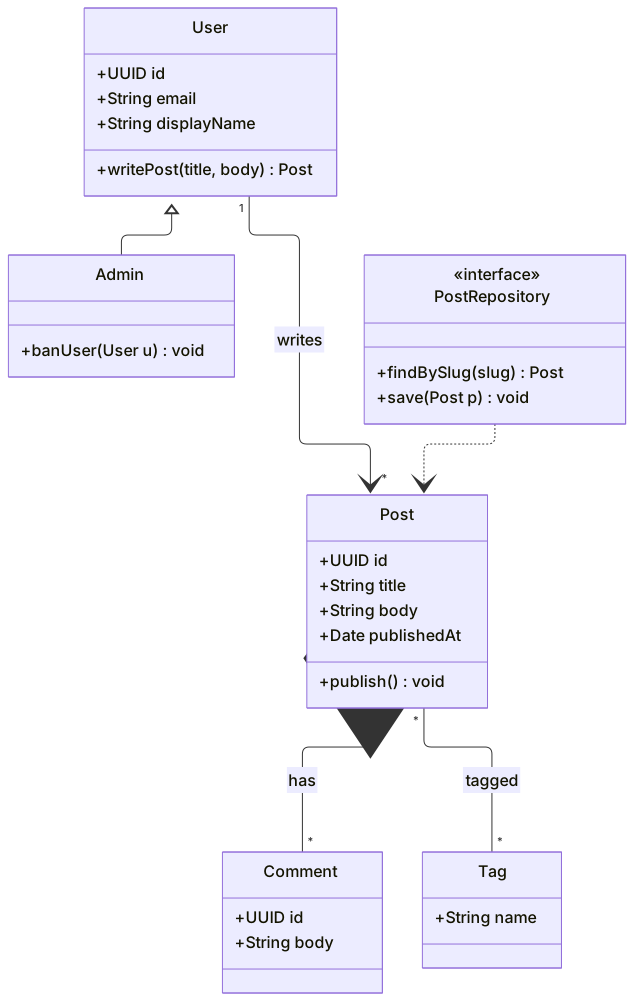
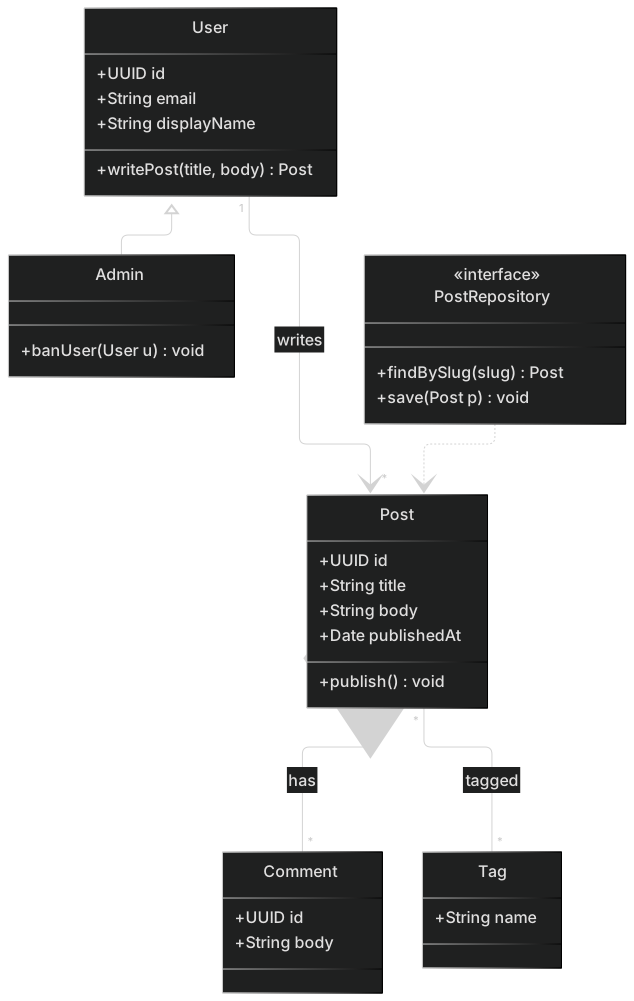
This is the worked model. Admin inherits from User. A post owns its comments. Posts and tags are a many-to-many association. PostRepository is an interface, marked with a stereotype, and it depends on Post without owning one. The same picture is the blog class template if you want it opened in the editor with the preview already running.
classDiagram
  class User {
    +UUID id
    +String email
    +String displayName
    +writePost(title, body) Post
  }
  class Admin {
    +banUser(User u) void
  }
  class Post {
    +UUID id
    +String title
    +String body
    +Date publishedAt
    +publish() void
  }
  class Comment {
    +UUID id
    +String body
  }
  class Tag {
    +String name
  }
  class PostRepository {
    <<interface>>
    +findBySlug(slug) Post
    +save(Post p) void
  }
  User <|-- Admin
  User "1" --> "*" Post : writes
  Post *-- "*" Comment : has
  Post "*" -- "*" Tag : tagged
PostRepository ..> PostWalk the rules out loud before you trust the picture.
writePost lives on User, so a banned user can still be represented, but you will want the ban to block that method. The diagram does not say that yet. Add a note, or add a method isActive() bool, when the rule matters to the reader. Do not encode the rule as a comment in the repository and hope people see it.
publishedAt is a field with no companion unpublish(). If drafts are a real state, either add the method or stop implying that publish is one-way. I have seen this exact gap ship: the diagram showed publish(), the code grew unpublish(), and support could not tell which posts were public.
Comment has no author. That is a product decision, not an oversight you should "fix" by habit. Anonymous comments, comments by users, and comments that store a display name snapshot are three different models. Draw the one you are building. If comments have authors, add User "1" --> "*" Comment and accept that the picture gets denser. Density is the signal that the model grew.
The stereotype <<interface>> is a line inside the class body. You can also write class PostRepository { <<interface>> } as above, which is what this example does. A second stereotype such as <<service>> is fine when your team uses it. Inventing six stereotypes for one diagram is how the legend becomes longer than the model.
Notes, namespaces, and a second slice
A note is a sentence that does not fit in a method name. Keep notes rare. One note that states an invariant is useful. Five notes means the diagram is a document and the document should be prose.
Namespaces help when two modules use the same class name, or when you want the picture to show a package boundary. Here is a billing slice that would be a mistake to jam into the blog diagram. It is a second model on purpose: invoices point at products, and the packages stay visible.
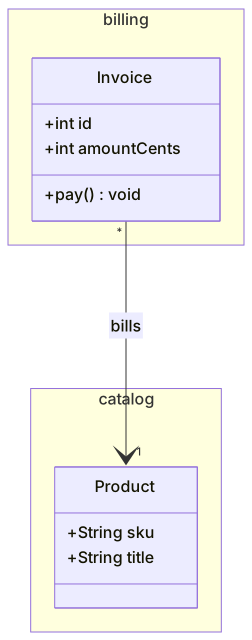
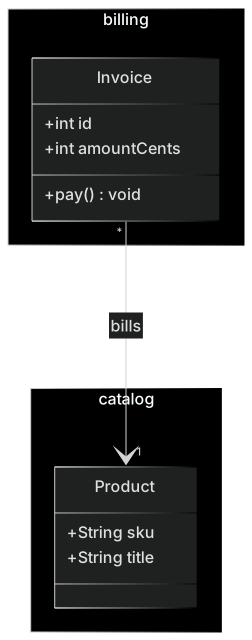
classDiagram
  namespace billing {
    class Invoice {
      +int id
      +int amountCents
      +pay() void
    }
  }
  namespace catalog {
    class Product {
      +String sku
      +String title
    }
  }
Invoice "*" --> "1" Product : billsamountCents is an integer on purpose. A class diagram that says Money without showing currency is how finance bugs get a friendly box. If you have a Money type, draw it, including the currency field, and associate the invoice to it. If you do not have that type, do not pretend.
direction LR or direction TB on the line after classDiagram asks for a layout. It is a hint. Mermaid still places nodes. If a layout fight is the reason you cannot read the model, you have too many classes in one picture. Split by namespace, or split by the question the picture answers.
Mistakes that show up in real files
These are the failures I correct most often. The broken lines are shown as text so a renderer does not try to draw them.
The star without quotes. Author "1" --> * Post dies because * starts a different token. Quote it: "*".
A generic with angle brackets. +List<Post> history looks like HTML to the parser. Write +List~Post~ history or drop the collection type and write +history() Post.
A label with a colon or parenthesis. Relationship labels and member lines share punctuation with the grammar. Post : has (many) is a mess. Use Post : has many or put the risky text in quotes.
Two definitions, one surprise. You can declare class Post and later add members with Post : +publish() void. That merges. It also means a typo, class Posts, creates a second box that nothing points at, and the real methods landed on the other name. Search the file for the class name before you add a third box.
Using `end` as a name. In other Mermaid diagrams end closes a block. Class diagrams are less touchy, but a method named end still confuses readers and some older builds. Call it finish or close.
Drawing the database. post_tags as a class with two foreign keys is an ER diagram wearing a class diagram costume. If the question is tables, use an ER diagram. If the question is behavior, a many-to-many between Post and Tag is enough, and the join table can stay an implementation detail.
Inheritance as a junk drawer. Admin <|-- User is backwards and it happens because people point the arrow at the "bigger" box. The triangle points at the parent: User <|-- Admin means Admin extends User. Read it as "Admin is a User." If the sentence is false, you wanted composition. An admin account that has a user, rather than being a user, is Admin "1" --> "1" User.
Methods that are use cases. User should not grow exportQuarterlyTaxCsv(). That operation belongs to a service, a job, or a diagram of the reporting flow. When every class has twenty methods, the picture stopped being a model and became a backlog.
If the preview is blank, copy the message into the guide for syntax errors. The line number is usually right. The cause is usually a quote, a generic, or a relationship that lost its class name.
How to review the example before you adopt it
Read the diagram as a list of claims. For the blog, the claims are:
- Every post has one author, and an author can have many posts.
- Comments belong to a post and are deleted with it.
- Tags are shared across posts.
- Admins are users with a ban operation.
- Persistence is hidden behind
PostRepository. - Publishing is an operation, not a boolean you set from the outside.
If a claim is wrong for your product, change the diagram before you change the code, or change them in the same pull request. A diagram that disagrees with the repository is worse than no diagram, because new hires will trust the picture.
Then check the names against the code you will write this month. displayName versus name, body versus content, UUID versus a numeric id. Pick the names the API already uses. A diagram that introduces a new vocabulary "for clarity" creates a second language.
Check what you left out, on purpose. Sessions, password hashes, media uploads, and revisions are real, and they do not belong on this page. Add a class when a reviewer asks "where does X live?" twice. Until then the omission is a feature.
Keeping the file alive
Put the Mermaid in the repo, not in a slide. A reasonable layout is docs/domain/blog.md with one fence, plus a link from the README. When a migration adds a column, the same PR edits the class. That is the whole maintenance plan. Tools that export a PNG from a whiteboard will not do this, because the PNG has no diff.
Regenerate the picture in the editor when you want a PNG for a doc site that does not render Mermaid. Commit the source. Treat the PNG as a build output.
When you are stuck on the shape, describe the types in a sentence and use the AI diagram generator to draft the first fence. Then delete every class you cannot point to in the code or the ticket. Generated diagrams love extra managers, factories, and helpers. Your example should be boring.
What to draw next
If the blog grows a publishing workflow with draft, scheduled, and published, stop adding booleans and draw the states. If the question is "which tables exist," draw the ER model from the schema. If the question is "what happens when someone clicks publish," draw the sequence from the controller to the database.
Come back to this uml class diagram example when the types change. Update the cardinality first. That is the line most likely to be a lie, and it is the line the rest of the code is built on.
Frequently asked questions
What does a UML class diagram show?
Classes, their fields and methods, and the relationships between them: inheritance, composition, aggregation and simple association.
How is visibility written in Mermaid?
Prefix a member with + for public, - for private, # for protected and ~ for package.
Where is the full syntax?
The Mermaid class diagram page lists every relationship arrow. This tutorial walks through one model from an empty file to a finished diagram.