Basic packet diagram example


mermaid
packet
    title UDP header
    0-15: "Source port"
    16-31: "Destination port"
    32-47: "Length"
    48-63: "Checksum"
64-95: "Data (variable length)"Packet diagrams show the layout of a network packet or binary structure: which bits hold which field. They're the familiar header diagrams from RFCs, generated from a short list of bit ranges.
Use them in protocol documentation, networking courses and embedded systems docs.
When to use a packet diagram
- Protocol and RFC-style documentation
- Networking courses
- Binary file format specs
- Embedded register layouts
Packet Diagram syntax reference
| Syntax | What it does |
|---|---|
packet (or packet-beta) | Start a packet diagram. |
title Text | Diagram title. |
0-15: "Field" | A field covering bits 0 to 15. |
16: "Flag" | A single-bit field. |
+8: "Field" | A field of the given width placed after the previous one (newer versions). |
Packet Diagram examples
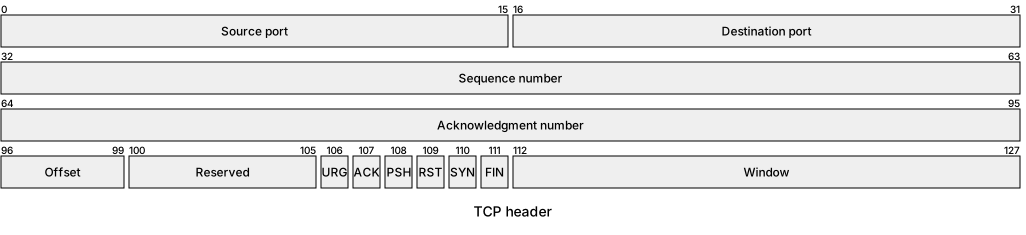
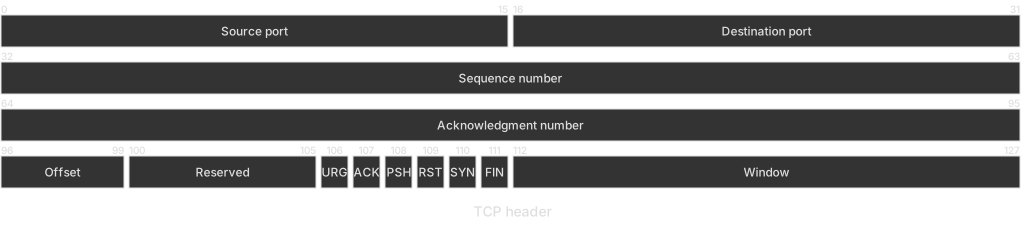
TCP header (first rows)
Single-bit flags sit next to multi-bit fields.
mermaid
packet
    title TCP header
    0-15: "Source port"
    16-31: "Destination port"
    32-63: "Sequence number"
    64-95: "Acknowledgment number"
    96-99: "Offset"
    100-105: "Reserved"
    106: "URG"
    107: "ACK"
    108: "PSH"
    109: "RST"
    110: "SYN"
    111: "FIN"
112-127: "Window"Tips and best practices
- Ranges must be contiguous and in order.
- Rows wrap every 32 bits by default, matching RFC diagrams.
- Keep labels short so they fit narrow fields.
Generate a packet diagram with AI
Not sure where to start? Describe what you need and the AI packet diagram generator writes the Mermaid code for you. Try prompts like:
- “IPv4 header”
- “Custom binary message format for an IoT sensor”
- “DNS message header”
Packet Diagram templates
Packet Diagram FAQ
How many bits per row does a Mermaid packet diagram show?
32 bits per row by default, like classic RFC header diagrams. This can be changed with the bitsPerRow configuration option.