Basic block diagram example
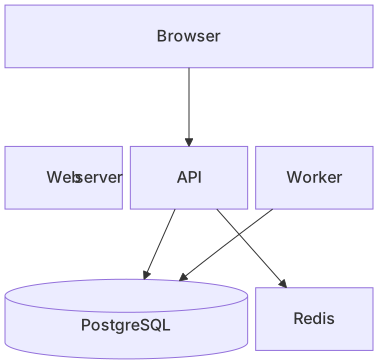
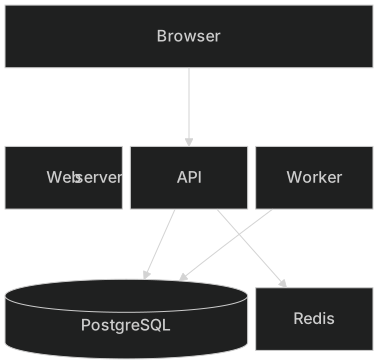
block
    columns 3
    Client["Browser"]:3
    space:3
    Web["Web server"] API["API"] Worker["Worker"]
    space:3
    DB[("PostgreSQL")]:2 Cache["Redis"]
    Client --> API
    API --> DB
    Worker --> DB
API --> CacheBlock diagrams give you control over layout. Instead of letting Mermaid position everything automatically, you define a grid with a number of columns and place blocks in it — useful when the spatial arrangement carries meaning.
They work well for system overviews, hardware diagrams, network layers and any picture where you want boxes aligned in rows and columns.
When to use a block diagram
- High-level system overviews
- Layered architectures
- Hardware and network diagrams
- Dashboards and page layouts
Block Diagram syntax reference
| Syntax | What it does |
|---|---|
block (or block-beta) | Start a block diagram. |
columns 3 | Number of columns in the grid. |
a["Label"] | A block with a label; shapes like flowchart nodes. |
a:2 | Block spanning two columns. |
space / space:2 | Empty cell(s) for spacing. |
block:group ... end | Nested block containing other blocks. |
a --> b | Arrow between blocks. |
Block Diagram examples
Layered architecture
Full-width layers stacked vertically.
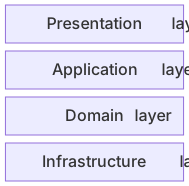
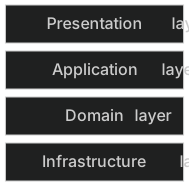
block
    columns 1
    UI["Presentation layer"]
    App["Application layer"]
    Domain["Domain layer"]
Infra["Infrastructure layer"]Tips and best practices
- Sketch the grid first — decide how many columns you need and which blocks should span.
- Use space blocks to create breathing room between rows.
- Prefer flowcharts when you want automatic layout and blocks when position matters.
Generate a block diagram with AI
Not sure where to start? Describe what you need and the AI block diagram generator writes the Mermaid code for you. Try prompts like:
- “Smart home system components”
- “Three-tier web application”
- “CPU and memory hierarchy”
Block Diagram templates
Block Diagram FAQ
How is a block diagram different from a flowchart?
A flowchart is laid out automatically, while a block diagram lets you choose the number of columns, spans and empty spaces so blocks appear exactly where you want them.
Is it block or block-beta?
Newer Mermaid versions accept block; older versions need block-beta. MermaidViewer supports both.