Basic architecture diagram example
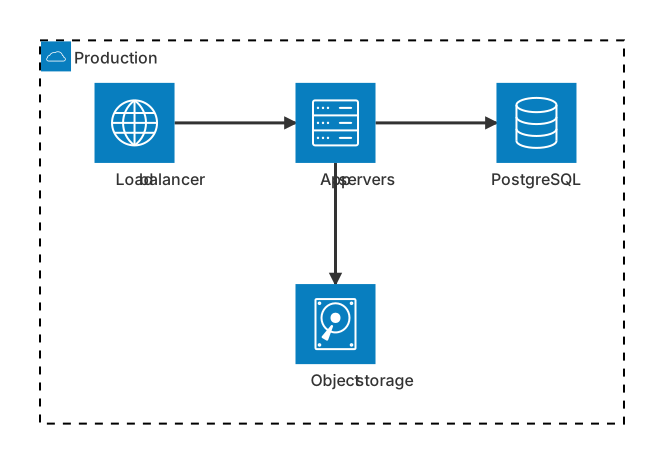
mermaid
architecture-beta
    group cloud(cloud)[Production]
    service lb(internet)[Load balancer] in cloud
    service app(server)[App servers] in cloud
    service db(database)[PostgreSQL] in cloud
    service files(disk)[Object storage] in cloud
    lb:R --> L:app
    app:R --> L:db
app:B --> T:filesArchitecture diagrams show services and resources — servers, databases, storage, queues — and how they connect, grouped by network or cloud boundary. Mermaid's architecture diagram uses icons and edge directions to create tidy infrastructure pictures.
Use it for deployment overviews, cloud architecture docs and incident write-ups.
When to use a architecture diagram
- Cloud deployment overviews
- Infrastructure documentation
- Network topology
- Incident and post-mortem diagrams
Architecture Diagram syntax reference
| Syntax | What it does |
|---|---|
architecture-beta | Start an architecture diagram. |
group id(icon)[Label] | A group/boundary; can be nested with in parent. |
service id(icon)[Label] in group | A service with an icon, optionally inside a group. |
Icons: cloud, database, disk, internet, server | Built-in icons (more via icon packs). |
a:R -- L:b | Edge from the right side of a to the left side of b (T, B, L, R). |
a:R --> L:b | Edge with an arrow. |
junction id | A junction point to split edges. |
Architecture Diagram examples
Tips and best practices
- Edge sides (T, B, L, R) control layout — plan the flow left to right.
- Use groups for VPCs, regions or clusters.
- Keep it high level; use C4 container diagrams for application detail.
Generate a architecture diagram with AI
Not sure where to start? Describe what you need and the AI architecture diagram generator writes the Mermaid code for you. Try prompts like:
- “AWS serverless architecture with API Gateway, Lambda and DynamoDB”
- “Kubernetes deployment with ingress and database”
- “Static site with CDN and object storage”
Architecture Diagram templates
Architecture Diagram FAQ
Which icons are available in Mermaid architecture diagrams?
Built in: cloud, database, disk, internet and server. Additional icon packs (for example logos from Iconify) can be registered by the host application.