This state machine diagram example follows one order from an empty cart to a terminal state. Each box is a status the order can be in. Each arrow is an event that moves it. The picture is the contract between the API, the emails, and the support tools: if a status is not on the diagram, the code should not persist it. Syntax details live on the mermaid state diagram page. A ready-made version of the order flow is the order lifecycle template.
State diagrams earn their keep when the same object changes status over time and the legal moves are a closed set. Orders, tickets, documents, and connections are the usual suspects. A procedure with branches that do not belong to one object is a flowchart. Draw the object.
The keyword and the two black dots
Start with stateDiagram-v2. The older stateDiagram keyword still runs. v2 is the one that understands choices, forks, and notes, so new files should use v2. The start mark is [*]. An arrow from [*] is the initial state. An arrow into [*] is a terminal state. You can have several terminal states. An order that is delivered, refunded, or cancelled has three ways to stop, and pretending there is one "end" hides the support scripts.
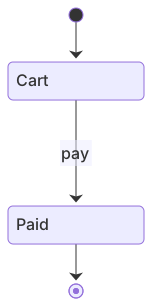
stateDiagram-v2
  [*] --> Cart
  Cart --> Paid: pay
Paid --> [*]The label after the colon is the event. pay is enough in a sketch. In a real model, name the event the way the code names it, such as payment succeeded. Labels are how a reader tells two arrows apart when the same pair of states has more than one move. Cart --> Paid with no label is a picture of a magic jump.
State ids should be single tokens. PendingPayment renders. Pending payment often needs quotes or an alias, and it breaks the moment you use it on the left of an arrow. If you want spaces in the box, alias it:
state "Pending payment" as PendingPaymentThen point every arrow at PendingPayment. The quoted text is the label. The alias is the id.
An order, end to end
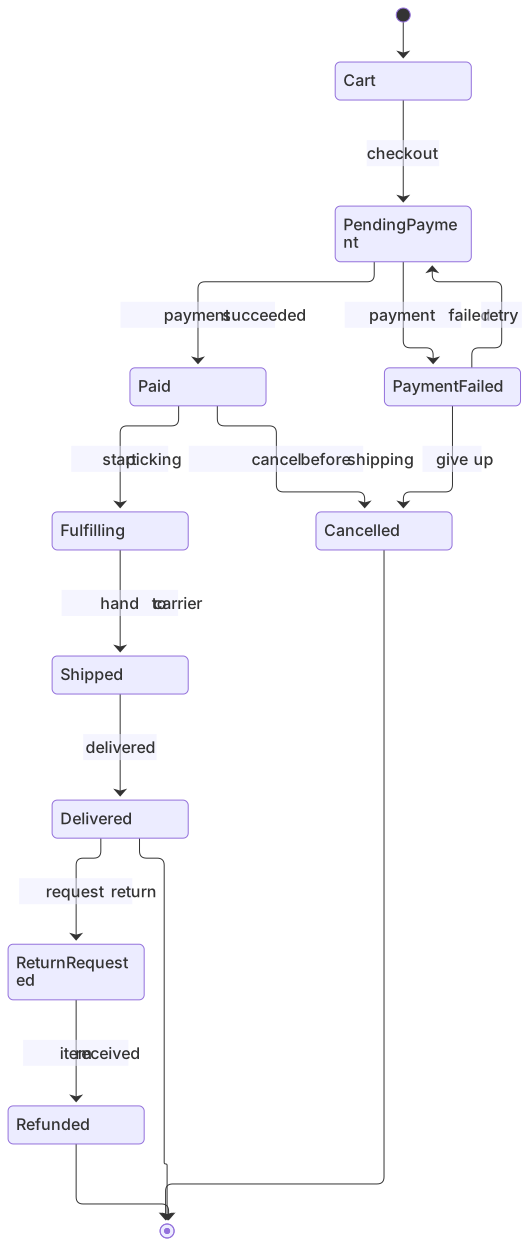
This is the example to steal. Checkout creates a payment attempt. Success moves the order to paid. Failure can be retried or abandoned. Paid orders are picked, shipped, and delivered. A delivery can be returned. Cancellation is allowed from the failed-payment state and from paid, while the warehouse has not shipped it. Delivered, refunded, and cancelled all terminate.
stateDiagram-v2
  [*] --> Cart
  Cart --> PendingPayment : checkout
  PendingPayment --> Paid : payment succeeded
  PendingPayment --> PaymentFailed : payment failed
  PaymentFailed --> PendingPayment : retry
  PaymentFailed --> Cancelled : give up
  Paid --> Fulfilling : start picking
  Fulfilling --> Shipped : hand to carrier
  Shipped --> Delivered : delivered
  Delivered --> ReturnRequested : request return
  ReturnRequested --> Refunded : item received
  Paid --> Cancelled : cancel before shipping
  Delivered --> [*]
  Refunded --> [*]
Cancelled --> [*]Read it as a test list. From Cart, the only exit is checkout. There is no arrow from Cart to Cancelled, so abandoning a cart is "delete the row" or "leave it," and you should say which in the paragraph under the diagram. From Shipped, the only forward move is delivered. A lost package is missing. If support can mark a shipment lost, add Shipped --> Lost : carrier loses parcel and decide whether Lost terminates or returns to Fulfilling. The gap is the point of drawing this. Whiteboards fill that gap with hand waving. A missing arrow is visible.
PaymentFailed --> PendingPayment : retry is a loop. Loops are legal. They need a bound, or a customer retries forever and your provider bills you for it. Put the bound in a note or in the text under the chart: three attempts, then give up. The diagram can show the bound as a choice, which the next section does on a smaller machine so this one stays readable.
Cancellation from Paid is named cancel before shipping because the label is doing policy work. Cancellation from Fulfilling is absent on purpose. Once someone is picking the order, cancel is a warehouse process, not a status flip. If your product allows it, add the arrow and the restock side effect in the note. If you add the arrow and do not restock, the diagram has approved a bug.
Choices, when one event splits
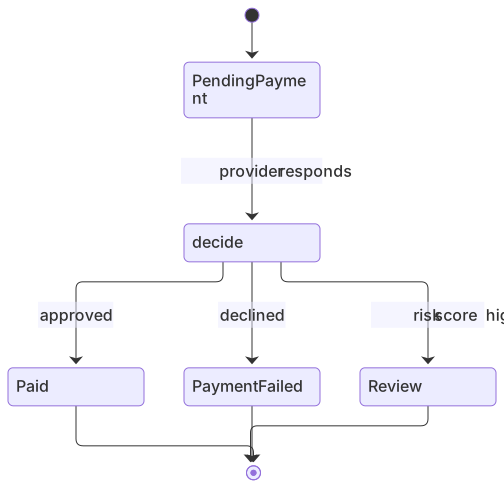
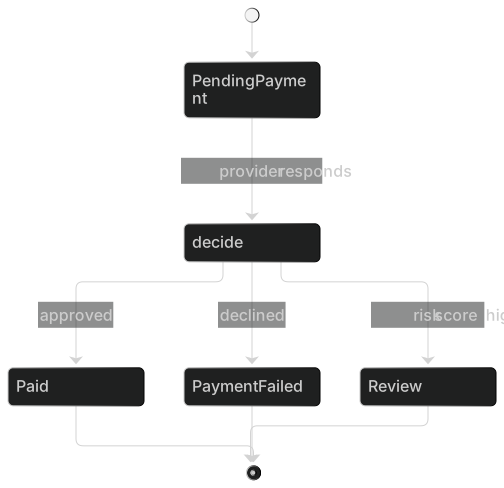
A <<choice>> state is a diamond. One arrow comes in. Two or more leave, and each leaving arrow carries a guard. Use it when the event is the same and the next state depends on data you already have, such as a score, a stock count, or an attempt counter. It is the state-diagram version of an if.
stateDiagram-v2
  [*] --> PendingPayment
  PendingPayment --> decide : provider responds
  state decide <<choice>>
  decide --> Paid : approved
  decide --> PaymentFailed : declined
  decide --> Review : risk score high
  Paid --> [*]
  PaymentFailed --> [*]
Review --> [*]Keep the guards mutually exclusive in plain language. "approved" and "risk score high" can both be true if you are careless. Write the guards so a tester can pick one. If the guards need a paragraph, the choice is a policy document and the diagram should name the policy, not quote it.
The word else is a valid guard in many builds and a trap in reviews, because nobody knows which cases it swallows. Name the remaining case. declined is a case. else is a shrug.
Forks, when one event starts two tracks
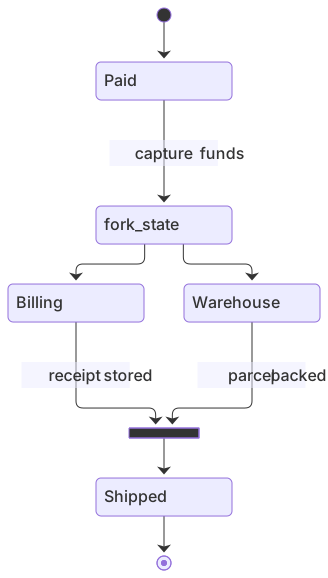
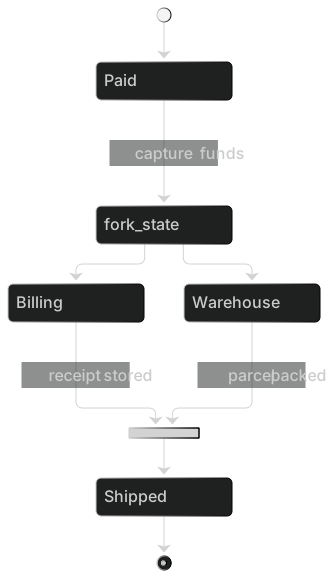
A fork says the order now has two concurrent activities that must both finish. Billing and the warehouse can run together after payment. A join waits for both. This is the picture you want when a boolean paid and a boolean packed keep getting out of sync in the database, because the diagram forces you to name the state where both are done.
stateDiagram-v2
  [*] --> Paid
  Paid --> fork_state : capture funds
  state fork_state <<fork>>
  state join_state <<join>>
  fork_state --> Billing
  fork_state --> Warehouse
  Billing --> join_state : receipt stored
  Warehouse --> join_state : parcel packed
  join_state --> Shipped
Shipped --> [*]Use a fork only when the tracks are truly concurrent and the join is real. If the warehouse always waits for the receipt, you do not have a fork. You have Billing --> Warehouse. A fake fork makes the implementation grow threads it does not need.
Composite states group substates when the outside world sees one status and the inside has detail. Active can contain Idle and Running for a document session. The outer arrow Active --> Closed applies no matter which substate is current. That is the feature. It is also how people accidentally allow close during a write. Look at every outer arrow and ask whether every inner state may take it.
state Active {
  [*] --> Idle
  Idle --> Running : start
  Running --> Idle : stop
}
The inner [*] is required. Without it, the composite has no entry and the parser, or the reader, has to guess. I keep composites rare. Two levels of nesting is the most I will review. Three levels means the machine should be two diagrams.
Notes and names
A note is a single constraint that does not deserve a state. "Author can still edit" on Draft stops a reviewer from inventing a DraftLocked state you do not have.
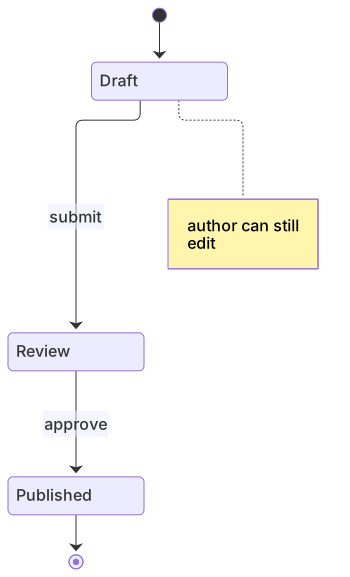
stateDiagram-v2
  [*] --> Draft
  Draft --> Review : submit
  note right of Draft : author can still edit
  Review --> Published : approve
Published --> [*]Notes are not a log. If you have three notes on one state, promote the rules into guards or into the paragraph under the diagram. The diagram stays a map.
Name states as statuses, not as actions. PendingPayment is a status. DoPayment is a step in a flowchart that wandered in. Name events as past or imperative verbs your logs already use. If the code emits order.paid, the arrow can say order.paid. Matching the log line is worth more than a prettier English label, because on-call will search the log.
Mistakes that create illegal orders
A flowchart with extra boxes. People write stateDiagram-v2 and then describe a UI script: click, validate, show toast. If the boxes are screens, draw a flowchart. If the boxes are values of order.status, you are in the right file.
Two arrows, one unlabeled. Paid --> Cancelled and Paid --> Fulfilling without labels look like a race. Label both. If both can happen, say what chooses. If they cannot both happen, you drew a lie.
No terminal state. Every [*] at the start needs at least one path that reaches [*] again, or you should say the object lives forever. Orders that can sit in ReturnRequested with no exit are a queue nobody owns.
Reusing a state for two meanings. Cancelled for "customer gave up at payment" and "warehouse cancelled after a stockout" are different refunds. Split them if the emails differ. Merge them only if every downstream system treats them alike.
Guards that hide new states. Shipped --> Delivered : if address valid smuggles a data check into a transition that should have been Shipped --> AddressFix. If the order waits on the customer, that wait is a state, because time passes there and support will ask "which orders are stuck."
Editing the enum and not the picture. The pull request adds PARTIALLY_SHIPPED to the database and leaves the diagram. Three weeks later a report counts that status as delivered because the author guessed. Change the fence in the same PR as the migration.
When the preview fails, the usual causes are a missing colon, a state id with a space, or a choice that has no outgoing arrow. The syntax error guide shows how to read the line number. Paste the fence into the editor if the host you publish to swallows the message.
How to check the example against the code
- List the enum or the check constraint in the database.
- List the states in the diagram.
- Diff the names. Rename until they match, including case.
PaymentFailedin the picture andpayment_failedin Postgres is fine if you document the mapping once. Silent drift is the problem. - For each arrow, find the handler that performs it. An arrow with no handler is a feature you have promised. A handler with no arrow is a back door.
- For each terminal state, name the email or the absence of one.
- Delete any state that has no row in production and no ticket. Speculative states rot.
Do this with one order type. A second type, such as a subscription, gets its own diagram. Combining them because they both have Cancelled produces a machine no single team can implement.
Put a table under the picture
The diagram is the map. The table is the contract a developer can implement without squinting at arrows. I add one when more than one team consumes the status. Keep the columns boring.
| From | Event | To | Side effect |
|---|---|---|---|
| Cart | checkout | PendingPayment | Create a payment attempt |
| PendingPayment | payment succeeded | Paid | Send the receipt |
| PendingPayment | payment failed | PaymentFailed | Show a retry button |
| Paid | cancel before shipping | Cancelled | Void the authorization |
| Shipped | delivered | Delivered | Start the return window |
If a row has no side effect, write "none" so the empty cell is a decision. If you cannot name the side effect, you are not ready to ship the transition. The table also catches duplicate events. Two rows with the same from-state and the same event should be impossible unless a guard column distinguishes them. Add that column when you introduce a choice.
Update the table in the same commit as the fence. A table that lags the picture is the same bug as a picture that lags the enum, just harder to see in review because both files look "documented."
Where the diagram should live
Put it in docs/orders/states.md or beside the module that owns the transition function. Link it from the README of that service. When a support macro mentions a status, link the macro to the heading above the fence so the macro writer sees the legal moves.
Export a PNG only for a tool that cannot render Mermaid. The source of truth is the fence. I have watched teams argue from a PNG that was three statuses behind the file. If you need a picture in a slide, generate it the morning of the meeting.
If you have a messy incident write-up and no diagram yet, paste the list of statuses into the AI diagram generator and ask for stateDiagram-v2. Then delete every transition the write-up does not justify. Generators add happy paths and forget the cancel arrow, which is the arrow finance cares about.
A smaller machine, to practice
When the order diagram feels crowded, practice on something with four states. A document review is enough to learn start, one choice, and a terminal pair: approved and rejected. Build it in the editor, then add one guard, then add one note. If you can do that without a parse error, the order diagram is the same skill with more arrows.
The order lifecycle template is this state machine diagram example with the events already labeled. Fork it when your statuses differ. Keep the habit: one object, closed set of states, every arrow an event you can log. Add a state when a person waits. Add an arrow when the code changes a status. Remove both when the product stops offering that move.
Frequently asked questions
Which keyword starts a state diagram?
Use stateDiagram-v2. The older stateDiagram keyword still runs, but v2 supports choices, forks and notes.
How do I mark start and end?
Use [*] --> FirstState for the start and LastState --> [*] for the end.
When should I use a flowchart instead?
Use a state diagram when the same object changes status over time. Use a flowchart when you are documenting a procedure with decisions, not an object's lifecycle.