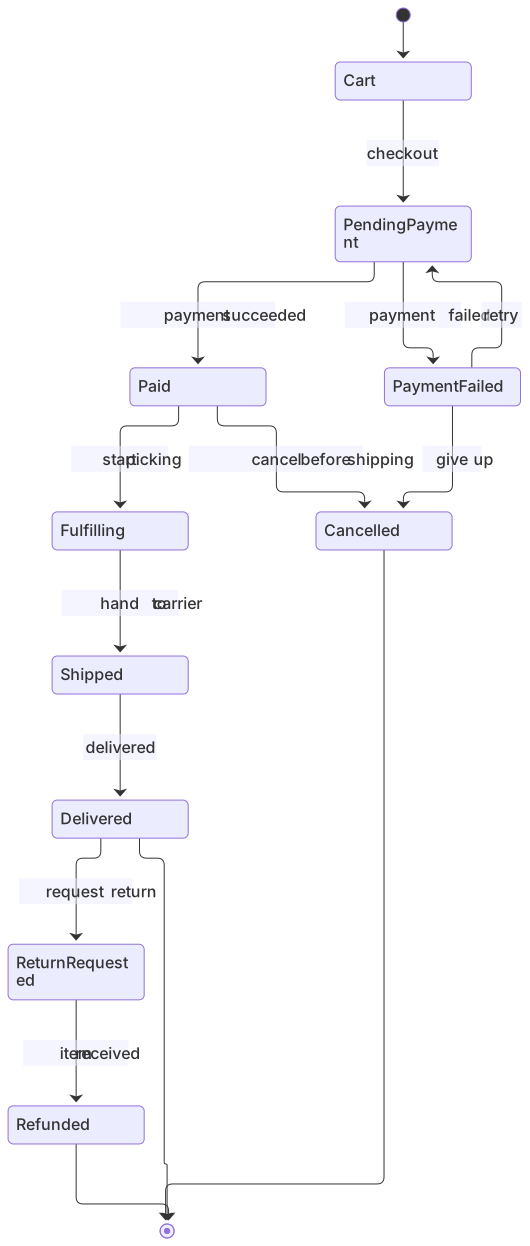
stateDiagram-v2
    [*] --> Cart
    Cart --> PendingPayment : checkout
    PendingPayment --> Paid : payment succeeded
    PendingPayment --> PaymentFailed : payment failed
    PaymentFailed --> PendingPayment : retry
    PaymentFailed --> Cancelled : give up
    Paid --> Fulfilling : start picking
    Fulfilling --> Shipped : hand to carrier
    Shipped --> Delivered : delivered
    Delivered --> ReturnRequested : request return
    ReturnRequested --> Refunded : item received
    Paid --> Cancelled : cancel before shipping
    Delivered --> [*]
    Refunded --> [*]
Cancelled --> [*]About this template
Order states drive emails, dashboards and support tooling, so it pays to define them precisely. This state machine covers payment, fulfilment, shipping, delivery, cancellations and returns, with event labels on every transition.
How to customise it
- Add partial shipment states
- Add a fraud review state after payment
- Rename events to match your backend
This template is a Mermaid state diagram. See the state diagram page for the full syntax reference and more examples.
Frequently asked questions
How do I use this order lifecycle state machine template?
Click "Use this template" to open it in the MermaidViewer editor. Edit the Mermaid code on the left and the diagram updates instantly. No account is needed.
Can I export the template as an image?
Yes. In the editor use Export to download PNG, SVG or PDF, or copy the image to your clipboard. You can also copy the code as a Markdown block for GitHub, GitLab or Notion.
Can AI customise this template for me?
Yes. Open the AI assistant (Ctrl/Cmd+K) and describe the change, for example "Add partial shipment states". The updated diagram streams into the editor.