This is how to draw a c4 diagram that a stakeholder and a new engineer can both read. You start one level up from the code: the people, the system you are talking about, and the other systems it depends on. Then, and only if someone asks what is inside, you zoom in. The element names are on the mermaid c4 diagram page. A SaaS context you can edit immediately is the context template.
C4 is a set of maps, not a single picture. Context, containers, components, code. Mermaid covers the maps with keywords: C4Context, C4Container, C4Component, C4Dynamic, and C4Deployment. Most teams need the first two. The code level is your class diagram or the repository itself. Drawing classes inside a C4 fence duplicates a better tool.
A context diagram is a cast list
The context diagram answers who uses the system and which outside systems it needs. It does not answer which framework you picked. Boxes inside your boundary wait for the container diagram.
Each line is a function call. The first argument is an alias you will use in relationships. Aliases are tokens: letters, numbers, no spaces. The later arguments are quoted labels and descriptions.
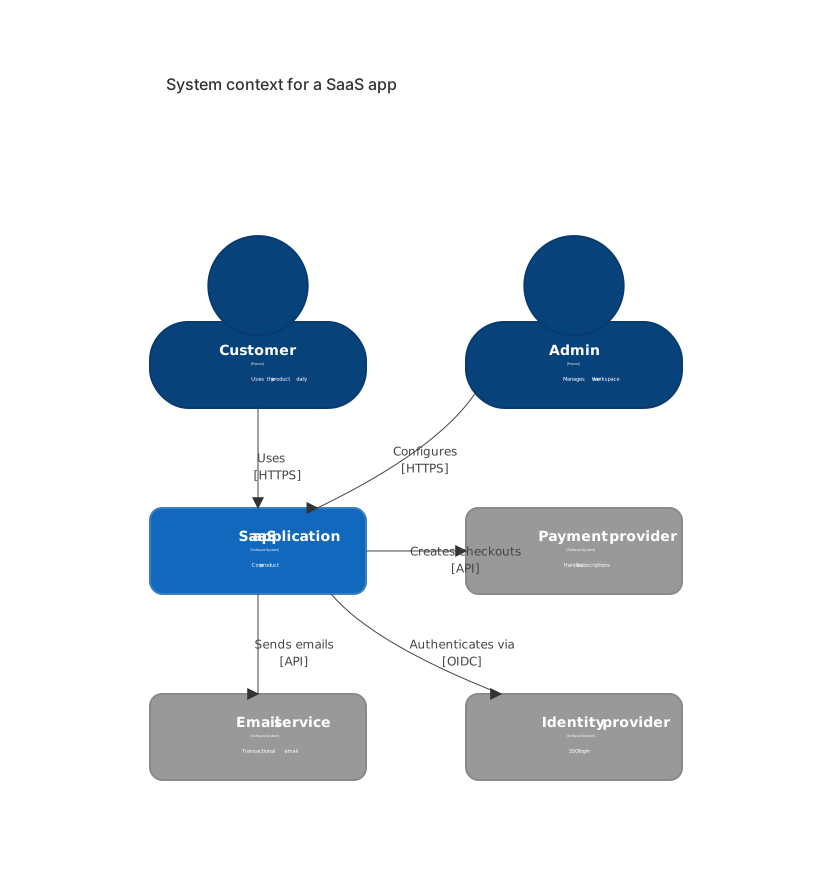
C4Context
  title System context for a SaaS app
  Person(user, "Customer", "Uses the product daily")
  Person(admin, "Admin", "Manages the workspace")
  System(app, "SaaS application", "Core product")
  System_Ext(pay, "Payment provider", "Handles subscriptions")
  System_Ext(mail, "Email service", "Transactional email")
  System_Ext(idp, "Identity provider", "SSO login")
  Rel(user, app, "Uses", "HTTPS")
  Rel(admin, app, "Configures", "HTTPS")
  Rel(app, pay, "Creates checkouts", "API")
  Rel(app, mail, "Sends emails", "API")
Rel(app, idp, "Authenticates via", "OIDC")Person is a human role, not a named employee. "Alex from support" does not belong here. "Admin" does. System is the software you own, the one this document is about. There should be one of those on a context diagram. If you have two, you are probably describing a platform and a product, and each deserves its own context with the other shown as System_Ext.
System_Ext is anything you do not ship: Stripe, an email vendor, the customer's identity provider, a partner API. Marking it external is the point. Readers stop asking you to refactor Stripe.
Rel reads as a sentence: from, to, verb, and an optional technology. "Customer uses the SaaS application over HTTPS." Write verbs a person can say. "CRUD" is not a verb. "Updates billing details" is. The technology slot is HTTPS, API, OIDC, SMTP, a queue name. Leave it off when you do not know it yet. A wrong protocol is worse than an empty one, because people copy it into firewall tickets.
title is the heading on the picture. Name the level and the system: "System context for a SaaS app." A title that says "Diagram" helps nobody who finds the PNG six months later.
What you leave off the context
The clutter shows up in predictable ways.
A database box. The database is inside the system. On the context diagram it is an implementation detail. Put it on the container diagram.
Every microservice. "User service," "order service," and "notification service" are containers or components. On the context diagram they collapse into the one system. If a reader needs the split, they are asking for the next level, and you should draw that level instead of stretching this one.
Internal batch jobs, queues, and caches. Same reason. They are inside the box.
A person for every job title in the company. Customer and admin cover a SaaS workspace. Add "Support agent" when support uses a different interface with different data. Do not add "CEO" because the CEO logged in once.
Arrows in both directions for one conversation. Rel(user, app, "Uses") is enough. A second arrow "Shows pages" says the same thing and doubles the lines. Add a second relationship when the verb is different and the risk is different: "Uploads CSV" versus "Reads dashboard."
Technology trivia in the description. "Core product" is a description. "Next.js on Kubernetes in us-east-1 with a blue/green pipeline" is a container diagram and a deployment diagram wearing a context costume.
If the picture needs a paragraph to apologize for a box, delete the box.
Zoom in: containers
A container is an application or a data store you deploy or run as a unit. A web app, an API, a database, a worker, a mobile app. It is not a folder in the repo and it is not a class.
C4Container is the keyword. System_Boundary groups the containers you own. People and external systems stay outside the boundary. Container takes an alias, a label, a technology, and a description. ContainerDb is the same idea for a database, with a shape readers recognize.
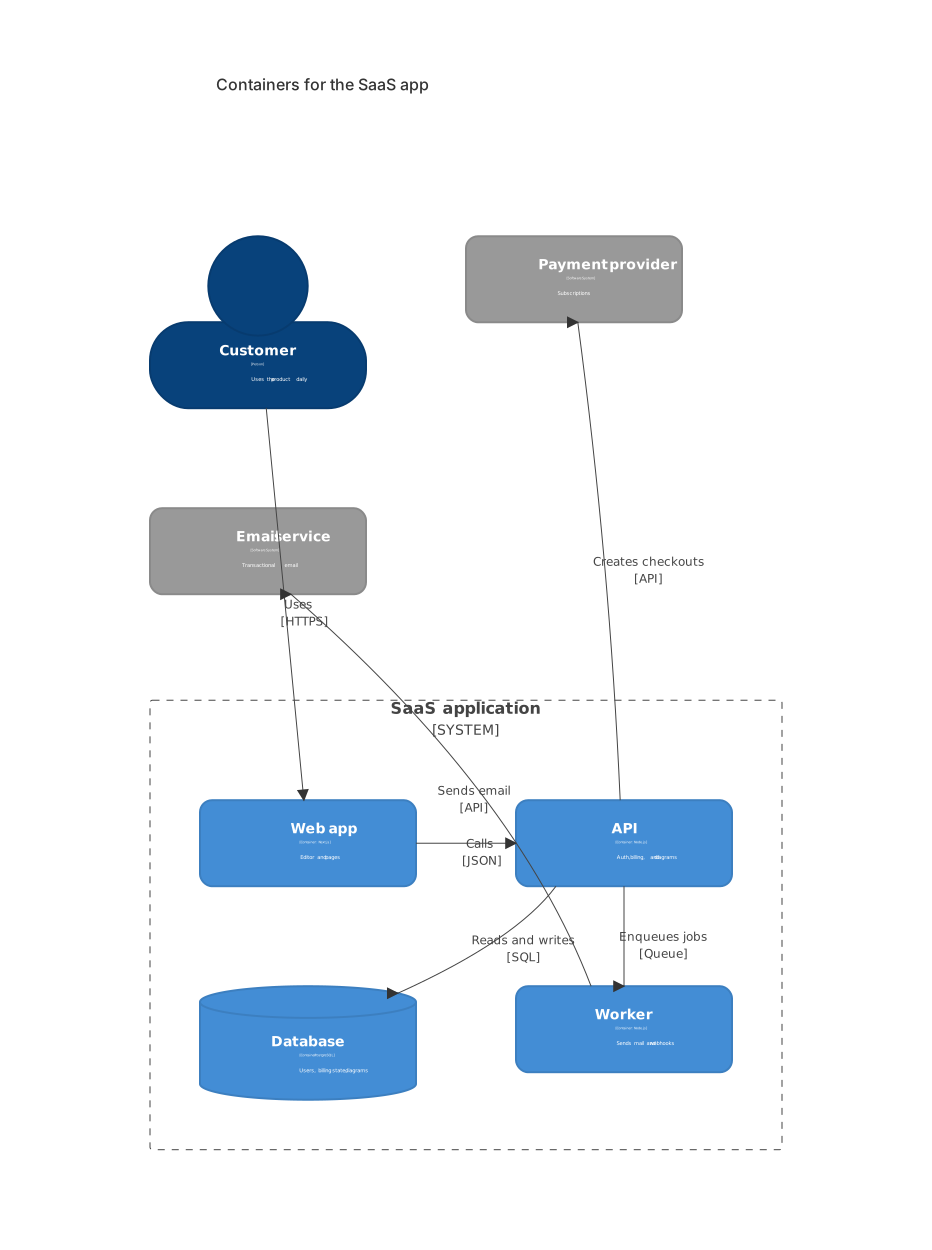
C4Container
  title Containers for the SaaS app
  Person(user, "Customer", "Uses the product daily")
  System_Boundary(app, "SaaS application") {
    Container(web, "Web app", "Next.js", "Editor and pages")
    Container(api, "API", "Node.js", "Auth, billing, and diagrams")
    ContainerDb(db, "Database", "PostgreSQL", "Users, billing state, diagrams")
    Container(worker, "Worker", "Node.js", "Sends mail and webhooks")
  }
  System_Ext(pay, "Payment provider", "Subscriptions")
  System_Ext(mail, "Email service", "Transactional email")
  Rel(user, web, "Uses", "HTTPS")
  Rel(web, api, "Calls", "JSON")
  Rel(api, db, "Reads and writes", "SQL")
  Rel(api, pay, "Creates checkouts", "API")
  Rel(api, worker, "Enqueues jobs", "Queue")
Rel(worker, mail, "Sends email", "API")The boundary name matches the system name from the context diagram. That match is how a reader knows these are the same box, opened. If the context said "SaaS application" and the container diagram says "Backend platform," you have renamed the system without deciding to.
Technologies go on the containers and on the relationships. This is the level where "PostgreSQL" and "JSON" earn their place. Keep them to the thing a new hire would type. "PostgreSQL 16, RLS, pgbouncer" belongs in a runbook.
The worker is a separate container because it deploys and fails independently of the web process. If the mail send is a function call inside the API process, it is not a container. Drawing it as one invents an operational boundary you do not have. I check this by asking "can this be down while the other is up?" If the answer is no, it is one container.
Relationships cross the boundary on purpose. The customer talks to the web app, not to PostgreSQL. If your picture shows the customer connected to the database, either you have a serious bug or the arrow is on the wrong box. The API talks to the payment provider. The web app does not, unless it really embeds a client-side checkout, in which case draw that arrow and be ready to discuss the security review.
Aliases, quotes, and the lines that fail
Aliases are the brittle part. Person(user, "Customer") defines user. Rel(user, app, "Uses") refers to it. A typo, Rel(users, app, "Uses"), is an unknown element, and the diagram errors. Pick aliases you would use as variable names: user, app, pay, db.
Descriptions and labels need quotes when they contain spaces, which is almost always. Commas inside a quoted description are fine. A stray quote inside the description ends the string early. Rewrite "customer's IdP" as "customer IdP" if the escape starts to fight you.
The boundary is a block with braces. Forget the closing brace and the rest of the file looks like a relationship error. When the parse points at a Rel line, check the brace above it first. The syntax error guide is the general checklist. The editor is where you confirm the fix before you commit.
A broken sketch, kept as text:
C4Context
  title Context
  Person(end user, "User")
  System(app, "App")
  Rel(end user, app, Uses)
Three failures: the alias end user contains a space, the relationship refers to that alias as two tokens, and Uses is unquoted. Person(user, "End user") and Rel(user, app, "Uses") are the repair.
How many diagrams, and in what order
Draw the context first, even if you are the only reader. It forces the external systems into the open. Then draw containers for the system in the middle. Stop. Add a component diagram only for the one container that people keep misunderstanding, usually the API with too many modules. Add a deployment diagram when the question is regions, accounts, or clusters.
| Level | Keyword | Question it answers |
|---|---|---|
| Context | C4Context | Who uses it, and what else is involved? |
| Container | C4Container | What are the deployable pieces? |
| Component | C4Component | What are the major modules inside one container? |
| Code | a class diagram, or the repo | How is one module built? |
Put each level in its own fence and its own heading. A page that stacks four levels with no prose is a poster. A page with context, five sentences, containers, and five sentences is a document.
Link the levels with words: "The SaaS application in the context diagram is opened below." Do not rely on color to connect them. Mermaid picks colors from the theme. A legend you painted by hand will break in dark mode.
Relationships worth arguing about
Write the verb from the caller's point of view. The API "creates checkouts" with the payment provider. The payment provider "sends webhooks" back. Those are two relationships if both exist. Webhooks are the one people forget, and they are the one that punches a hole in the firewall. If webhooks are real, draw them.
Rel(pay, api, "Sends webhooks", "HTTPS")Add that line to the container diagram when you mean it. Leaving it off because the picture was busy is how production gets a surprise route.
Queues get a technology label, not a new person. "Queue" or the product name is enough. A box called "Kafka cluster" is a container if you run it, and an external system if you buy it. Decide which is true and use the matching element. A managed queue you do not operate is System_Ext. A broker in your cluster is a Container.
Do not draw trust boundaries with extra boxes labeled "DMZ" unless you are on the deployment diagram and the boundary is real. A rectangle of hope around half the systems confuses C4's own boundary, which already means "this is our system."
Reviewing the picture
- One system under discussion on the context diagram.
- Every external box is something you would name in a contract or a status page.
- Every arrow has a verb you can demo.
- Container technologies match what you deploy this month.
- The customer cannot reach the database except through an app you drew.
- The context system name and the container boundary name match.
Then delete one box and see if the story still stands. If it does, the box was vanity. I do this with the worker most often. Sometimes it stays, because mail really is async. Sometimes it folds back into the API, and the diagram gets honest.
When you have a blank page and a paragraph of architecture, the AI diagram generator will draft a C4Context. Expect too many boxes. Delete until the cast list fits the rules above. Models like to add a monitoring system, a CDN, and a cache. Add those when they are part of the question you are answering, which is rare on a context diagram and common on a container diagram for a performance review.
A component diagram, only for one fight
When the API container keeps generating the same argument ("where does billing end and accounts begin?"), draw components inside that one container. Leave the web app alone if nobody is confused by it. C4Component uses the same relationship lines, with Component inside a container boundary. Keep it to the modules a new hire would look for in the tree.
Name components the way the code names them. Billing and Accounts beat Manager and Helper. If you cannot point at a directory, the component is a wish. Wishes belong in a ticket, not in the architecture page, where they will be quoted as if they shipped.
Skip C4Dynamic until you need a numbered collaboration on top of the containers. A sequence diagram is usually clearer for one request, and you already know how to read it. Use dynamic C4 when the audience expects C4 notation in every picture and will bounce off a sequence fence. Otherwise save yourself the second syntax.
Deployment pictures answer a different question: which account, which region, which cluster. Draw them when an incident hinged on that fact. A deployment diagram that restates the container diagram with the word "prod" on each box is a copy. Add it when production and staging actually differ.
Where it lives
Keep docs/architecture/context.md and docs/architecture/containers.md, or two headings in one file if the system is small. The context file should be readable by someone who will never open the repo again: a security reviewer, a new PM, a customer who asks where their data goes. The container file can assume an engineer.
Update the external systems when a vendor changes. "Email service" can stay the label while the description names the vendor, so a vendor swap is a one-line diff. Hard-coding the vendor into the only label makes the picture look like a redesign when all you did was change a contract.
Open the context template when you want the SaaS cast already in place. Replace the payment, mail, and identity boxes with yours. Then draw the container level underneath, using the same system name. That pair is how to draw a c4 diagram people will still trust after the next reorg: few boxes, verbs on the arrows, and the inside of the system saved for the next zoom.
Frequently asked questions
What is a C4 diagram?
C4 is a set of maps for software: system context, containers, components and code. Mermaid covers context and container diagrams with the C4 syntax.
Which keyword do I use?
C4Context for a system context diagram and C4Container for the next level down. People, systems and relationships use function-style lines.
How is this different from an architecture-beta diagram?
C4 follows the C4 model vocabulary. The architecture diagram type is a free-form cloud layout. Use C4 when your readers expect Person, System and Container.