Mermaid in markdown is a fenced code block whose info string is the word mermaid. The fence holds the diagram source. Apps that understand the info string replace the fence with a picture. Apps that do not understand it show the source as code. The syntax is small. The surprise is how many editors still do the second thing.
That fence is the portable form of a diagram. A README, a docs page, a wiki, and a note can all carry the same block. You write it once, you preview it in a tool that actually renders Mermaid, and you only then trust the app you are publishing to. The editor is the reliable preview. The file is the thing you commit.
What the fence actually is
A fence is three backticks on their own line, an info string, some lines of text, and three backticks to close. For a diagram the info string is mermaid, lowercase. The next line is a Mermaid keyword such as flowchart or sequenceDiagram. Nothing about the fence draws a picture by itself. Drawing happens when a renderer that knows Mermaid reads the file.
OPEN with three backticks and the word mermaid
flowchart LR
  A[Write] --> B[Preview]
CLOSE with three backticks on their own line
That sample is the whole format. The OPEN and CLOSE lines are the fences. People add a title inside the fence, or a second info string. You can leave one blank line inside the fence. Keep Markdown headings out of it. The fence is Mermaid's document, and that document starts with a diagram keyword or with a short config block that older renderers may reject.
Not every app renders it. GitHub, GitLab, Notion, Obsidian, and a lot of docs tools do, each with their own setup and their own Mermaid version. A static site generator, a chat app, or a desktop editor can show the fence as a gray code block forever. If you are picking a tool, test one fence before you migrate a dozen files. Mermaid in GitHub Markdown is the common case. The sibling guides on this site cover the apps that need a different click path.
Two rules keep files sane.
- One diagram per fence. A second keyword in the same fence is a syntax error, even if you left a blank line between them.
- The info string stays lowercase.
MermaidandMERMAIDare how a careful diagram becomes a code block on a strict renderer.
The fence can sit in a .md file, in a comment field that accepts Markdown, or inside an MDX doc once the docs tool is configured. The bytes are the same. The host decides whether they become a picture.
Write one, step by step
Use a scratch file named something dull, like diagram-scratch.md. You want a file you can break.
- Put a blank line where the diagram should appear, so the fence is not stuck to a list item or a heading.
- Open the fence with three backticks and the word
mermaid. - Write the diagram, starting with a keyword.
flowchart LRis enough to prove the file works. - Close the fence with three backticks on their own line.
- Preview in a host that renders Mermaid, or paste the inner source into the editor first.
- If the preview shows code instead of a picture, check the info string before you touch the nodes.
Here is a complete starter. It is valid on its own, and it is small enough that a failure means the fence or the host, rather than your graph.
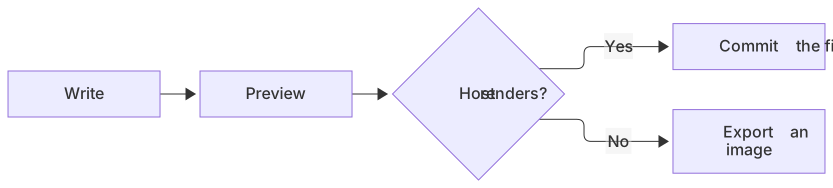
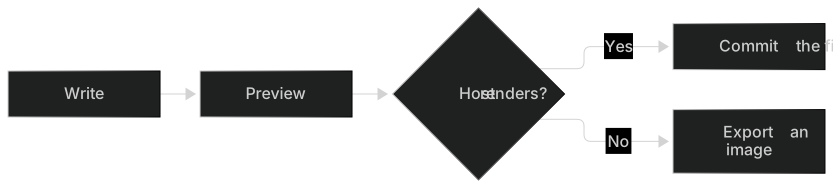
flowchart LR
  A[Write] --> B[Preview]
  B --> C{Host renders?}
  C -->|Yes| D[Commit the file]
C -->|No| E[Export an image]The editor is the place to grow this past a handful of nodes. Markdown previews inside editors often refresh on save, and some of them only refresh when you reopen the preview. A keystroke-by-keystroke loop is the editor on this site. When the picture is right, copy the source back into the fence. There is a copy-as-Markdown action if you want the backticks included.
When you can describe the picture and you do not want to hand-write the arrows, start with the AI diagram generator. Drop the result into a fence and read it. Generated labels are suggestions. Your file should use the names your readers already use.
If the diagram is a flowchart with decisions, keep the flowchart syntax page open. The keyword, the node shapes, and the labeled edges are all that most documents need. Extra diagram types are available, and they are also the first thing to break on a host with an older Mermaid build.
A worked example
A release checklist in a README is a fair real example. The prose around it can stay short because the picture has the order.
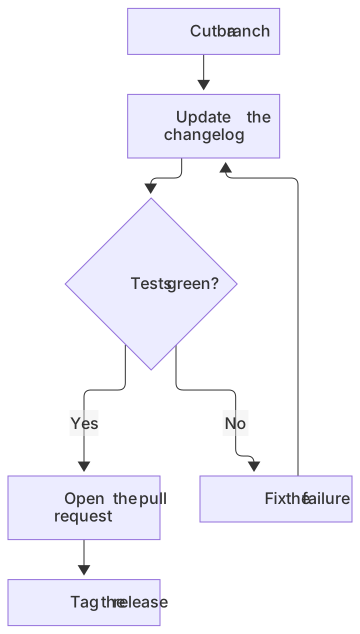
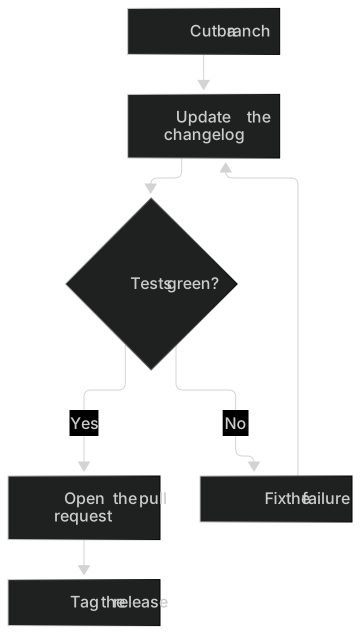
flowchart TD
  A[Cut a branch] --> B[Update the changelog]
  B --> C{Tests green?}
  C -->|Yes| D[Open the pull request]
  C -->|No| E[Fix the failure]
  E --> B
D --> F[Tag the release]Someone new should be able to follow it without the surrounding paragraphs. The branch comes first. The changelog is next. Tests either send you back or let you open the pull request. The tag is last. The loop through E is the part a numbered list tends to hide, because lists look linear even when the work is not.
Labels stay short on purpose. A README column is wide on a desktop and narrow on a phone, and Mermaid wraps text inside the node. A node that contains a sentence becomes a tall block and pushes the rest of the chart down. Put the sentence under the fence.
A sequence helps when the README is explaining a conversation between systems. The same release, told as messages:
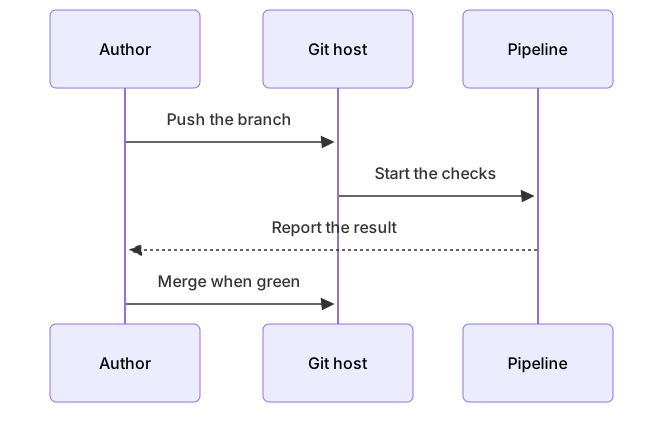
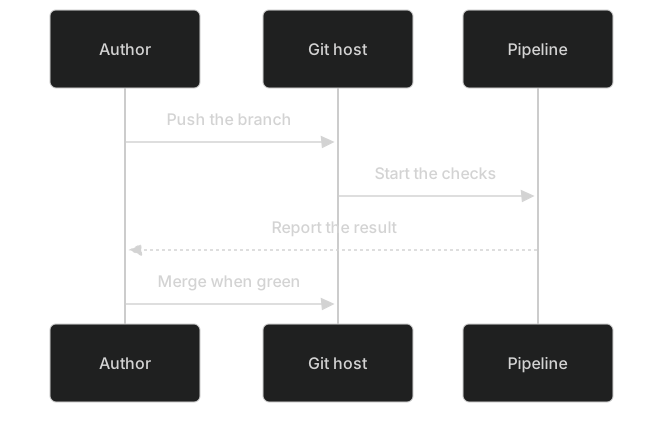
sequenceDiagram
  participant Dev as Author
  participant Repo as Git host
  participant CI as Pipeline
  Dev->>Repo: Push the branch
  Repo->>CI: Start the checks
  CI-->>Dev: Report the result
Dev->>Repo: Merge when greenGive each diagram its own fence. Between them, one sentence should say what the second picture adds. Readers skip walls of diagrams that repeat one story in two dialects.
A fence inside a list is the layout that bites people. Markdown lets you indent a fence so it belongs to a bullet. The opening line, the diagram, and the closing line all need that indent, and the closing line has to be exactly as indented as the opening line. If you do not need the diagram to be part of the bullet, put it after the list, at column zero, with a blank line above it. That form survives more renderers.
Which apps draw it, and which do not
The fence is a convention, not a law of Markdown. CommonMark specifies fences. It does not specify Mermaid. Each app chooses whether to look at the info string.
| Host | What you do | Watch for |
|---|---|---|
| GitHub | Commit the fence in Markdown | Version lag, click callbacks disabled |
| GitLab | Same fence in files, issues, merge requests, wiki | Build may differ from GitHub |
| Obsidian | Fence in a note, then reading view | Indent and dark-mode fills |
| Notion | Code block set to Mermaid, no extra fence | Preview or Split, lagging build |
| VS Code | Markdown preview in a recent version | Older installs need an extension |
| Docusaurus | Theme plus markdown.mermaid | Fence at the top level of the MDX |
| Plain HTML | You load Mermaid yourself | securityLevel and a pinned build |
| Everyone else | Assume it will show code | Export PNG or SVG |
Those rows are the short version of the sibling guides. Mermaid in Notion is the code-block path. Mermaid in Obsidian is the vault. Mermaid in GitLab is the repo host that is not GitHub. Mermaid in VS Code is the local preview. Mermaid in Docusaurus is the docs site. Embed Mermaid in HTML is the page you control from scratch.
If your app is missing from that list, run the four-node starter. A picture means you can keep going. A code block means you should export.
Limits and version skew
Two hosts can both "support Mermaid" and still disagree. They ship different versions, they disable different features, and they put the fence in different corners of the product.
- A new diagram type can render in the editor and fail on the host. Flowcharts and sequences travel best.
- Frontmatter for themes is excellent in modern Mermaid and optional in older builds. If a file renders only after you delete the
---block, the host is behind. The themes and styling guide shows the config. Treat it as progressive, not required. clickhandlers and HTML labels get stripped or disabled on GitHub and GitLab. Write the link in the paragraph under the fence.- Huge diagrams time out or turn into a scroll box. Split them at a real boundary in the process.
- The info string has to be alone.
mermaid title=Releaselooks helpful and is not the info string these hosts expect.
Preview on the host you ship to. The editor tells you the syntax is valid against a current Mermaid. The host tells you the file will survive contact with its build. Both checks are short. Skipping the second one is how a README looks finished on your laptop and broken on the pull request.
Dark mode
Some hosts switch Mermaid to a dark theme when the reader is in dark mode. Some do not. A diagram with default colors usually survives either choice. A diagram with hard-coded fills often does not.
classDef and style lock colors. A light green fill with dark text is a reasonable status chip on a white page. On a dark page the chip is a bright rectangle, and a light text color you also set can disappear on a node you forgot to paint. Prefer labels that carry the meaning. "Tests green" does not need a green box.
If the host documents a dark behavior, test it with one real account in dark mode, not with a screenshot from someone else. GitHub applies a dark Mermaid theme for dark-mode readers. Other apps differ. When you cannot test the host, ship the diagram without custom fills.
Troubleshooting
Most broken fences are one of a few mistakes. Go in this order.
The preview shows a code block. The info string is wrong, missing, or capitalized, or the app does not render Mermaid at all. Fix the word mermaid first. If a known-good starter still shows as code, stop editing nodes and read the host's guide or export an image.
The preview shows a parse error. Copy the inside of the fence into the editor. The syntax errors guide lists the patterns. The ones that show up in Markdown files every week:
- A node named
end, which closes subgraphs. UseEndor quote it. - Parentheses in a label without quotes:
A["Call api(v2)"]. - A
subgraphwith no matchingend. - Smart quotes from a rich-text editor.
- Two keywords in one fence.
- A config frontmatter the host's Mermaid cannot parse. Remove it and retry.
- The fence indented under a list, with the closing backticks back at column zero.
The preview shows the wrong diagram. You edited a different file, or the host is caching a rendered page. Rename a node to something obvious, preview again, and confirm the obvious word appears. Then put the real label back.
The picture is tiny or enormous. Long labels and a left-to-right layout on a narrow column are the usual cause. Switch the direction to TD for a phone-width doc, or shorten the text. Direction is a layout choice, and it belongs in the keyword line: flowchart TD or flowchart LR.
The rest of the file renders as code. The closing fence is missing or it is indented so the parser never sees it. Count the fences. They come in pairs.
When to export an image instead
Export when the publishing tool will not render the fence. Export when you need a snapshot for a slide, a PDF, or a design file. Export when the host's Mermaid is too old for the diagram type and you still need that type. Export when legal or process review wants a picture that will not change the next time someone edits the file.
Keep the fence in the repo anyway, next to the image or in a comment that points at the source file. The editor downloads a PNG on every plan: 1× with a watermark on Free, up to 4× on Starter, up to 8× on Pro. JPG, SVG, and PDF downloads are on Pro. The Mermaid to PNG converter is enough when a bitmap is all the other tool accepts.
An image does not update itself. If the process changes, the fence and the image diverge unless someone regenerates the file. Put the date in the paragraph under the image. A stale PNG with no date looks authoritative, which is worse than a fence that failed in public, because at least the failure is obvious.
Fix syntax before you export. An exported error is just an error with extra steps.
Questions
What is the Markdown syntax for Mermaid?
Open a fence with three backticks followed by mermaid, put the diagram on the following lines, and close the fence with three backticks. The word mermaid is the info string, in lowercase. The first line inside is a diagram keyword. That is the whole syntax the host needs in order to try.
Does every Markdown app render Mermaid?
No. GitHub, GitLab, Notion, Obsidian, and many docs tools do. Others show the raw code. For those, export a PNG or SVG and commit or upload the image. Test a four-node flowchart before you convert a set of documents.
Can I put two diagrams in one file?
Yes. Each diagram needs its own mermaid fence. Keep a sentence between them so the second picture has a job. Do not put two diagram keywords in a single fence. The parser will stop on the second keyword, and the file will look like a single broken diagram.
Should I commit the fence or the image?
Commit the fence when every reader opens the file in a host that renders Mermaid. Commit an image when any important reader does not have that host. You can commit both if you are honest in the prose about which one is current. The fence stays easier to review in a diff. A one-line label change is a one-line diff. An image change is a binary blob reviewers will skip.
Where do I learn the diagram language itself?
Start with flowchart syntax if the picture is a process. Use a sequence when the picture is a conversation. The upstream language is documented at mermaid.js.org. Preview in the editor before you trust a host, and use the syntax guide on this site when the parser points at a line and you want the usual repair.
Frequently asked questions
What is the Markdown syntax for Mermaid?
Open a fence with ``mermaid, put the diagram on the following lines, and close the fence with ``. The word mermaid must be the info string, in lowercase.
Does every Markdown app render Mermaid?
No. GitHub, GitLab, Notion, Obsidian and many docs tools do. Others show the raw code. For those, export a PNG or SVG.
Can I put two diagrams in one file?
Yes. Each diagram needs its own mermaid fence. Do not put two diagram keywords in a single fence.